apologies, I obviously wasn’t paying attention when I linked your text.
I was intending to reply to the @eastgate post directly above mine. I actually just succeeded in creating a cross-document link by trial and error but I am unsure how I did so . I think it happened while I was playing around with Note>Make Web Link feature.
No worries. I think @eastgate has meanwhile answered your question.
Tinderbox is document centric. You can (as described above) link (via $URL) to other other documents’ notes but this is not done via ‘internal’ Tinderbox links. If you want that functionality, consider merging your TBX documents.
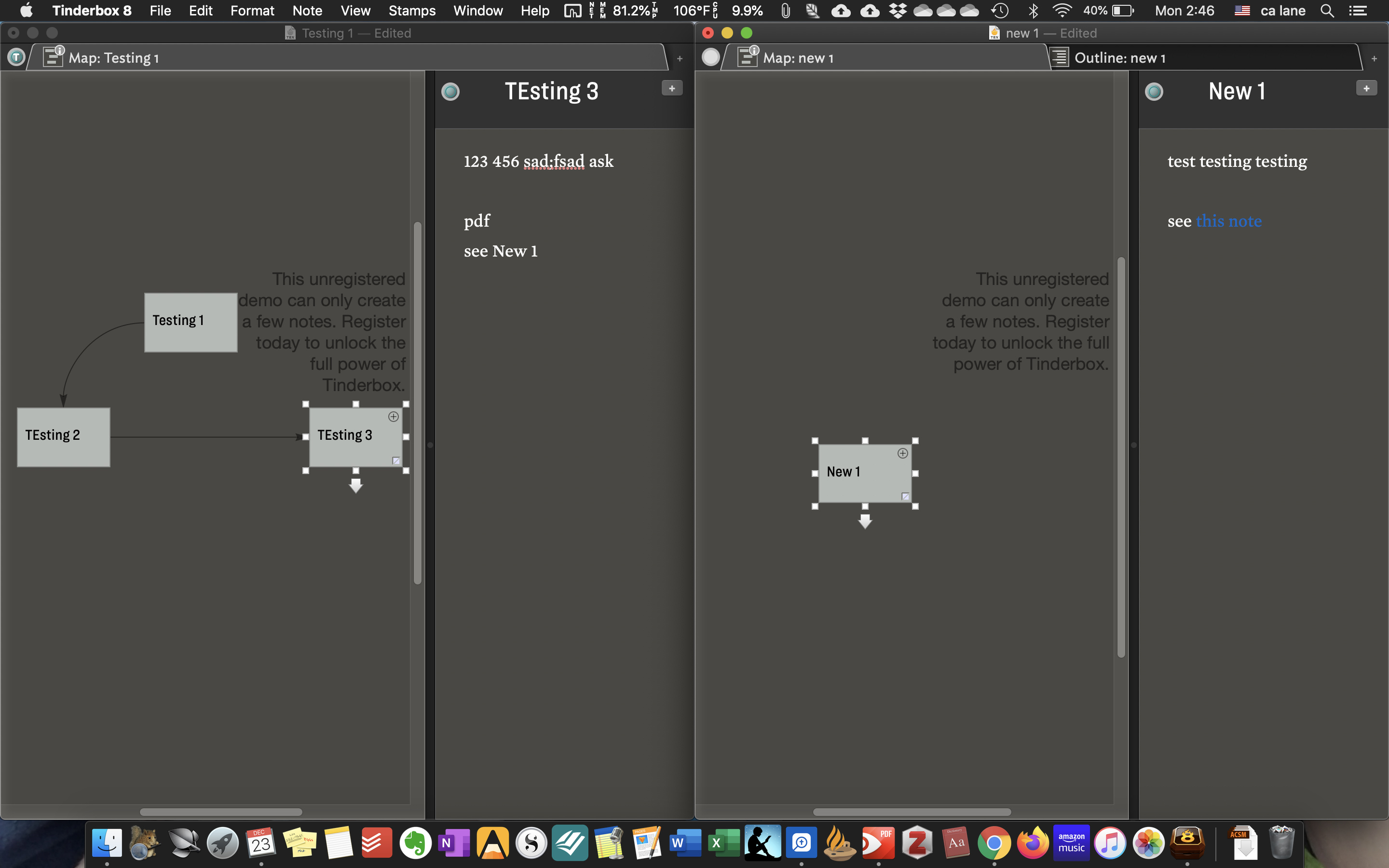
Tangentially, FWIW, this SS (+ a skim through the [dated] “Getting Started” documentation) shows the extent of my experience with TB. Anyway, when clicking on the blue, “this note” it will open the document to which the link is “built” (if that is the correct word). When right-clicking the blue text and selecting “Browse Links” it does indicate that it is a web link. If I frequently use these links to navigate topics, authors, etc, which are tangentially/distantly but not directly related, am I setting myself up for failure?
Per my last above, Tinderbox links are in-document. Inter-doc links are essentially a different, Web-style, external link. You are less setting up for failure as frustration.
The chick-and-egg problem here, in trying to give pertinent advice, is in understanding what outcome you are trying to achieve. Certainly, if you want/expect to navigate around/between discrete TBX documents within a single session, I think that is currently going to be a frustrating exercise - you would do better to merge your documents.
Ok, thank you. I am hoping to use TBX for academic purposes in a similar fashion to Beck Tench in her tutorial videos but am, indeed, hoping to have discreet TBX docs, as you put it. I am hoping to have siloed docs that interlink as, just the thought of one giant doc holding years of compounding zettels, author bios, book notes, article notes, personal writing notes, etc, etc, etc is slightly overwhelming and, I suspect, will become quite cumbersome. Obviously, the size & contents of each doc will be a work in progress, but I know from the start that I would rather err on the side of multiple docs as opposed to a singlular space (I have already seen that this seems to be long time question of users’ preferences & TBX philosophy) for dozens of different topics. With that said, I think that I might endeavor to make a master doc where, if needed, I might attempt an indexing system of my few docs. With the system I have in my mind a way to inter-link, say, an author who might pop up in varous docs is quite essential. Maybe my opinion will change as my comfort level with TBX grows, but, ATM, I would rather use links and monitor real estate rather than reconfigure adornments, notes, or large swaths of a gigantic document as it grows in size or in philosophy, should I feel the need to tweak the system. Really, this is coming from a system I have thought about (read: romanticized) for a few years (no exaggeration) as I have balked at the price of TBX on a student’s budget, but now that I have finally come around to potentially being able to pull the trigger while it is on sale, I am giddy about the prospect of trying my hand at actually making it work. But, I realize that I am not even a novice user so this could, of course, all be written out of ignorance (I would certainly welcome any input, wisdom, or advice that you or @beck has learned through your efforts, be they errors or successes).
And, lest I forget, a big thanks to you and @eastgate for your time and help as my question(s) were, I’m sure, painfully basic.
Whilst one can use web-style links out of a TBX document to another, the resulting experience is not as rich as working within a single document. My advice is to experiment with both approaches rather then try and guess the outcome that suits you best.
Given that Tinderbox is a toolbox rather than a single-purpose utility offering only limited alternative uses, and given that individual styles of use vary, experimentation is good. All the more so as Tinderbox is very supportive of emergent structure and rolling back from mis-steps.
Thanks, Mark, I appreciate the help, encouragement, and advice; especially this bit here:
Thanks for a great first experience on the forums!
If I might follow up with a p.s. query – IYO, as I set out to experiment, is it easier to split docs that have become unmanageable or merge two docs that one surmises might function better as a single recepticle?
Not a simple answer as it depends on how much structure you have built in. The easiest way to split a doc, IME, is to make a copy and rename one. Then from each of the two discrete files, delete the unwanted content.
Merging requires a bit more attention to detail in terms of (re-)assigning prototypes accordingly.
I’d not get to invested in either approach as it’s really a way to avoid getting on with the real experimentation. Worrying about problems you might encounter is less useful than addressing actual problems.
Tinderbox doesn’t have many fixed limits but common sense dictates that scale will have effects. A 100 item map, yes; a 1,000 item map, likely no. Even if you work/think in map view, be aware of your document’s outline and avoid putting too map items in the same map/container. Enlightened self-interest is a good guide to choice.
Tinderbox is not designed to hold (in one doc) every note you have and all associated images/files. Use an ‘everything bucket’ type of app like DEVONthink (or similar) for all that extra information. Use Tinderbox for your actual thinking/planning work; you can still use URL-type links to link to DT-stored assets. Be open to natural divides. You might put all your research project notes in one doc, but your general daybook or to-do list might better live in a separate doc; common sense applies as to where splits might go.
This is my philosophy as well. I run solo TBX documents when I need to think through a messy problem, contribute concept maps and document my learning in my ZKN.tbx, and in the year since I’ve been contributing to it, I’ve created a v2, in which I copied some things over and redid others, giving me the opportunity to see how my understanding has evolved.
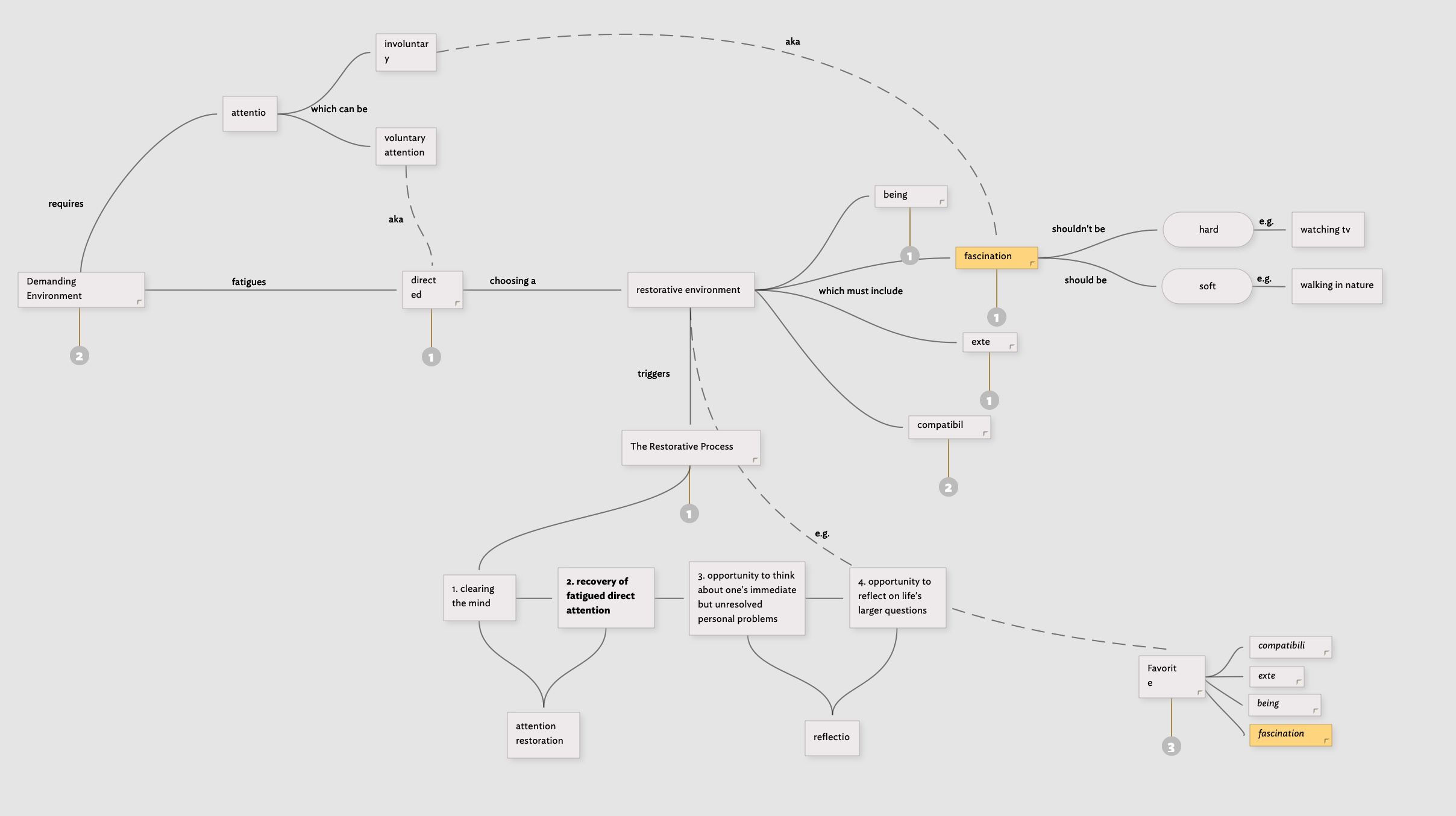
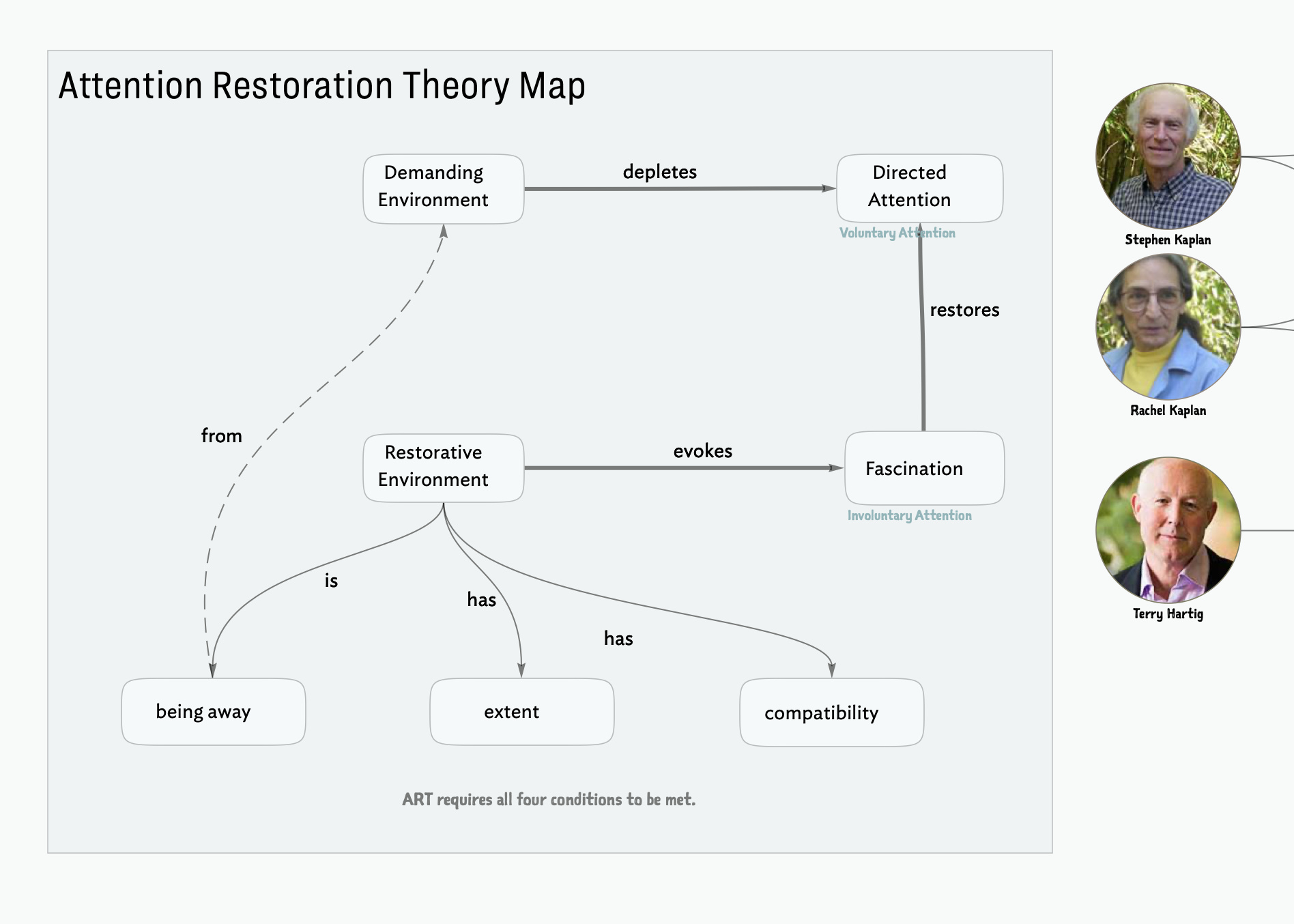
For example, here’s the difference between my initial understanding of Attention Restoration Theory to how I think of it today. I imagine, like many things, it will expand and shrink, expand and shrink again, over time.
Man, this rich-text stripping when moving between notes is the absolute worst.
I’ve run into this in so many apps, not just Tinderbox. Sometimes I paste the source text into an external plain text field first just to see what exactly I’m copying—if the link structure (like Markdown or HTML) is even making it to the clipboard before the paste strips it.
If you’re trying to diagnose exactly what text is getting lost between the source and the destination note, I’ve actually used comparetext.app before to quickly check the raw text versions of the “before” and “after” to see exactly where the formatting disappeared. It’s super helpful for spotting stripped characters or tags.
I think several mis-assumptions are at play here. It appears the real issue is not that you don’t see what you expect but why this occurs … and how to address that. The cause is likely not a simple ‘fail’.
Firstly, the macOS clipboard (pasteboard) is more complex than described. If you really want to see the actual detail use a tool like Clipboard Viewer. Thus, the ‘text’ may be stored in multiple different encodings so that, for instance, apps using styled text (aka ‘RTF’) can exchange text with plain text editors, and so on.
A second misconception is how links are encoded and thus travel via the clipboard. The receiving app can’t extract what the creating app didn’t (meaningfully) encode. The recent crop of Markdown-based tools lead users to the misconception that Markdown == HTML. Not so. So, in Markdown the ‘styled’ render is actually HTML [sic] not Markdown, but does a copy from that UI put Markdown or HTML on the clipboard? IOW, we might assume we copied a link but all we put on the clipboard might be the Markdown plain text. If the receiving app doesn’t speak Markdown, it might mis the implication of a link. It all boils down to design assumptions at both ends of copy/paste that don’t necessarily match our expectations.
Magic is the stuff that just works, otherwise we need to look at things empirically and it helps—from long experience of data transfer work—to start from the assumption that the ‘error’ may arise at either/both ends of the process, i.e. saving into the clipboard and pasting from it.
Ironically, the more common issue raised here is extra unwanted data coming via the clipboard. The ‘Paste and match style’ option ( ⌘+⌥+⇧+V) usually sorts the latter problem. Yours might need a bit of delving into who is encoding what onto the clipboard.
So, practically, to help track this down what sort of (app) sources are failing to pass their links to Tinderbox? What format is the source/text display?
Just as a reminder: the original report was from eight years ago.
There is no “rich-text stripping” when pasting to a Tinderbox text pane. If the copy contained an NSAttributedString, or something that can be coerced into a NSAttributedString such as public.html, that will be pasted. (OK: there are nuances about margins and paragraph style, but that’s not the question here.)
This is good practice, but it’s fallible. Many applications will place multiple formats on the clipboard, and the plain text editor is only going to show you public.plain-text. Your receiving program may prefer a different format that might even contain different information.
For example, a Copy from Numbers puts plain text, styled text, and even an image on the selection onto the clipboard. This is an annoyance for me because Telegram is set up to prefer images to text! But my only use for Telegram is communicating for https://pizzaForUkraine.com ; I want to sent tables and lists, not pictures of tables and lists!
I’ve run into this a few times too - it’s so frustrating when the clipboard seems to strip everything out without warning. One thing that helped me figure out if the issue was with the source or the paste was using comparetext.app to look at the raw text/formatting of both snippets side-by-side. It usually helps me spot if the link tags are actually making it onto the clipboard or if they’re getting dropped during the transfer.
 apologies, I obviously wasn’t paying attention when I linked your text.
 . I think it happened while I was playing around with Note>Make Web Link feature.