Perhaps I’m missing the point of this, however it seems to me that:
just as there is no single best way to think or single best approach to organizing and querying notes, I’m leery of approaching thinking and note-taking tools in a capability hierarchy. That would needlessly excise so many basic thinking tools from the kit.
all the apps discussed above - including Tinderbox - share one great bottleneck, which are the thinking/learning style and the clarity of purpose of their user.
The original question posed seems to me to’ve been less a “which application is better” query than (the other popular question from newcomers to Tbx) a cost-benefit prediction of “I’m trying to do x but my constraints are money and time, can any users on this forum advise if Tbx is worth these investments or could I get away with (insert free/cheap option) instead?”; to which my personal response is invariably both “Yes!” and “it depends…” lol.
This was most helpful; thanks to all. I am a newb here, and untechy, so a lot of this was, as of yet, over my head… but I know it will come. But this Obsidian or TBox question has been plaguing me.
I know TBox is capable of much more than I will ever ask of it as a PKM tool (because I don’t yet know what I don’t know), which speaks to the difficulty of getting up to speed with TBox vs hitting a gallop in an hour with Obsidian.
At the end of the day I am a visual learner who needs a PKM tool with good linking capabilities. I haven’t yet found how to DO the linking but I hear you referring to it and being pleased with its features.
Tinderbox draws on hypertext rather than the Web’s narrower subset of hypertext. In the latter links can only be made from the text of a note.
Note that Markdown is simply a simple way of writing HTML. Thus Markdown-based tools (many common PKMs) assume links anchor in text (start from text selections). The latter is often not needed for the task but done due to the limits of the Web model.
Notes can link to other notes. In Tinderbox terminology this is a basic link.
Note text (Text) can link to other notes. In Tinderbox terminology this is a text link.
The ‘zip’ method of linking allows Markdown-style wikilinks. See Text link creation via the Ziplinking method. Although some use the term, a ‘zip link’ is not a type of link, it is simply a text link generated using the ‘zip’ method. It was added as many users stepping up from Markdown-based PKM tools only know link creation via wikilink-style ‘[[’ markup.
It is possible to make a text link both from and to selections in $Text. This text link style is less used, but see Linking to target $Text (a basic link can also point to a text selection rather than another note).
Note text (Text) can link to URLs outside the TBX document. In Tinderbox terminology this is a web link.
The URL can include pseudo-protocols, local file links, other apps links (Bookends, DEVONthink, etc.), links to other TBXs, etc.
‘Notes’ includes notes, container notes, aliases and agents.
But, adornments and composites cannot be linked to or from.
Action code may be used to create/remove links automatically: Linking operators
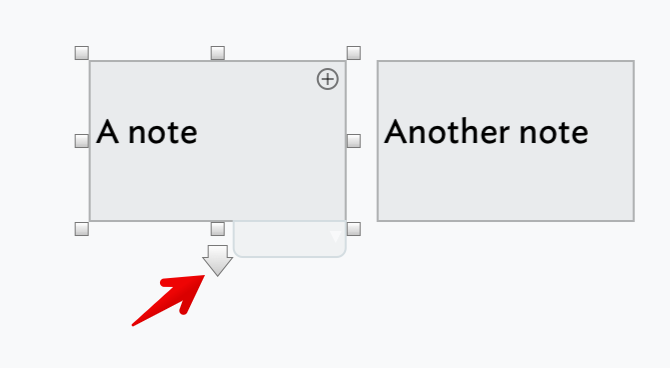
Links can be created by dragging the link widget in the view—a little arrow next to the select note title in most views:
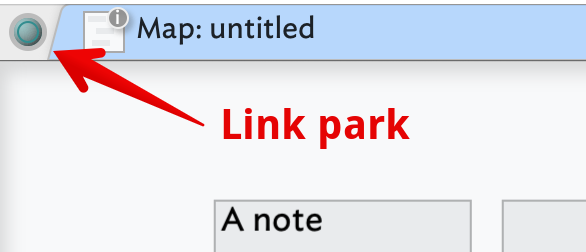
Clicking on the link park in either the tab bar or the text pane shows a pop-over allowing you to type/autocomplete the target. Or, simply click on the park and drag/drop onto the target note in the view pane (first scrolling the view, if necessary).
Dropping a link opens the Create Link pop-over. Check settings and click create.
You don’t have to make settings adjustments, so a basic or text link can be a quick/simple as drag → drop → click Return key.
Even if (only) used to Markdown-style wikilinks, I strongly commend trying out Tinderbox’s richer tools. Otherwise, you may be driving your sports car in first gear. Possible, allowed, but what’s the point? The ‘zip’ method also has a (complex) syntax allowing the ‘zip’ method to employ much of Tinderbox’s richer linking features. I’d observe that the ‘need’ for using the ‘zip’ method is generally to do with whether one is a keyboard centric user, i.e. you don’t like using a trackpad or mouse if a keyboard option exists. As with most things in Tinderbox, there is note than one way to do things and the ‘right’ method is more a case of personal preference.
For more on links and linking in Tinderbox: Links.
[No video as that would have taken time I don’t have. Most of the links above have some illustration to help explain the text. ]