Correct Answer
due t some confusion up thread, those testing were sorting an agent, rather than the maps container. Recall, outline order ($OutlineOrder) isn’t seen on the map (except when notes overlap).
In short, set your map’s container sort options to:
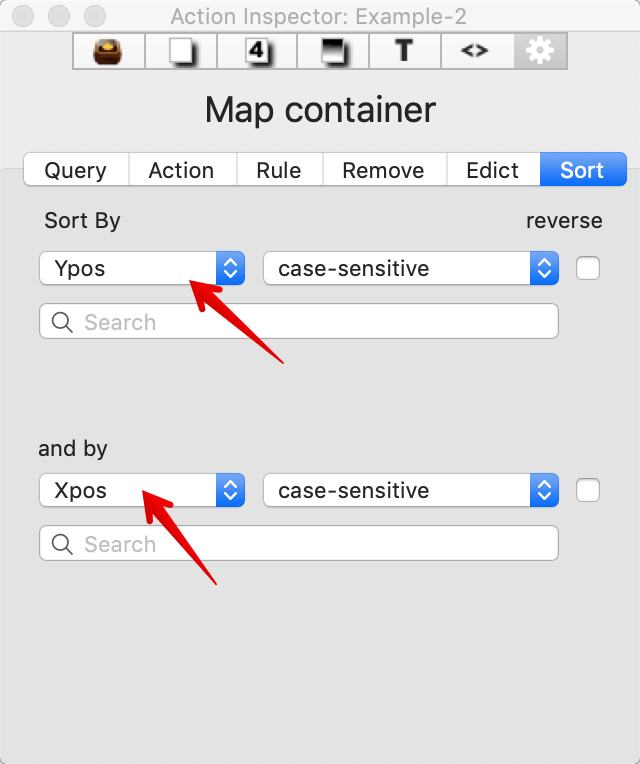
There is no need to set ‘original note’ in the pop-up because you are already acting on the original note. Earlier discussion about using agents was a red herring (and this leading to the false trail above).
So, now we know. It’s much easier than imagined to get the outline order of a container to reflect its map layout in a broadly left→right, top→bottom-right order (akin to English as written on a page). If you need a different orientation swapping the Ypos and Xpos order of application and/or using the reverse sort setting may help.
Before someone points it out this doesn’t cover mapping all layouts. If nothing else, it might suggest to anyone starting a new doc that a top-left/bottom-right progression makes it earlier to transpose to a (linear outline order). If the map is essentially finished and you want to export but have a branching structure, consider nesting branches in the map inside their starting note. These will also nest in the outline So you could apply the same sort to this new container). some assembly required, but a small once-only task.