The contents of this post will seem trivial to experienced TB users, but maybe they will be helpful to novices like me.
I recently decided that I should try using Tinderbox for writing rather than simply making notes and sorting out my ideas before writing a document, usually in Scrivener. Although the advantage of Tinderbox will come only when I have more complicated projects to organise, I decided to start with a simple one to learn how to do it. The files I was writing had the following structure.
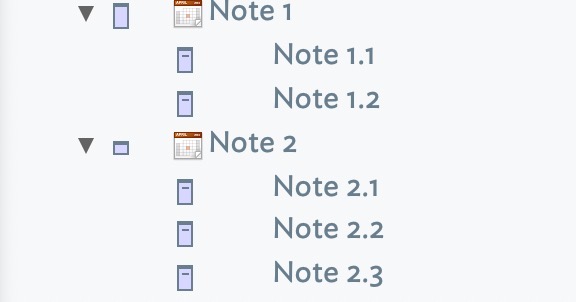
The first level notes are chapter headings, which may or may not have any text in them. Within each chapter are sections, each of which contains text.
The problem I had was that I wanted to export all these notes to a word processor, including both headings and text, and to have everything formatted using the word processor’s paragraph styles. I could not get any of the built-in methods to export text as I wanted it. After getting into a muddle, one of Michael Becker’s videos (thank you!) led to a simple solution.
As Mark Anderson points out elsewhere, the easiest way to export a batch of notes is to put them into a container:
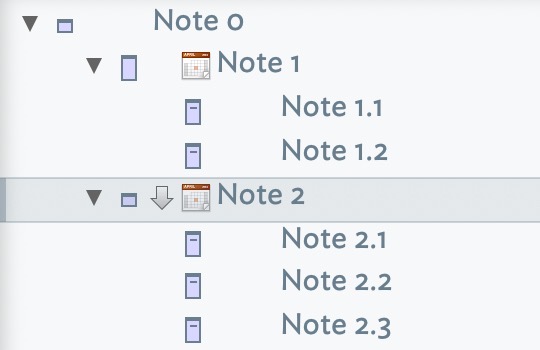
Then create an HTML Export Template for each level of notes as follows:
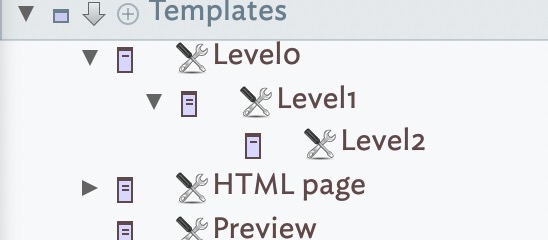
Level 0:
^children(/Templates/Level0/Level1)^
Level 1:
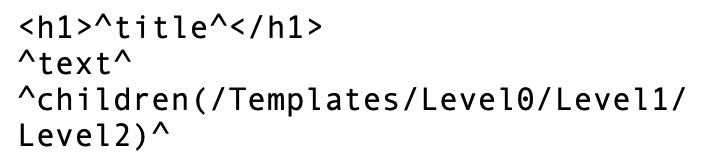
Level 2:
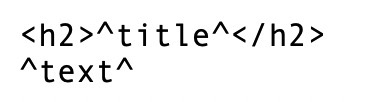
Note that nothing from Level 0 (other than its children) is output, because it is merely used as a container to group notes together.
After that, to export all the chapters, select Note 0, attach the Level 0 template and export the Selected Note. No need to attach Templates to the notes inside Note 0. Note that you need to do it by opening an HTML file in LibreOffice because otherwise the HTML code is not converted.
To export a single “chapter” (Note 1, Note 2 etc) with all its contents, click on the “Export” pane in the Note, and set the Template to Level 1. The note can then be exported to an HTML file. It can then be opened in LibreOffice, and when the text is copied and pasted into a regular document, the headings will all have corresponding styles attached.
It would be very easy to extend this to further levels of note, including or excluding Titles as desired.
Maybe there are easier ways of doing this in TB, and there are obviously other ways to convert HTML to text formatted with paragraph styles, but using LibreOffice is very easy, and from there it can go into any other word processor.
