Accessing Numbers on Attached Arrows

Gosh.. what a messy title… a picture’s worth a thousand words…

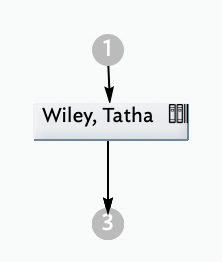
My links are attaching numbers to my notes; yay. I can click on the top numbers and see information but can’t seem to ‘open’ (?) access information with the bottom ones:

How do I ‘use’, ‘access’ the info from the bottom dot?
Hope that makes sense.
TIA

If you click on the circle, you’ll see a popup menu listing the notes at the other end of the link stub. Select a note to visit that note.

It is often more convenient to view this information in the Links Panel of the Text pane (⌘-7)

See more on link ‘stubs’, i.e. links originating or terminating outside the current map. See also Visualising links.

If unsure of terminology, don’t overlook the fuzzy search built into every page of aTbRef: aTbRef Fuzzy Search.

Thank you. I don’t know why it worked on the top circle and not the bottom one. Turned out my view/circle was too small. I expanded the view and was then able to open the bottom circle as well.
1 Like