Agent query: range overlap using .numbers on string attribute (TB11)

In Tinderbox 11, notes have a string attribute $FocalLength (e.g. “35 mm”, “24-105 mm”).

Want agent to find notes where the number range overlaps 35-85 (for example):
• “35 mm” (fixed focal length): → overlaps ✓
• “24-105 mm” (zoom): → overlaps ✓
Proposed query: $FocalLength.numbers.first <=85 & $FocalLength.numbers.last >=35
.numbers extracts correctly in actions/stamps, but agent doesn’t populate. Works .numbers.first/last in agent queries (TB11)? Syntax error?
Context: Film shot planning – primes match exactly, zooms if range covers needed focal length. No extra Number-attributes; scalable for new zooms (“70-200 mm”).

Alternatives like regex or .extract welcome if simpler. Thanks!

There is no .numbers operator in Tinderbox, as I recall. Even if there were, we’d be in trouble because “70-200 mm” might plausibly return [20;-200]!

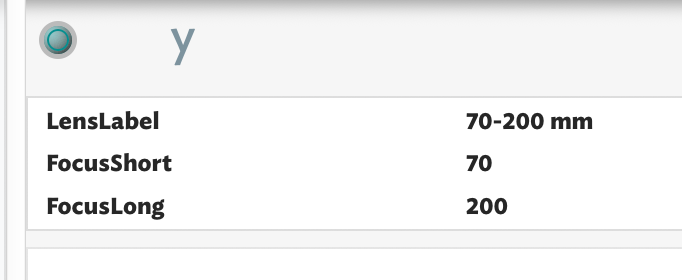
I’d suggest instead having two numerical attribute, perhaps $FocusShort and $FocusLong. This makes the query much easier!

If you do want to extract all the numbers in a string, you could writer a function using the streaming operators skipToNumber and extractNumber. That would be worthwhile if you had hundreds or thousands of lenses to inventory. For a few dozen lenses, it might be easier to do that by hand. Or, let Claude do it (check the results!) and save the results in a comma-delimited or tab-delimited table. You can import that table into Tinderbox and then you’d be all set.

1 Like

That’s what I thought about too, but I thought it would be basically an unnecessary Attribute for all prime lenses (fixed focal length). Because in my case I got about 10 prime lenses and 2 zoom lenses. So for every prime with would be 2 times the same value and just beneficial for the minority of the lenses. I does not seems like a very sleek solution.

Isn’t a a way to work with some of list ether containing one value (prime lens) or two values (zoom lens)? OR maybe a rule to search for numbers in strings?

Thank You!

  1. The cost of an extra attribute is very slight. If you find yourself needing hundreds of user attributes, it might be worth thinking a bit because it’s hard to remember what each of them do. But an extra attribute or two is not hard. Tinderbox is quite efficient in memory use.

  2. You could establish a convention: any lends with $FocusLong==0 is a prime lens, with a focal length in $FocusShort.

  3. Or, you could have an agent look for prime lenses, with a query of $FocusShort>0 & $FocusLong==0 and an action of $FocusLong==$FocusShort. Now, you enter 25mm as the short focal length and the long focal length is automatically 25mm. Change it to 80, and it will stay 80.

You could use the Tagger to pull strings (ex.: “70-200mm” as a text string) and find the value in a Set-type attribute. Only caution would be to type it consistently of course.

I’ve a hunch the assumed ‘.numbers()’ might be a misunderstanding of String.toNumber(). The latter would not help here as your string contains an ad hoc mix of numbers and other characters. Indeed, the need for a regex in order to do meaningful query is the small of info that could be stored better.

You pattern is one or more numbers, possible space(s), hyphen (or other dash type?), possible space(s), one or more letters: ^(\d+) *\- *(\d+) *[A-Z]*$. If you aren’t prone to typos—most you are—you might use: ^(\d+)-(\d+).

I think @eastage’s suggestion makes a lot of sense. Rather than make regex mine out numbers from literal text, simply store the numbers you need. If concerned by the prospect of using two attributes, why not us a single List (so the order is maintained. For instance a user List attribute ‘ZoomRange’, and for you two examples the values would be:

  • 35;35
  • 24;105

There’s no right way but decades of data wrangling has taught me it’s easier to store the key bits you need (the numbers) and clothe them in extra text as needed. So:

function fLensAsLabel(iShort:number,iLong:number){

   var:string vLabel;
   if(iShort==iLong){
      vLabel = iShort+" mm";
   }else{
      vLabel =iShort+"-"+iLong+" mm";
   }
   return vLabel;
} //end function

//usage 
//[string] = fLensAsLabel($FocusShort,$FocusLong);

Thus:

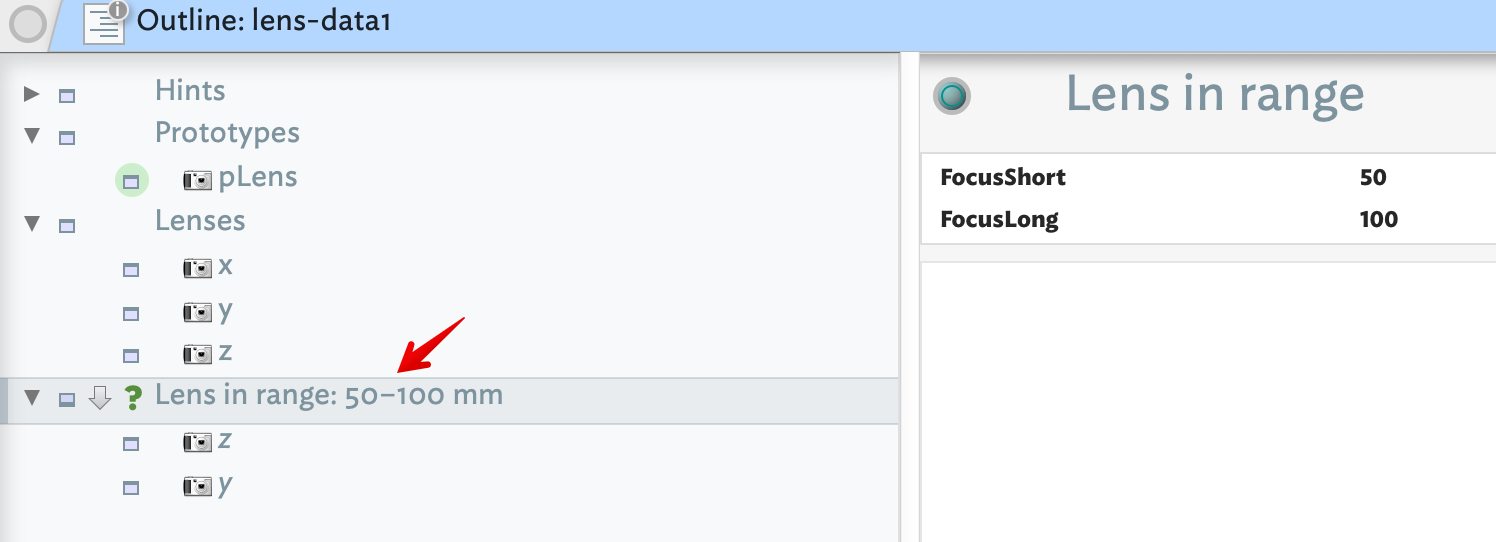
By setting our agent to use $FocusShort and $FocusLong for the upper/lower bounds, we can test query:
Now you test query:

between($FocusShort,$FocusShort(agent),$FocusLong(agent))|between($FocusLong,$FocusShort(agent),$FocusLong(agent))

Plus, if we give our agent a Display Expression like so:

$Name+": "+$FocusShort+"–"+$FocusLong+" mm"

We get this result:

Here is the test document: lens-data1.tbx (115.2 KB)
1 Like

An elegant solution that offers a peek into functions as well as action code, nice!!

Just curious, the family of lenses will pretty much be restricted (I’m assuming max 20?) and the usage issue seems to be more one of identifying a particular lens entered in Text as being one or other of a set - couldn’t the Tagger offer an efficient alternative in this scenario?

Personally - when in a hurry, I might enter something like “7+” in text and have Tagger auto-populate my Attribute with “70-200 mm”. I could also go back and auto-correct my abbreviations after the fact, if I choose to. Just wondering.

FWIW, I started thinking a List attribute would be a more elegant solution but it appears a query can’t evaluate a query like $MyList[1] == $MyNumber. Learning from that I immediately discarded a Dictionary-based approach. IOW, $MyDictionary["MinFocus"] ==$MyNumber, etc. There is trade off of perforct (and lobbying for a solution not yet present) or working with what we have.

Another lesson brought back to mind is use what works with the tools you have, not the ones you don’t have. The demo above shows it simple to work with two Numbers 9upper/lower bounds) and make a ‘text’ version with ease. By comparison sorting a ‘text’ version and digging out the numbers needed if far more work.

The latter implies no disrespect to @nkoenig, as best fit to the toolbox isn’t always obvious at outset We tend to start from the info we have at hand “20-60 mm” and assume this is the best way to store/use the data. Often, as here this turns out quite quickly to me a misstep. Despite years of use, I often make just such an error when faced with info that is new or in a domain unfamiliar to me. That event brings out another overlooked strength of Tinderbox—a do-over is quite easy. Sure, the first time, everything is ‘more work’. But ,as @archurhh notes, attentive use of the app’s toolbox quickly nerfs the sense of ‘extra’ work.

1 Like