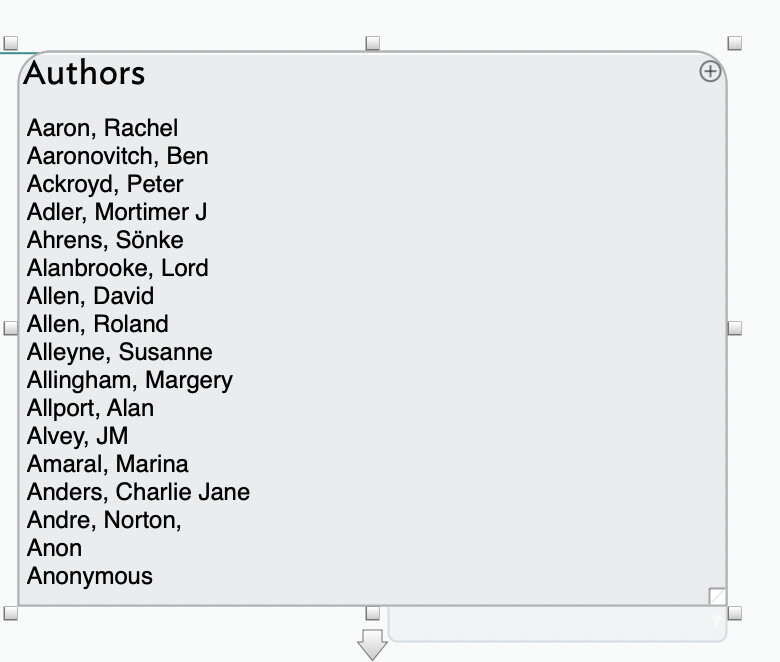
In this example, the list is far longer than is currently shown.
I can manually change the height of the note (and $TitleHeight to match), but is there any way of calculating the height of the container from the number of children, so that the note’s $Height always shows the number of items in the table?
I’ve been trying to work out if there’s a correlation with $MapBodyTextSize I could use, but my maths isn’t really up to this sort of thing…
Some interesting writers on this list! What a dinner party: Mort Adler, say “Hi” and Andre Norton.
At standard magnification, 1 map unit is 32 pixels. If $MapBodyTextSize were12, the desired height FOR THE LIST would be $ChildCount*12/32. Then you’d need to add in a margin for the border, padding, and the title — probably about 16px, but trial and error should find it.
Well, you’ll be able to say hello yourself, because you’re also on the list (twice)…
Many thanks for the calculation: I’ll give it a go tonight. (I shall build in a maximum height for practicality, but I was interested in the basic calculation.)
If anyone bottoms this out into a value/calculation the originally user can apply, I’ll stick it into aTbRef which is part of the latter’s purpose. Nothing is obvious at outset, but often simple once a few folks with some app expertise poke at it.
A point missed in the previous discussion is whether the resulting $TitleHeight makes sense. Why? Well, if Aalberg–Abernathy alone is more than $Height, indeed the vertical height of the app window, does it make sense to just re-size $TitleHeight?
No implied critique in any of the above. I’m simply applying some decades’ experience of me realising “this problem is more nuanced than I’d thought.”. The forum is wonderful for just that—the missing perspective, not least in surfacing (innocent) assumptions.
I’d been thinking about the width problem too, but was leaving that for the next phase. For my purposes, it would be probably enough to truncate the first column ($Name.substr(0,20)), which takes away the need for taking long titles into account.
There’s invariably a nested level in this sort of thing as we test with 3–4 items when the reality might be 100s. But, we shouldn’t be too gloomy. If the basic test doesn’t scale, things like posters offer lots of ameliorative approaches.
I note this as it is w=quite in human nature to think “app doesn’t working as I want: it is wrong/badly designed”. We don’t thing: “my assumptions were flawed”. Yet this isn’t a zero-sum assessment. Rather it should make us ask ourselves: “what am I actually trying to visualise?”.
For instance, the (vertically) overflowing table expression might be easily addressed by a separate tab in AB view. My observance, over time is that users—myself included—are resistant to switching tabs (near zero overhead) to see needed into. Yet the differing views are there in an instant. A limitation (tech reasons I’m too unskilled to explain) is that it is not possible to view more than one view (via different windows) if the selected note differs. The limitation still offers lots of scope, especially for those privileged to work on more than one monitor.
TL;DR. visualisation constraints are not always what they appear to be, if one takes into account the full toolbox of Tinderbox.
I am aware of the other views and do use them regularly.
This particular question arose in the context of a dashboard view, so I wondered how much was possible within that view. It wouldn’t be appropriate in all circumstances, but it is useful to explore what’s possible, I think.