Config notes: how to?

Thank you for putting together the hitchhiker’s guide!

I’m intrigued by what you’re calling a “config note.” But I don’t understand how to make and use one.

For example, let’s say say I have a tinderbox document where I’m keeping track of books that I’m reading. And I’d like to keep track of status like {“read”, “reading”, “”} and have an agent assign a badge for each status.

Would I somehow use config note to set up mappings like “read”: “sf-text.book.closed”?

And then write an agent to assign $Badge= by looking up the the icon name for this note’s $Status? I don’t know how to write that, but maybe something like, $Badge=$ReadingStatusMap(“/Config”)[$ReadingStatus(this)].

Or is that not what you had in mind?

1 Like

The underlying concept of the ‘config note’ is variables that persist beyond the current action code session, even so minor as processing item 1 in a list and item 2, etc.

To do this involves storing info in an attribute and only notes have attributes. Thus the 'configuration (storage) element got externalised to the locus of the storage. IOW: storing config(uration) data in a note called ‘config’. By convention people like to store these at root level but that’s naïve convention. Significantly more important is the ‘config’ note’s title ($Name) is unique in the TBX. Thus resolving $Name only ever returns one note, as $Path should. But there is no requirement to use the name ‘config’ or to store that note in a particular location; failing to embrace either of those facts is likely to lead to confusion.

What a ‘config’ note stores is completely ad hoc, using as many discrete attributes (user or system) as needed as well as a range of attribute data types as needed.

Thus your scenario (in the absence of a reference TBX to test) calls for a Dictionary-type attribute to hold the status-to-badge mapping. Thus, a key:value pair like "read":"ok";, likely being part of List-type data with a key per read state.

$Badge=$ReadingStatusMap("/Config")[$ReadingStatus(this)]

Here, the current note’s $Badge would locate note at path /Config and read (assumed Dictionary-type) attribute ReadingStatusMap passing the key name string $ReadingStatus, the (this) being redundant as it is the default scope of resolution unless set otherwise.

"read": "sf-text.book.closed"

I’d understand this, without further clarification, to imply the last-read book was called sf-text.book.closed though this seems an improbable book title.

So are you saying you tried the $Badge assignment and it failed? else, what is he issue? It would help us help you more if you were able to share (upload) a minimally explanatory text TBX document so we can see your code and how you are applying it.

Bottom line, a ‘config’ note is concept, not a fixed feature. The above could as easily be:

$Badge=$Foo("/Bar")[$Baz]

Not as obvious or understandable but it helps show that the names are not fixed, this is just a concept. The key point is storing variable data across different action code expression execution.

My example was made up. I was trying to use it as a way of asking, “Is this what you’re talking about when you talk about config notes?”

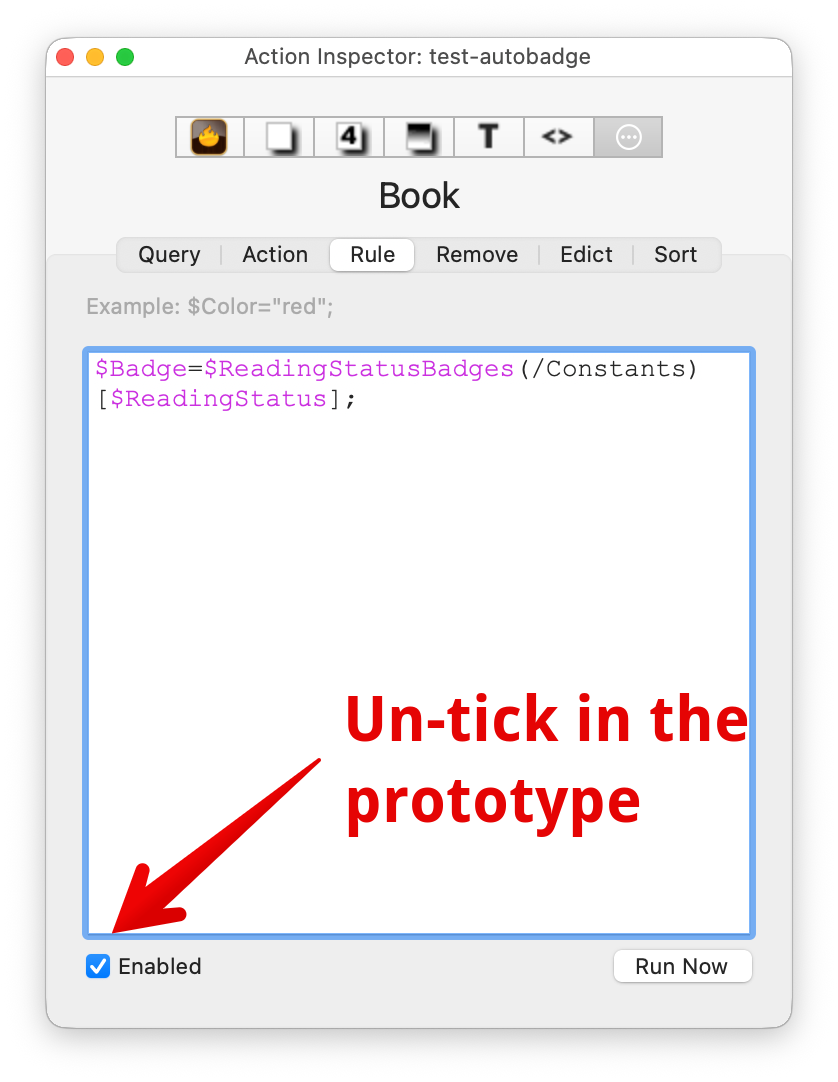
Attaching a working tinderbox doc that I hope will be clearer than my description. See the ReadingStatusBadges attribute on the /Constants note, the rule on the Book prototype, and the badges on the book notes.

test-autobadge.tbx (79.9 KB)

TL;DR yes, you’ve make a 'config note! :slight_smile:

Thanks! The TBX is a real help, and I see the mystery name I misunderstood is actually a badge name (from the macOS icons set, this the dot-notation).

From the shared TBX, I’d say your note at $Path /Constants is a ‘config’ note. It proves the point that it doesn’t have to be called that. The convention arises as its an easy trachable term, but Tinderbox is very flexible about such things.

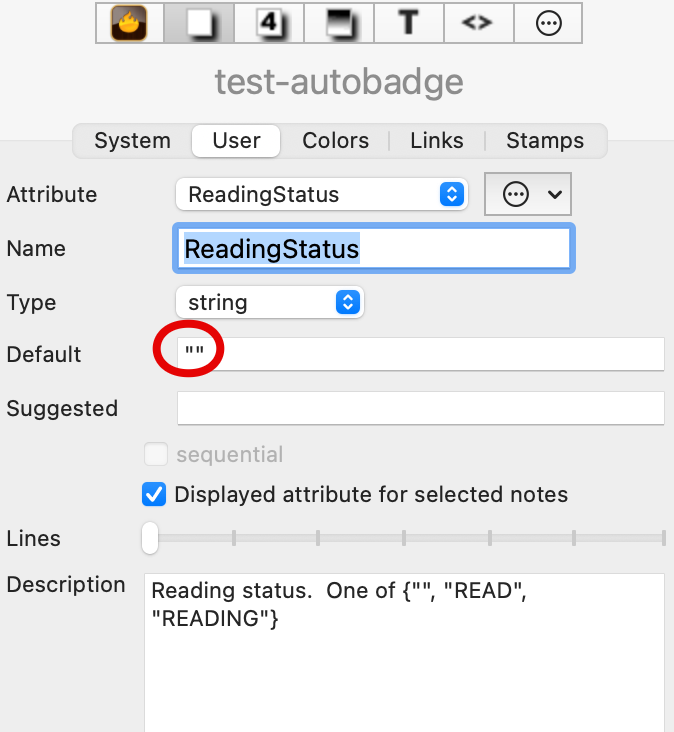
A few observations … firstly on your user attribute:

The “” (circled above) is not needed. If you don’t want a default value, leave the box empty.

Not strictly needed, but you could add READ;READING to the ‘Suggested’ value box. Doing this pre-populates the pop-up value list at the right end of Get info and Displayed Attributes tables. It also means you never have to re-key a value if it is correctly configured when typed in as a suggested value (note: the values ares a semicolon-delimited list) are initially entered.

:+1: Kudos for adding a description for your user attribute. It is so easy to leave that out and then weeks later be wondering about the fine detail of its purpose.

Rules run fast and all the time. Your prototype’s rule code is really better placed in an edict, noting that altering a Displayed Attribute value automatically triggers the note’s $Edict code. Also for both Rules and Edict’s it is a good idea to disable the rule/edict in the inspector:

That stops the code changing the prototype but the code is still inherited/run by notes using the prototype.

Does that help answer things?

1 Like

Thank you! You threw a lot of “best practices” in there, which were good for me to read, but I’ll try to stay on topic and summarize what I learned about config notes. Let me where I’ve got it wrong!

What’s a “config note”? It’s a note that sets attributes which are intended to be referenced by other notes. It’s a regular note that we’re giving a special function.

Why go to the trouble? One reason to consider using a config note is to avoid duplication, which should make things easier to modify later.

For example, if you have notes where you want to use a monospace font, you probably want to use the same font consistently throughout the document. You could set $NameFont on a number of different notes or prototypes. Or you could do this:

  1. make a new attribute MyMonoFont
  2. make a config note, e.g. at /Config
  3. set the value of MyMonoFont on the config note, e.g. set $MyMonoFont=IosevkaNFM on the config note
  4. add edicts like $NameFont=$MyMonoFont(/Config) to the notes that use the font

Now you can change the value of MyMonoFont on /Config and see the font change for all of those notes.

In my made up example with the badges, this strategy also separated data from code. I was able to write the edict as a simple lookup instead of nested if conditions that hard-coded the names of reading states and badge names.

From what I’ve seen, a prototypical use case is to designate one place to save data that changes infrequently and is used repeatedly throughout the document. Are there others?

I have a feeling that the mysterious Hints/Library might also be used for this kind of thing. But I have no idea what can be done with that.

2 Likes

I stumbled across a different use case for “a config note” in Tinderbox Lesson Dynamically create notes from attributes with functions.

In that case, the “config note” functions to synchronize the existing values of a displayed attribute with the names of a subset of notes in a designated container. The point is to enable a workflow: add a note as a child of a container; and automatically have its name available in the drop-down menu of the displayed attribute across the document.

I’m wondering, is this even the same kind of thing as the “config note” that we were just talking about? The use cases I imagined were relatively declarative and static – like what you’d put in an application’s config file – whereas what @satikusala describes is more about dynamically maintaining consistency of state. But I’m easily confused :wink:.

1 Like

Another, very esoteric use of config notes is in writing Storyspace interactive fiction or adventure games. (This is not the primary style for Storyspace, but it can be done.)

In this sort of story, we need a note that stores the state of the player characters — how much gold you have, whether you’re healthy, what sort of equipment you are carrying. One way to handle this is in the attributes of a config note, conventionally /me. Then, you can use guard fields to limit access to some links: $Gold(/me)>150 or perhaps $Keys(/me).contains("Key of Silmar").

This can also be useful in dashboards for providing an explicit, but changeable target.

if ($TotalWordCount<$TotalWordCount(/goal)) {
   $Color="green";
} else {
    $Color="";}
1 Like

I think he answer is that ‘config note’ is a concept , note a defined thing. It simplest it is the notion of storing persistent variables (globals) general value (constants) in the attributes of a single note.

This note is normally at document root, for ease of access, but doesn’t have to be.

The note is also often calls ‘config’ or some variant of the name, but doesn’t have to be.

I’s suggest that most users (later readers f this thread will never likely need this (globals and constants for action code), but for those who do the concept works well. IITC, the concept has emerged in the Tinderbox community back around v5 (so back around 2009).

When Storyspace moved to a common codebase with Tinderbox c.2015 and acquired the latter’s more powerful action code it enabled the /me concept (as @eastgate notes).

†. For anyone familiar, Storyspace was a pre-Web era hypertext authoring tool dating from the mid-80s and developed/maintained by Eastgate Systems since the early 90s. The Tinderbox map is essentially an improved/enhanced form of Storyspace’s original map. In an age were new is cool, people often overlook that Storyspace/Tinderbox have been doing this hypertext things since long before the Web, or Markdown, etc., etc. Today’s Storyspace will happily open app files from the first public release (1987), which is impressive when many apps have a life of a few years if not only months, and generally orphan early works.

‡. I may be doing @eastgate a disservice here as I never used Storyspace pre v3 but I don’t think think had the /me concept—for the perfectly good reason that it leverages action code that didn’t exist in early Storyspace. :slight_smile:

1 Like

I also use it as a temporary place for interim calculations.

You’re welcome! I apologize for the tardy reply. My wife and I rang in the New Year with the flu, but we’re both feeling better. Mostly.

This has been a tremendous help, as I haven’t, to this point, made use of a config note. But I’ve seen it used to great effect in many Tinderbox files, so I understand its value, just not all the best ways to put one together.

I’ll be mining this thread for the next draft, which I will, hopefully, upload before Saturday’s meetup.

Nice way to greet the new year! Thanks!

As always, please let me know where I’m off base here.

But I understand that what people are calling a “config note” in a Tinderbox document is any note whose purpose is to store attribute values that will be used by other notes.

I find that it’s confusing to call all notes that use this technique, “config notes,” because “config” suggests a particular use case to me. But the list of use cases is open-ended. So far in this thread, we’ve talked about:

  1. Declaring settings. From this thread: the goal settings example; and my font and badge examples.
  2. Maintaining state. From this thread: Tinderbox Lesson Dynamically create notes from attributes with functions
  3. Caching.
  4. Is there a Tinderbox analogue of that cool Storyspace example?

It’s easier for me to think about these kinds of notes by their function in the context of the Tinderbox document: a note for declaring settings, for maintaining state, for caching expensive computation. I don’t know what to call the technique that Tinderbox exposes for achieving this functionality, but “configuration” doesn’t seem quite right.

But I’m biased. I interpret “configuration” in the context of using computers as what you would do with an application’s configuration file, which fits with the first use case but not the others.

I sense you’re looking for a definition that doesn’t exist. the ‘config note’ is a colloquial term within the Tinderbox community for a note where you store things.

‘store things’ likely has a different resonance—but to the same end—for those who have, or have not, had some exposure to coding.

The problem addressed in all the use cases address is how do you share a consistent setting/value for all notes (globals and constants), or how—in more complex actions—do you store state either within execution of an action code expression (e.g. ‘store interim results’) or between use of (sessions) for such expression (persistent value).

Beyond that, the name is whatever you wish to use. Other people’s terminology may be confusing (albeit not with intent) but Tinderbox is pretty permissive and doesn’t feel the need to be proscriptive about what people call the notes that solve this issue or the act of doing so.

Yes— a ‘config’ note. See above for why the terminology differs.

TL;DR. Understanding flows from the role/task of such notes, not their name or description.

This is a very worthwhile discussion and illustrates some of the challenges in making Tinderbox’s features accessible to a wide audience. Action Code, Export Code, Functions, Stamps and so on make it appealing to people who already have an understanding of programming, and they bring their perceptions to the app and the discussions about it.

Others don’t have a coding background, but manage to “work out” ways to use Tinderbox’s features to be more productive. It was @satikusala who introduced the concept of a “config” note to me, and I think that he, like me, doesn’t have a deep “coding” background, so terms are generated kind of ad hoc to meet the needs of that particular project, conversation or exchange.

The intent of THHGTT is to make some of the more “advanced” features more accessible to users who have watched some of the YouTube videos, explored some of the sample files and had some success using Tinderbox; but want to take a “deeper dive,” without necessarily trying to become experts or skilled coders.

The “config note,” is a practice that can make a user more productive. Frankly, the only use case I had in mind, because of my own limited experience, not because I have some particular view of what a “config note” is, or should be, was caching.

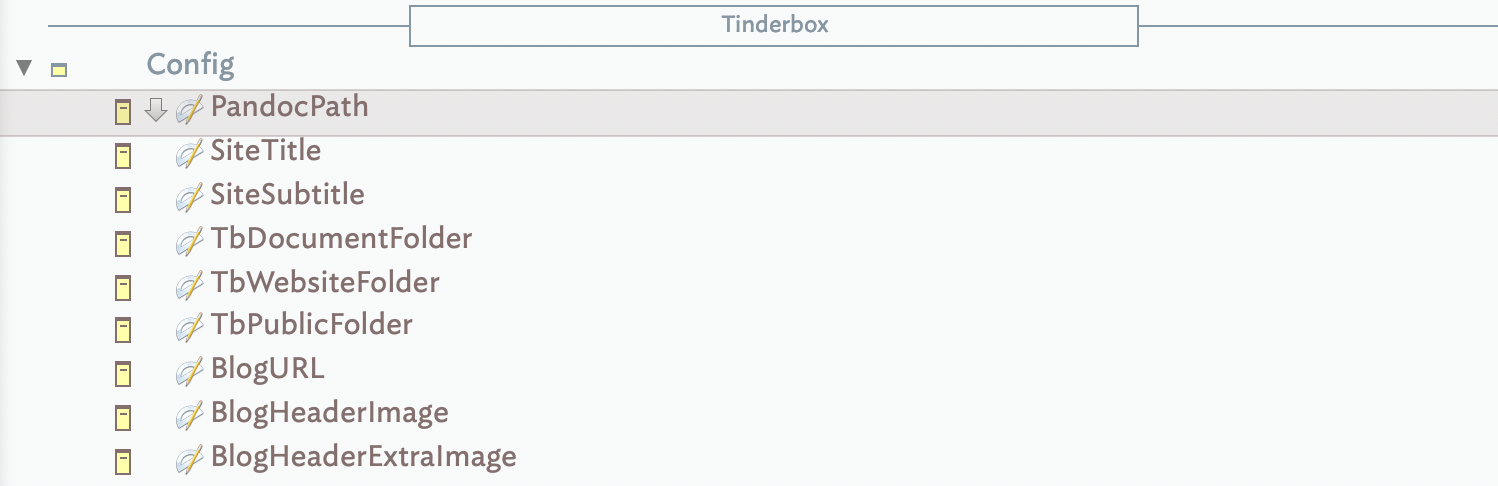
And the “Config” note is/would be a container that stored data like file paths, URLs, API codes, and the like. Something like this:

I think @satikusala /Media container is similar, though I don’t have a lot of experience incorporating external media in Tinderbox, so I’m not sure.

I like the Settings idea, and that was one idea I wanted to explore given the recent discussions about color and fonts and so on.

The interesting question is, should we use a more rigorous vernacular to label these concepts? If so, then folks like @echuck , yourself , @eastgate would kind of have to help steer the conversation, because it’s out of my depth.

I have a hobbyist/historical interest in “programming,” but I’m not a developer, nor will I ever be one. But I am willing to learn how to use the vernacular correctly to help avoid creating confusion to Tinderbox users of any kind.

So what overarching name would be appropriate for a container that held notes about:

  1. Declaring Settings
  2. Maintaining State
  3. Caching
  4. Other examples? (Package installers? AI prompts?)

This has been helpful, and if we think it’s wise to kind of proceed along those lines then that’s what I’ll do. I do intend to try to keep things “light” in tone, some of this stuff can be intimidating (or “boring”) if you’re unfamiliar with it.

1 Like

Worked for me!

1 Like

I didn’t see this before, but there’s a short description of the config note technique here as well as an alternative of using attribute defaults: Simulating global variables

1 Like

Indeed, the article flags up the fact the advent of attribute() opened up new approaches. The ‘config’ is simply a concept that is implementable in many ways.

Teaching this is difficult. When starting out.a user unused to the nature of coding anything you need to type or construct tends to be treated as gospel: do exactly like this or you do not get the result. If the code works it if anything cements the notion that this is the right way. Said user goes on to instruct others and a best practice rapidly become unbending rules.

I’ve been through the latter myself, thinking to when I started to make deeper use of Tinderbox. It wasn’t until I’d followed the rules that I had the perspective to see they weren’t rules at all. It took longer, and through years of helping other users to see that their ‘config’ though quite unlike mine works for them and does the same job and doesn’t need to conform to a non-existent ‘best practice’ (i.e. how I would tend to to the same).

As the opening comment notes, improvements have also been made since. Going back a bit:

  • var() arrived in v5.10.0. Before that, you had to make your own user attributes>
    • during v5 time (early 2010) the community developed the notion of a ‘starter’ file with pre-defined user attributes of various data types, normally prefixed ‘My’, e.g. $MyStringB, to act as a place to store such info as otherwise needed a variable.
  • Tinderbox 6 app re-code added the ‘Sandbox’ group of notes with internalised the ‘My[DataType]’ form of naming of pre-defined utility attributes. Essentially this drew for the ‘starter’ file idea used in the v5 era.
  • v8.0 added the create() operator allowing on-the-fly note addition opening the way to easily adding logging to action code.
  • in v9.1.0 var() got support for explicit data types. Thus a List-generating operator could be passed to an explicit Set-type var causing the result to be de-duped and sorted.
  • v9.1.0 also added the user defined function() which helped reduce the need for attrs just to store interim values.
  • v9.2.0 added createAttribute() allowing user attribute generation on the fly. No more need to pre-defined attributes you didn’t need.

There is more but if you’re looking at a v5 file telling you ‘best practice’, for instance, for logging/tracing actions, it is worth looking for more recent work before simply copy/pasting a set-in-code solution.

The notion of a ‘config’ note is a concept not a fixed thing.

OK.Sure: “If it works it works…”. A sentiment fine for docs that will never need new (forms of) content. But, we should not be blind to innovation. Tinderbox v1.0 and v11.5 are very different in the scope of what they can do: we users should be equally flexible in thinking how to use a ‘config’ note.

†. My memory, my email trove my files (metadata corrupted by numerous OS updates) and even the seemingly all knowing AI have failed me§. My earliest trace to a ‘starter’ file is that it was part of my offering at Tinderbox weekend Boston 2010 (March 13–14). I’ve no recollection if it was a useful concept I ‘borrowed’ from another user, though I definitely leaned on it hard when helping forum (old and new) users from 2010+. But if any longtime players can fill in the date gaps, I’d welcome this info.

‡. If we learned nothing else from Fahrenheit 451 it is that we all ought to remember at least one thing before the firemen— or he blessed Sponge of Amnesia—come calling. You’ve probably guess my thing to remember.

§. If you want to use the internet Archive to look at the old YaBb=based forum (c.2007–2015), it seems the forum w/w didn’t play well with the IA’s spider. IA has entries for 2007–2014 but my experience is it wasn’t until 2013 that the spider actually indexed content. Plus, search (in-site for the forum) doesn’t work—there is a limit to IA’s recreation. But once at the old forum home page you can navigate to sub-forums, thread, posts etc. Kudos to the Internet Archive

¶. q.v. recent word news, unexpected regime change can wreak havoc on a polity’s records. It’s not a matter of which side we are on, it is what is burned and lost that we can never get back. Knowledge is more fragile than we think.