I would like to delete an agent; I have checked the Tinderbox Help link but am unable to locate help.
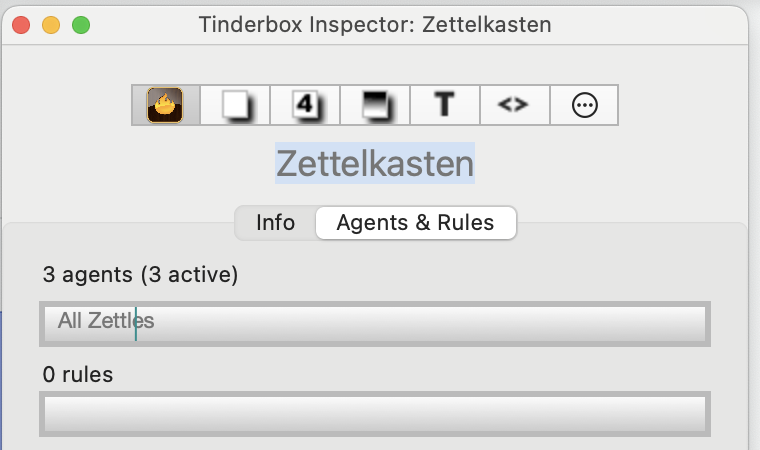
My inspector shows I have 3 active agents, but it only names one. How do I see the other two? Further, can I then delete the one I no longer want?
I would like to delete an agent; I have checked the Tinderbox Help link but am unable to locate help.
My inspector shows I have 3 active agents, but it only names one. How do I see the other two? Further, can I then delete the one I no longer want?
OK, you are misunderstanding the above dialog. Yes, there are 3 agents. The box is not a list of agent names but shows the agent currently running. If not much load, the cycle completes and so the last to run is shown until the next update. In this case the last (sorted by $OutlineOrder) is very likely called “All Zettles” (i.e. the agent’s $Name). So find and delete that agent. Now the above dialog should show the previously penultimate agent. Find and delete that agent. Repeat once more and now you will have deleted all 3 agents.
Tip. If confused as to the location of things in your documents, avoid Map view and do the work—of locating things—in Outline view. Outline view shows everything.
There are lots of ways to resolve the task above but I’ve suggested one that works within aspects of the app I believe you understand (IOW no new leaning just to do this task).
Thank you.
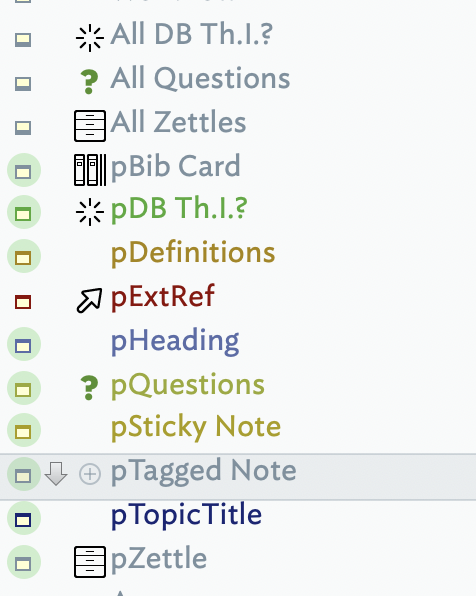
I see these three agents; I thought one would be the agent associated with my “disappearing” notes as they are still disappearing; evidently I was successful in deleting that agent.
Creating new notes, and selecting that prototype (pDefinitions), are still “disappearing” in map view. In outline view they appear at top level at the bottom of my outline view. I am not clear why they are not visible in map view, or as they are not at the top level map view, where they are going and why.
I have now deleted the “disappearing” prototype and recreated a new one which is not disappearing. Yay! I will now attempt to create an agent to work with these notes.
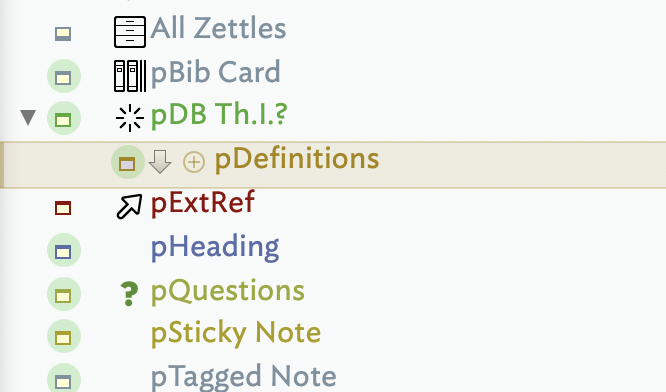
I just moved my new prototype to a new location (outline view) and it automatically jumped in a level, ie:
This happened previously and I wonder if it’s part of the trouble I am now working to sort out.
So, it wants to be at second level but I need it at first level. When I select it and attempt to drag it left to first level it keeps automatically popping back to where it is in the image. What am I missing? TIA
Thanks for the screen grabs!
In the first grab, I see 3 agents: “All DB Th.I.?”, “All Questions”, and “All Zettles”. If you look at the icons on the left column, you will note that for agents the thick bar is at the bottom and for notes/containers it is at the top, as documented here. The styling also reflected the position of the title bar in map view agents vs. container notes (as documented here).
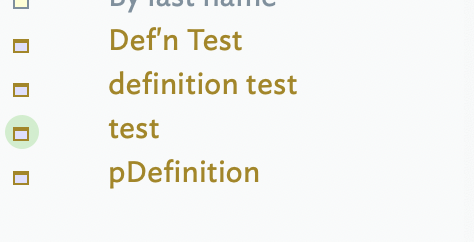
In the second screen grab, I see 4 notes (4 and a bit!). Of these one is a prototype, which we can tell by the green disc around the icon (as documented here). I see a note ‘pDefinition’, that is not a prototype (no green disc†), but has a ‘p’-prefixed name most normally adopted for prototype note names to assist with signalling their prototype status. I only note this in case ‘pDefinition’ is intended to be a prototype.
†. The actual controlling attribute for prototype status is $IsPrototype.
In the bottom most screen grab, showing pDefinitions with the green halo, you can see what I am talking about re how to shift it to the left.
The upper screen grab you are referring to is shows outline view indicating I have first level notes, but I do not see them in map view first level. I am unsure why.
OK, now in your second post ‘pDefinition’ is a prototype (so I guess my hunch above was correct  ). The reason it is nested is simply because of where you dropped it. When you drag a note, look at the left edge of the green line indicating where the note is to be inserted. If the line starts to the right of the note above the line it will be inserted as a child note (see more). So, user error, albeit unintentional.
The OnAdd issue (and a failure to correct its effects is the most likely reason why the ‘pDefinitions’ is moving itself. But without seeing the TBX document it is impossible to diagnose further.
Note: if the prototype ‘pDB Th.I.?’ has an OnAdd action, after moving the ‘pDefinitions’ prototype up to be a sibling (use Shift+Tab to do this easily) check and undo any changes made by firing the OnAdd of ‘pDB Th.I.?’ when you dropped a child into it.
Another interesting think apparent from your screen grabs it stat you are creating prototypes outside the normal /Prototypes container (see more). Although doing as you have done is allowed, general convention is to put prototypes in the Prototypes container. This is definitely recommended when still learning the app as you are. The short explanation is pre-empts unwanted/unexpected outcomes—indeed things like you have been reporting. Are you creating prototypes in their current location for as specific reason, or just because that was the map you were in when you wanted to add a prototype? If the former, could you share the reason? It might help flush out further causes of these unexpected behaviours.
Also, is there a particular lesson or method you are following (for instance I see mention of ‘zettles’)? Knowing that again might help understand the cause of what you are experiencing. I might add that the latter is extremely unusual. however, rather as with (unintentionally) building on sand everything atop shaky foundations may be affected.
So I dropped a line in the wrong place. Yes. I do know this. What I need is to know how to now move it to the correct place. I keep trying to move it to the left and it won’t ‘stick’.
OK.. I returned it back down to the bottom of the outline view and it it still indented to the right.
I would LOVE a prototypes container. I wish I could contain/organize outline view to make it useable!
Did you try using Shiftt+Tab as suggested, to move the note? The reason I suggested that particular approach is it removes any drag/drop ambiguity (as you aren’t using drag/drop!).
If you use that shortcut method to promote the ‘pDefintions’ to be a sibling of ‘pDB Th.I.?’ and then it still gets moved back to be a child, then something else is at work. But there are too many possible causes to list here. So, given screen grabs aren’t giving enough info, bBetter would be to post your TBX file (or via a private Direct Massage (DM) if the TBX;'s content is sensitive.
Short+Tab - I missed, and still don’t see, that suggestion. I do not understand “short”. I don’t have that key on my keyboard; I do not see “Short” in the TBX drop down menus; am I to type the word “short” before adding +Tab?
See Built-in Prototypes. Add at least one built-in prototype and the container is created (you can always delete the prototype if not needed. Once you’ve done that, in Outline find and drag all your prototypes to that container and use it for making any new containers.
Apologies. Dyspraxia strikes again. It should be Shift+Tab (⇧+⇥). I’ve fixed my post above. In fairness, in the original mention it was correct.
OK, later here in UK, I’ll catch anything else tomorrow.
Note: an uploaded TBX doc the displays the problems you’re seeing would help us help you so much more easily.