I would like to change/add text colour options to the following dropdown:
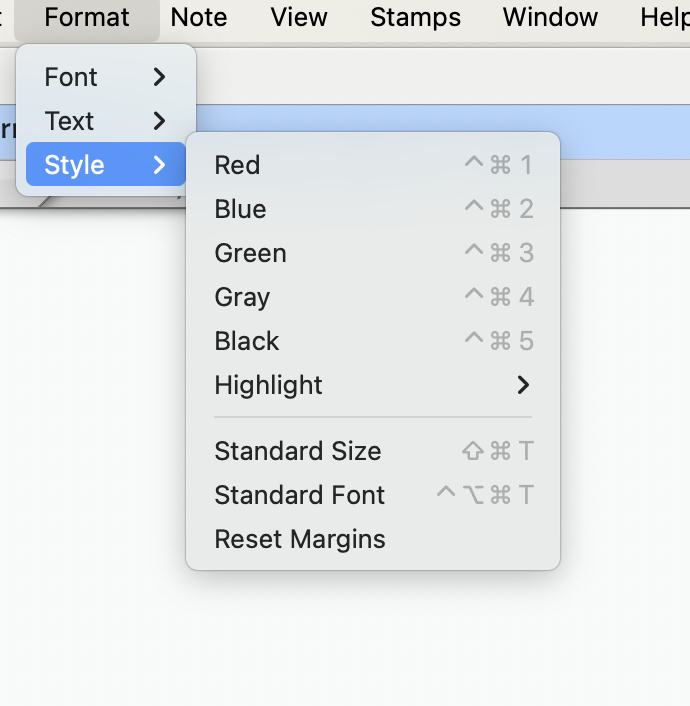
I tried the Inspector but seemed to luck out.
Can someone perhaps direct me?
TIA
I would like to change/add text colour options to the following dropdown:
I tried the Inspector but seemed to luck out.
Can someone perhaps direct me?
TIA
These are the options, for better or worse.
The genesis of this feature might be interesting. A Canadian judge used Tinderbox from the bench. He wanted to color-code notes with regard to arguments made by the defense and the Crown, and needed to be able to code things quickly. So, here we are.
It’s always fascinating learning the history of features and how they got here.
Anyway @WinkyDeb - if you’re okay with the options there, and just want quicker access to them, the free CustomShortcuts is very good for creating new assignments to items exposed through menus. It sets them at a system level, so you don’t need to keep the application running, and it doesn’t interfere with other input elements.
Nice to learn a fellow Canuck helped create this feature!
Thanks Dave. My understanding is poor…
RU saying that via CustomShortcuts I can “create new assignments to items exposed through menus”… R U saying I can assign a new color to Format > Style > Red/Blue/Green/Gray?
Does the bottom note mean the colour is changeable, given
“Changing this attributes does not change text colours previously applied, but affects future applications of this style” ?
I don’t think so! I’m saying you can assign new keyboard shortcuts to existing menus.
If you want those menus to do different things, you have to ask @eastgate!
Sorry if I misunderstood - I thought you wanted to change the shortcuts.
Edit: But you’re right in your other comment - if you open the inspector (⌘1), go to the 2nd item on the button strip at the top (next to the tinderbox icon), click ‘System’ below that, then type ‘TextColorBlue’ in the search box, you should be able to pick the attribute and change its default value (a hex code, or a named Tinderbox colour, as listen on the ‘Colours’ tab). I had no idea you could change this, but I’d be wary that the menu and system names don’t update to your new colour definitions - exactly the kind of thing you’d forget about when you came back to that document six months later and drive you nuts.
Thank you! I’ll check that out.
No luck.