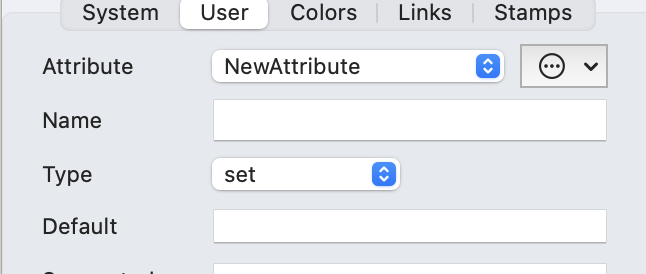
Hi there, I’m using Tinderbox for several projects, one of those is to create a commonplace book to store my favorite quotes from the books I read or things that resonated with me.
I have for example the following quote from Marcus Aurelius:
It’s enough if one’s current belief is true, if one’s current action has the common good as its objective, and if one’s current state of mind is willing acceptance of every externally caused thing that happens.
For the title of the note I’m writing in a couple of words what’s the quote about. Not sure if that’s the best way to save notes in a commonplace book but well, I still have some reading to do about that practice, I got two good book recommendations watching one of the meetups.
Anyway, an attribute I’m giving to my notes is “Themes” and I think I created a string attribute, and then I added “Stoicism”. This because I later want to create an agent that searches for particular themes.
But what if one quote has several themes? I don’t think separating them by commas is going to work. Maybe I should create several of them? Like “theme 1”, “theme 2”, “theme 3”. By the way, thanks to Dominique Renaud for his YouTube videos, I think he also keeps a commonplace book with tinderbox.
Another inspiration I took comes from Ryan Holiday and Robert Greene, as they use index cards. I think of my notes in Tinderbox as intelligent index cards with attributes to later be searchable and actionable.
I’ll later definitely use the agents to retrieve notes to help me write some essays for a personal blog I want to create or a YouTube script, but right now I’m the collection phase.
If you remember a meetup where you guys discussed how to use tinderbox for a commonplace book I’ll happily watch it.
Leaving aside the more complex data structure of a dictionary type, only Set and List
support having one or more values. In general terms Adding a new value to a String type replaces the value (only one is allowed†, whereas for a Set and a List the new value is added. The primary difference of a Set and a List is a Set automatically de-duplicates. Adding a value already stored for a set attribute results in no addition and the same value cannot exist twice. A by-product of this is that Sets always sort their values A-Z (and the user cannot stop that), whilst a list does not. A List retains the user’s desired order, which may be important to them. A List also allows duplicate entries, again this may be the users express desire.
In documentation ‘List’ will refer to List-type data, whereas ‘list’ generally refers to either both Set and List type (i.e. multi-value data)
As you show, in your grab, selecting any System or User attribute in the Inspector will show its data type. System data types cannot be altered, but this is possible for User attributes. If doing the latter some adjustment to pre-exiting values may be needed. Changing a Set or List into s string will result, for notes with multiple values for the attribute, as a single string with a semi-colon joining each previously list item: ant;bee;cow. Indeed, that string is how lists are stored, as a semi-colon delimited list of items.
If you add spaces at the start or end of an item, i.e. either side of the semi-colon delimiter, they will be removed when the data is stored. As things like Displayed Attributes show the stored form of the attribute, the sorter answer is thus ‘No’. Also, if you add a closing semicolon after the end of the last list item, this is also omitted when the list is saved.
Yes, this is how the value of $Tags would look, for instance if shown in Displayed Attributes, for a note whose $Tags had 3 discrete values: Wonders, Helenistic, Stoicism.