I have a document with a series of about 500 notes that contain the attribute $RefCode, of which the value is a simple alpha-numeric pairing of one or two letters with one or two numerals, such as A1, AB1, A12 or AB12. I would like to reformat the values, so that, in the numeric half of the code, any single digit number is padded with a preceding zero. In other words, using the code examples above, I would like to produce the following transformations: A1->A01 and AB1->AB01 (while leaving A12 and AB12 as they are). How can I achieve this reformatting with action code?
Here’s one approach (I’m sure the experts will be able to point out a better way!).
- Split
$RefCodeinto two temporary parts to hold the letters (I’ve used$MyString) and the numbers ($MyNumber) using the.extractAllfunction twice. - Add $MyString and a formatted version of $MyNumber back together.
So:
$MyString = $RefCode.extractAll("[a-zA-Z]").replace(";","");
$MyNumber = $RefCode.extractAll("\d");
$NewCode = $MyString + $MyNumber.format(0,2,0);
Points:
.extractAll("[a-zA-Z]")produces a list of every letter, separated by “;” (e.g. “C;D”)..replace(";","")removes the “;”, leaving you with “CD”..extractAll("\d")extracts all the numbers. As $MyNumber doesn’t accept lists, there’s no need to replace any “;”.- the final line uses the
.format(0,2,0)to add the leading zero. The first parameter is the number of decimal places (0), the second is how many figures to the left of the decimal point (2), and the third the character that is to be used for the padding (0).
In this screenshot, I’ve used $Name for $RefCode and $Text for $NewCode, and I’ve put the action code into a stamp, but hopefully you can see how it works. Obviously, you could use the same code in the Action Code of an agent or make it into a function as well.

As I said, I’m sure there are more elegant ways to do this, but this seems to work if you want to use it to experiment with.
Nice!
Also, once you know it works, you’ll want to clean up your working variables in $MyString and $MyNumber (for all the notes affected):
$MyString =;
$MyNumber =;
Once your’e happy with the new code values, you can move the code back over the originals and clean up:
$RefCode = $NewCode;
$NewCode =;
Thank you David for sharing the action code and giving such a clear description of how it works. With your help, I was able to make a stamp with action code that 1) extracts the alphabetic and numeric parts of the value of an attribute and assigns these new values to their own attributes, and 2) returns these values back to the original attribute, concatenating the alphabetic value and numeric value as a string, and reformatting any single digit with a leading zero in the process.
Thanks for teaching me how to use the .extractAll operator, some very basic regex (first time!) and the .replace operator for cleaning up the semicolons in the resulting list. Some learning was had!
2 Likes
I just noticed, the above line of code creates an error, illustrated in your image of the test, in that both ‘CD9’ and ‘CD99’ end up as CD09 whereas the latter input logically ought to be CD99
This can be fixed by amending the code thus:
$MyNumber = $RefCode.extractAll("\d+");
The regex + creates a single number from one or more digits.
The problem is your initial code extracts List-type data, e.g. from ‘CD98’ you extract 9;8. But as you store the list in a Number-type $MyNumber, the latter can only store a single number. So it takes only the first item in the list, i.e. just 9 and thus the output error arises in the revised code.
By comparison, the revised regex extracts a single number 98 from ‘CD98’ and so the overall code returns CD98.
Revised overall code:
$MyString = $RefCode.extractAll("[a-zA-Z]").replace(";","");
$MyNumber = $RefCode.extractAll("\d+");
$NewCode = $MyString + $MyNumber.format(0,2,0);
I also tested two further edge cases: no number and >2 digits:
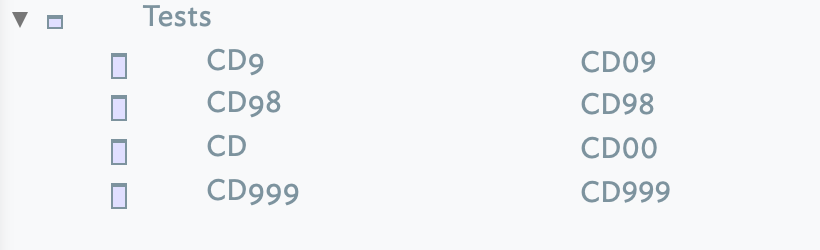
Unless you are certain of the number of digits, it is a good idea to check cases outside the expected number range (here 1 through 99).
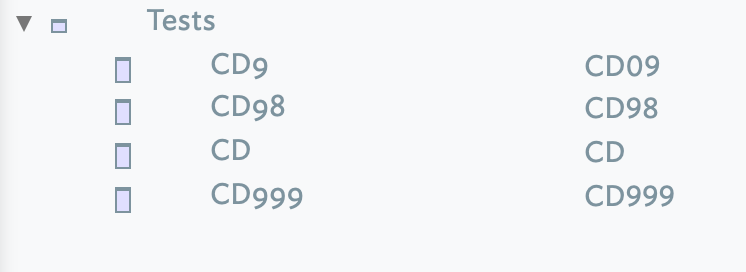
To avoid adding digits where none are in the source value, e.g. ‘CD’ giving CD not CD00, use this as the last line of code:
$NewCode = $MyString + if($MyNumber>0){$MyNumber.format(0,2,0)};
It has this result:
HTH 
Good catch – I should have spotted that.
Thanks!
1 Like
Rushing for a train earlier, so here’s a version using variables, and thus saving any tidy up:
var:string vString;
var:number vNumber;
vString = $RefCode.extractAll("[a-zA-Z]").replace(";","");
vNumber = $RefCode.extractAll("\d+");
$NewCode = $MyString + $MyNumber.format(0,2,0);
As all variables cease to exist once the code has run, no interim values are retained (unlike with using attribute). But, as we’ve seen above, using attributes, or logging values, can help in inital test and build.
In case anyone wonders, .extract all will return a list (of strings). A String value of character "8" will, if read into a Number-type attribute or variable, save the number 8. There is some flexibility as "005" will likely coerce to Number 5. If it doesn’t, or you see similar unexpected results, check your code for unexpected auto-conversion of data types. This latter example flowed from just such: a List (of String values from .extractAll()) passed to a Number. The number characters in the String coerced to Number type but the latter could only consume the first 'list item.
Sorry if the last seems complex. It gets clearer with practice!