and you would be right! Profuse apologies, I’d used ‘Command’ when I meant ‘Control’ in 3 places. 
My last post above now fixed.
and you would be right! Profuse apologies, I’d used ‘Command’ when I meant ‘Control’ in 3 places.
My last post above now fixed.
thanks @mwra
unfortunately, it does not render the outcome i subjectively desired …
“highlighted text” in $Text in the source note
$Name of the newly created note (through splitting)$Text of the newly created notewhat happens, though, is:
$Name of the newly created noteit maybe that this is intended by @eastgate … but, unfortunately, it is neither what i subjectively expected nor what i subjectively desired (see goal above)
i’d love to remedy my subjective intuition and learn to understand the objective intent of how the split-function currently works.
Thank you
This all makes sense, but as you note is not a current feature.
I think the current split is close.
Current behaviour:
Aside, I think the selected $Text option makes no sense here as the source text’s remainder now doesn’t make sense as an inline part is missing.
You want:
Aside, if $Text is selected, I’d have expected only that $Text to in the new note, with it being retained.
This begs the question of whether the feature needs modifying or a separate feature needs adding. I don’t have a settled view on that, if only because it isn’t a feature I use with any regularity and regular use is where the sharp edges of a feature come to the fore.
thanks, @mwra! you making it crystal clear when you summarise it:
What do you say @eastgate in light of the following consideration from Mark?
I would very much like to see this feature added, as it would spare one the effort of having to insert delimiters into a text beforehand, which would then need to be processed using the explode feature.
I’ll look into this
thanks @eastgate
Wonderful (I’m getting blind - looking for that feature and finally found it like that:
Question ▸ Infructuous search ▸ ( where the hell is the Forum ? ) ▸ login Forum ▸ Search Split Return
There is a French joke about “Polytechniciens” (graduates of the Ecole Polytechnique who know about Math and nothing else, but still govern the French State): Put an egg, a saucepan, and a soldering iron in front of the stove and ask someone on the street to cook an egg. The person takes the pan, fills it with water, places it on the stove, and adds the egg, while the polytechnicien wonders how to do it: he makes a hole in the pan, repairs it with the soldering iron, then fills it with water before placing it on the stove to put his egg in it. I am wondering if I was not for a moment this polytechnicien. (Mark B and Dominique R. will certainly understand what I mean). Fortunately, my mathemathical skills are not that good.
Thank you Rigas for this anecdote! I understand it by analogy with this expression: Why make things complicated when you can make them simple? In a clinical approach to the relationship to knowledge—in an approach less anthropological than psychoanalytic—I would be tempted to say that it is a way of unfolding certain things with the aim, conscious or not, of understanding or explaining them. I often told myself that it was a fault until the moment when I realized that it was intrinsically a way of being. It saves me from telling someone that there is a simpler way of doing certain things. That being said, a friend whose brother was a polytechnician explained to me that it was impossible to play with him: before engaging in any game, he spent time literally calculating the different ways to achieve the game’s objective. When it comes to cooking the egg, what can be a flaw also has advantages: for a soft-boiled egg, for example, the correct cooking time, between 5 minutes 30 and 5 minutes 40, depends very closely on the intensity of boiling. I suppose that a polytechnician would construct a rule for this very easily. This is not my case. So, I evaluate the cooking time every morning, by eye. All this is not off topic: can’t Tinderbox do the complex as well as the simple? And isn’t that also why we use it?
Dominique is correct (as always!).
As an additional note: I have been using a lot Tinderbox, but I felt it increased my natural propension to complicate things, to increase my natural tendency to be scattered, or as the analogy of the joke above says, to do a hole just in order to see how to do the soldering, and along the way, to forget the work I was initially trying to do with Tinderbox. BTW, the way both Mark Bernstein introduces the uses of Tinderbox and you Dominique in your famous video, a machine that helps taking notes, is a good way to get thing straight.
any updates on this as of yet, @eastgate?
We actually tried this for several months, through a number of Tinderbox 10 releases.
Two problems arose. First, people often notice typos in the middle of words. They are accustomed to opening the title for editing, correcting the mistake, and hitting [Return]; suddenly, they’ve split the note in two.
A second problem arose when trying to delete the current name and replace it with a new name. In the old approach, pressing [Delete] many times was a reasonable way to clear out the current title. Now, when you reach the start of the note, it begins delete the previous note title.
I think there was a third scenario as well. @archurhh ?
alright. but i actually referred to the splitting-aspect over here to which i thought your respond “I’ll look into this” referred. @eastgate
I think what @andreas seeks is a way to spawn a new Note by selecting a section of $Text of an existing Note.
It seems he would like to have the selected portion constitute the $Name of this created Note, and have all the $Text that follows it belong to the newly created Note.
The issue I had experienced wrt the Return/Enter key functionality related to the fact that hitting it after making edits to the Note’s $Name, which (post v10.0.1?) had the net effect of creating a new Note instead (unintended behavior).
We had a couple of threads going on this between main forum and BackStage. One such thread is here: Tbx 10 - Changed Arrow and Return/Enter keys operation
I can see the merits of what @andreas requests, it’s a timesaver for some. However as regards the result of hitting Enter while cursor is in the $Text field, I believe all that ought to do is ^CR.
ISTM that the Return key is getting overloaded with conflicting (intuited) meanings. Naturally, we all think our intuited meaning is the ‘obvious’ one. My observation of 20+ years of the Tinderbox community is assumed common defaults are harder than imagined.
Put another way—to us all— stop hogging the Return key! Surely, Split-and-use-selection can invoked other ways, to encompass the different assumed outcomes?
The overlooked edge case is the un-surfaced assumption as to whether the selected text is only the new $Name or also part of the new $Text. The assumption there is everyone uses split the same way: it’s likely they don’t. If Explode seems to have lots of options we individually don’t use, it is a tell that our norms differ.
Re-reading the start of the thread recently, my hunch is the original assumption was one of fast input. I’m typing in a note, realise I’ve essentially started a new now, so take the first bit of $Text after the cursor, make a $Nae then keep writing in the new note. It makes perfect sense as one way to approach this, but clearly there are others. So, rather than fight over the ‘norm’, and everyone feeling unhappy, I’d suggest the way forward is to consider how we deconflict the various tribes of the intuited meaning of ‘split’.
Hear, hear. I am happiest when Return/Enter behave exactly as MacOS intended them to; any extras advisable subject to modifiers, or macros.
I don’t have the chops for it, but methinks a Keyboard Maestro macro could achieve the “split at cursor, create new Note, break at sentence, and paste ensuing Text in $Text field “?
Sure @archurhh. That definitely works with Keyboard Maestro. However, I consider this – from my humble perspective – such a central and important feature for the writing, thinking, and work process that one almost has to wish this feature could be directly at everyone’s fingertips, without also having to be a Keyboard Maestro maestro.
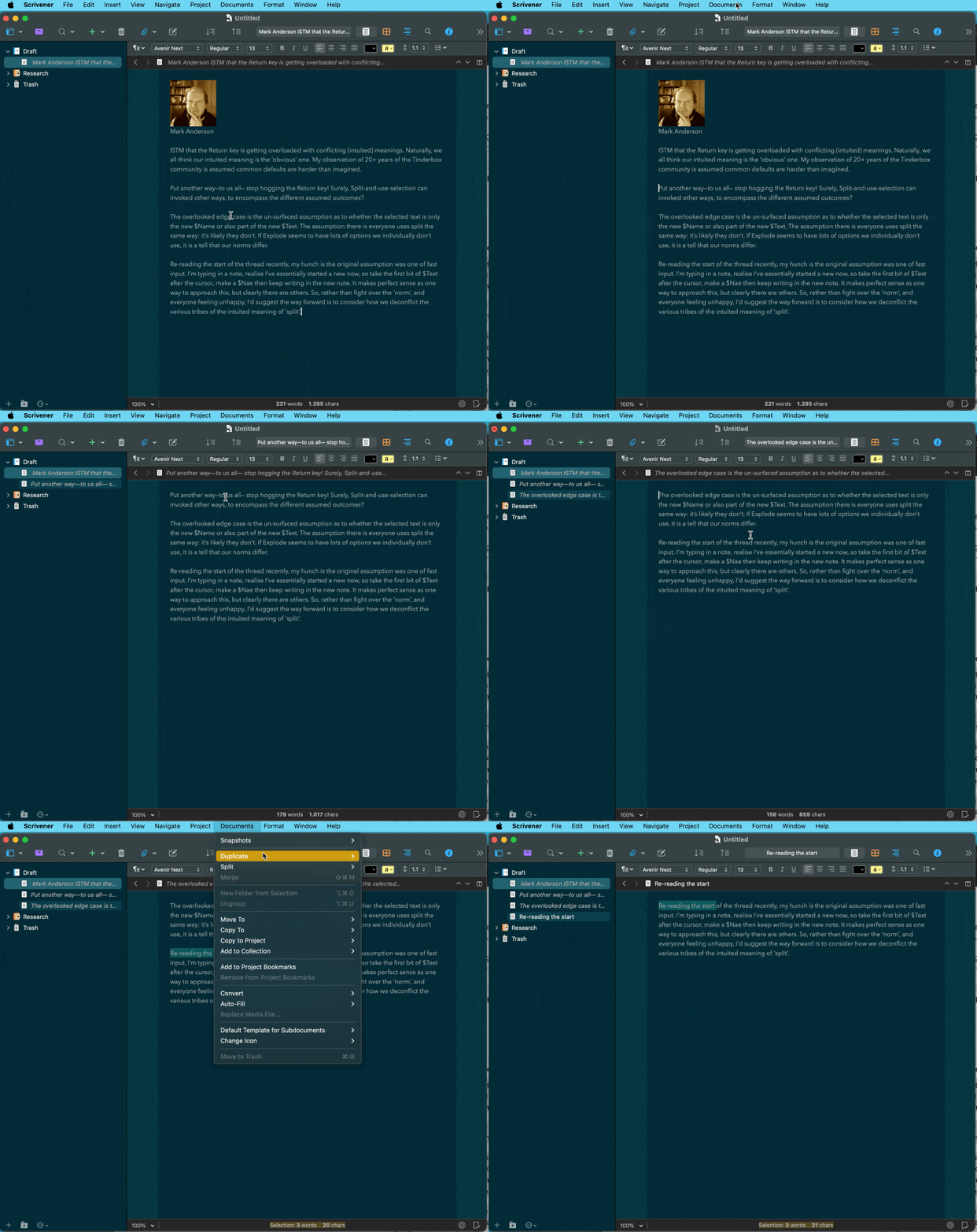
Here (see the gif below) is “my” suggestion – taken straight from the way “splitting” is handled in Scrivener … which might be a considerable blueprint, to begin with. At least, that’s what i had in mind when i wrote this.
Does it make sense, @mwra, @eastgate?
OK: I was confusing this with another, separate proposal.