[Admin note: I’ve retitle this thread as the original thread name turned out to be unintentionally inappropriate. This should aid later readers of the thread]
Hi,
I’m collecting research papers in a Tinderbox file. I work mainly in map view and add a link from a paper that references another paper. This gives a directed graph of relationships between papers that can be studied in hyperbole view for instance. However, I have encountered instability problems with Tinderbox. I’m on version 11.0.1. In a note there is always a link to the pdf in Devonthink. If I read the paper I may add more text, links and pasted screen shots from the paper, e.g., clipped figures.
Sometimes when I click a note Tinderbox crashes. Sometimes when I go from map to hyperbole or back it crashes. I think I have noticed that if there are several tabs active, the crashes are more frequent.
Is there a number of notes or links where it is known to give problems? Should I simply split the file into several, however losing some possibility to see relationships. I try to upload the file. It does not contain any company secrets but just a number of papers with some additional information.
If Tinderbox crashes, copy the information from the crash log and email it to me at tinderbox@eastgate.com. If convenient, also tell me what you were doing at the time.
My weblog file has 11,700 total objects — notes, agents, aliases, and adornments. The Tinderbox development roadmap has 11,400. aTbRef has 9,700. There are larger Tinderbox documents out there, but not (I think) any with 50,000 notes.
The number of active tabs is unlikely to be the culprit. hyperbolic view might well be your issue. I’ve rewritten hyperbolic view for Tinderbox 11.1, which will be out soon. But those crash logs will reveal exactly what the problem is.
The reply above was posted as I drafted this but I’ll post anyway as it doesn’t disagree and has some general info that might be of use.
Crash logs tend to get purged after a while, so if you encounter a crash, or more importantly a crash to cab trigger on demand, do email the log(s) to Tech support (tinderbox@eastgate.com). Note, the more circumstantial info you can give (e.g. what you’d just done, number/size of TBX(s) open, etc., this is all useful for the developer. Sometimes the log points to a cause, other times the context really helps figure the real cause.
No, there are no fixed limits. aTbRef (3,166 notes + 7,027 aliases and 6,724 links) work OK in hyperbolic view. For fun, I just dusted off a physio triage tree I did as a consulting task back in v5 era - it has 56,764 notes and it open OK (so over 50k items). It did prove a challenge in my Mac of that time but opens OK here if there is a delay to full unfold the entire outline!
I should note that’s on a 2024 MacbookPro M4max w/ 64GB RAM. Clearly, the general ‘horsepower’ of your Mac and other things running feed into the performance mix.
Be aware too that more ‘content’ in the view is more to draw, so as a file grows some aspects of views may take a little longer to finish drawing. For big maps, there are two things that you can disable via a Map view’s map settings pop-over. The latter is opened via the ‘i’ button on the tab label in the tabs bar above the view/text panes). There settings are:
Map link animation. The control in Setting is Animate Links. This is enabled by default.
Link controls. The control in Setting is Hide link controls. This is disabled by default—i.e. link controls are visible by default.
Removing both those may help reduce the load on busy maps. Indeed, using every visual hint in the palette (dashed borders, flags, complex shapes, patterns, etc.) may also have some effect.
I tested @thogu’s TBX above. I was using the current beta so can’t post details here but i have posted some crash info direct to @eastgate. I couldn’t open Hyperbolic view in anyway without an immediate hard crash. As part of debugging a cause—unsuccessfully—I observed/tried the following:
A fair few notes include complex formatting likely copied from a web page or PDF. I reset it all to basic styling Format ▸ Style ▸ Standard Font (⌘=⌥+⌃). Result: no change.
Some notes also include embedded images. These are supported but add a lot of ‘fat’ to note content. So, I removed all the images in $Text. Result: no change.
I turned off map animation and link controls. Result: no change.
I looked for loops in the network of links, in case a loop might update the Hyperbolic view layout. Result: no loops found.
Still, I note these as things one can try. Whilst Tinderbox notes will accept a lot of formatted text and/or allow image embeds, I’d suggest neither of these fit well with the main deign approach of the app: lots of small notes and less complex text. I say ‘suggest’ as these aren’t rules, but are perhaps poor choices if you don’t need to do such: IOW, it’s personal style rather than need.
Thank you for the quick responses and the efforts to find the cause. Out of curiosity, what is a dataset path? I have the tbx file on a removable disk formatted with exfat. I should have reformatted it to a macOS filesystem before starting to use it, though. macOS has complained about being unable to store old versions of files on the disk.
In Tinderbox terminology, a ‘path’ is the network of connected links a for a given link type, so in this case the link type ‘dataset’. In your test document there are 4 notes in the path ‘dataset’ and 3 links of that type.
How to tell. Select any note and open Get Info (use Note menu, view context menu, or Cmd+Opt+I). In Get Info:
Open the pop-up list (top centre) and click ‘dataset’
The dialog now shows:
the ‘paths in use’, i.e. the number of discrete link types defined in the document and with one or more actual links of that type present (it includes ‘prototype’ as this is how prototypes use is effected or although such links are always hidden)
the ‘Notes on this path’, i.e. all the notes with an inbound or outbound link of the selected type
a listing (beneath the pop-up), of all the notes connected as per the bullet above.
Note this dialog lists all the networks using the selected link type path. IOW, there may be several discrete such networks, using the same link type, but with no interconnection to one another.
I always kind of glossed over the distinction between a ‘path’ and a plain old link network.
Breaking down exactly how the ‘Paths’ tab in Get Info works and what ‘Notes on this path’ actually means is a huge win for troubleshooting large, highly-linked documents. That level of detail is exactly what was needed.
Yes! I’m surprised it took me so long to get to documenting it. A chick-and-egg here, it is the addition of and improvements to Hyperbolic view that make link types more tangible as a concept (beyond also acting as box-and-line drawing labels).
Contingent is the fact old Paths view died with v5.x. Hyperbolic view first arrived in v7. It wasn’t until v8/v9+ Hyperbolic view got deeper polish. Get Info only added a Paths tab (essentially the v5 view’s info) in v9.1.0. So it’s comparatively rather recently that all the parts to document have come into place. Still. it sometimes needs a problem thread like above to dig into the darker corners of the app’s toolbox.
I have downloaded the newly released Tinderbox 11.5 and opened my tbx file in it. When selecting Hyperbole, the application crashes immediately. I have extended the tbx a lot since I last uploaded it. I then downloaded the version attached to this thread, but when loading it in Tinderbox 11.5 the app crashes immediately. Thing is that for some reason Tinderbox 11.01 does not crash when going to Hyperbole and back any longer. However, it does not redistribute the notes in the view, maybe there are too many of them. Any way, this is a regression in 11.5.
As above, @eastgate will need to see your file, but the number of notes is almost certainly not the cause. I can open the same TBX with 56k notes in it without problem (see here above). I think this worth noting lest it cause confusion for the wider user community.
Whilst Tinderbox can’t entertain an infinite number of notes, 10s of 00s should be possible, though the power/RAM/age of your Mac will be a factor. If a user expressly needs 100,000 notes it is worth reviewing the use case and breaking into small documents or using a large database tool.
I can confirm the crash with the original text doc (post #1 up thread) in the v11.5.0 release. This is possibly a regression issue, but note my understanding is the original issue wasn’t the number of notes in the document but a link type path that had a implicit closed loop, i.e. following the path never ended as the loop was endlessly traversed. Likely not the user’s intent, but the likely cause nonetheless.
No need to send the document as the file already uploaded crashes v11.5. I can send the new version so you have a larger file to test. I assumed in the first post it could have something to do with number of notes, since this is my largest tbx file to date. It seems that a high number of notes generally does not give a problem. It does not for me either, in outline and map views, which are the common ones for me, but in hyperbole view my larger tbx files crash the application, hence my statement it has to do with number of notes. I have understood from the comments that I use links and data in the notes in an uncommon way, which maybe trigger new traces through the code.
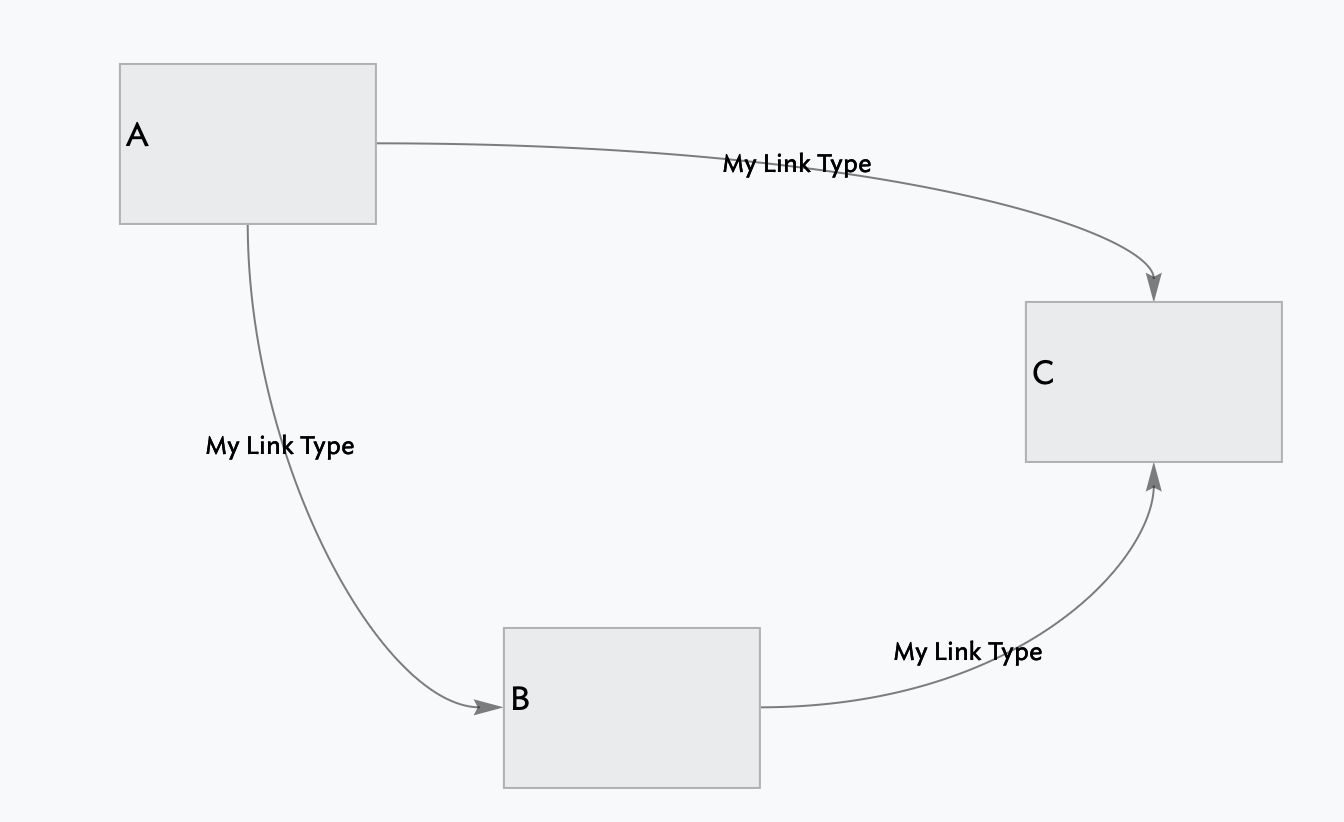
Hyperbolic view looks at ‘paths’, all links of selected link type(s). For simplicity, all links above. are of link type “My Link Type”.
So, where’s the loop as all C’s links are inbound. But hyperbolic view draws the ‘path’ of the link type regardless of link direction (for valid reasons). But here A links to C links to B links to A etc. an infinitum.
I’m sure it may be more complex, but this diagram crashed v11.5.0 (and the current beta) if in map view:
I select ‘A’
Open a new tab and select hyperbolic view
In view settings I select ‘My Link Type’ as the path to illustrate.
Then, if I also select the ‘cross’ option, then I get a crash.
So not due to 3 notes being ‘too many’.
Again, no critique here, this is not an intended outcome, but i’m clarifying as, separately people often ask how many notes a TBX allows and this might meet a search and give an (unintended) false answer.
I’m having a bit of what appears to be a similar problem, but in map view, not hyperbolic. If I try to drag within the map view to see portions that aren’t showing in the window, TB crashes. I’ve tried over and over, but it continues to crash. I unchecked the Animate Links and Display Link Stubs, per Mark’s advice. Hide Link Controls wasn’t checked. That didn’t seem to help. According to my Mac the file is only 48.2 MB. I do have lots of notes on the map, but this used to work for me. I created the file in January of 2018, I don’t recall what v. of TB that was. Currently I’m using 11.5.0 on my M2 MBPro with 24GB RAM running Tahoe 26.2.
Crashes are hard to diagnose in the forum especially if unusual, noting the problem here was a closed loop in the hyperbolic view, not the number of notes
[Admin note I’ll retitle this thread as the name is inappropriate]
Please send your crash logs to tech support at tinderbox@eastgate.com. Logs can be found at ~/Library/Logs/DiagnosticReports and will include the app’s name and an .ips or .diag file extension.
Hi Mark. I sent you the file; if you don’t get it let me know. My email program seemed to choke on it and indicated it couldn’t send it due to a “connection error.” Immediately after that notification it was in the sent mail folder. Thanks for your help. –Bob