JSON trouble - how to convert JSON into a TBX dictionary

Hi,

I‘m confused by the way TBX deals with JSON data.

I receive this JSON from a server:

[{"wp_post_id":649,"title":"Ich bin ein Test aus TBX","content":"# Test mit Anf\\u00fchrungszeichen und mehr\\r\\n\\r\\nDies ist ein Test mit:\\r\\n- Doppelten Anf\\u00fchrungszeichen: \\"Das ist ein Zitat\\"\\r\\n- Einfachen Anf\\u00fchrungszeichen: \\"Ein anderes Zitat\\"\\r\\n- Schr\\u00e4gstrich: C:UsersDetlefDateien\\r\\n\\r\\nCode-Beispiel:\\r\\n\`\`\`javascript\\r\\nvar text = \\"Hello \\"World\\"\\";\\r\\nconsole.log(\\u00b4Das ist ein Test\\u00b4);\\r\\n\`\`\`\\r\\n\\r\\nUnd ein echtes Zitat:\\r\\n> \\u201eDies ist ein deutsches Zitat mit Guillemets.\\"","post_status":"publish","sync_id":"0340acb1-62b3-4620-893f-8e5f7f019e70","sync_version":1,"sync_status":"pending_tb","source":"tinderbox","last_modified_openclaw":"","last_modified_tinderbox":"2026-04-06 18:07:23","last_updated":"2026-04-06 18:07:23","deleted_by_openclaw":false,"deleted_by_tinderbox":false,"tinderbox_meta":"","category":"allgemein","related_notes":\[\]}\]

[Admin edit, added code mark-up above to help spot forum changing quote type]

I already remove single quotes since they break the JSON methods in TBX. Here I see a valid JSON payload. Let’s store the JSON in a string variable “theList”. JSON uses “,” to separate elements, TBX uses “;”.

Now with theList.json[0] I can access to first element in the list - TBX sees the content as valid JSON object. But the result is no valid JSON anymore since TBX seems to “unescape” the string:

theList.json[0]:

{ category:“allgemein”;content:"# Test mit Anführungszeichen und mehr

Dies ist ein Test mit:

Doppelten Anführungszeichen: “Das ist ein Zitat”

Einfachen Anführungszeichen: “Ein anderes Zitat”

Schrägstrich: C:UsersDetlefDateien

Code-Beispiel:

var text = "Hello "World"";
console.log(´Das ist ein Test´);

Und ein echtes Zitat:
> „Dies ist ein deutsches Zitat mit Guillemets.“”;deleted_by_openclaw:false;deleted_by_tinderbox:false;last_modified_openclaw:“”;last_modified_tinderbox:“2026-04-06 18:07:23”;last_updated:“2026-04-06 18:07:23”;post_status:“publish”;related_notes:[  ];source:“tinderbox”;sync_id:“0340acb1-62b3-4620-893f-8e5f7f019e70”;sync_status:“pending_tb”;sync_version:1;tinderbox_meta:“”;title:“Ich bin ein Test aus TBX”;wp_post_id:649 }

Now the JSON is broken - the double quotes break the structure.
I also tried to get the object out of the JSON string - remove the brackets around the string:

truncList = theList.substr(1,theList.size-2);

When I pass the shortened string as a JSON Object like in truncList.json it is empty - so for TBX this is no valid JSON Object - but it is.

So far I found no way to transform the JSON into a valid TBX dictionary. Any idea?
If I place the JSON you posted in a JSON validator it fails, so Id fix the JSON so it parses before going further. The problem seems to be the content field which is invalid JSON. Interestingly it is using Window-style line breaks in the string: odd though Tinderbox test uses \n fro line breaks.

The ‘cleaned’ string you show has also removed the Markdown code block markers (set for type-string of ‘JavaScript)’ around the code section. Having turned all the \\r\\n sections into line breaks, I see:

"# Test mit Anf\\u00fchrungszeichen und mehr

Dies ist ein Test mit:
- Doppelten Anf\\u00fchrungszeichen: \\"Das ist ein Zitat\\"
- Einfachen Anf\\u00fchrungszeichen: \\"Ein anderes Zitat\\"
- Schr\\u00e4gstrich: C:UsersDetlefDateien

Code-Beispiel:
\`\`\`javascript
var text = \\"Hello \\"World\\"\\";
console.log(\\u00b4Das ist ein Test\\u00b4);
\`\`\`
Und ein echtes Zitat:
n> \\u201eDies ist ein deutsches Zitat mit Guillemets.\\""

as being the actual ‘content’ key’s value.

Bear in mind Tinderbox isn’t a coding IDE. If you need to do additional (un)escaping you should do this before passing it to Tinderbox. As you appear to be using Openclaw why not get it to unescape the text?

You also have this line of ‘code’:

var text = "Hello "World"";

In action code—even in string literals handled by action code you can’t do that. You can’t escape single or double straight quotes, though you can nest them. You need to use enclosed differing quite types:

var text = 'Hello "World"';

The u00b4 according (acute accent) being used as a single quote.

Is the ‘content’ value supposed to form the contents of a note?

Returning to the top, I’d check the JSON validates before passing it to Tinderbox.

HTH

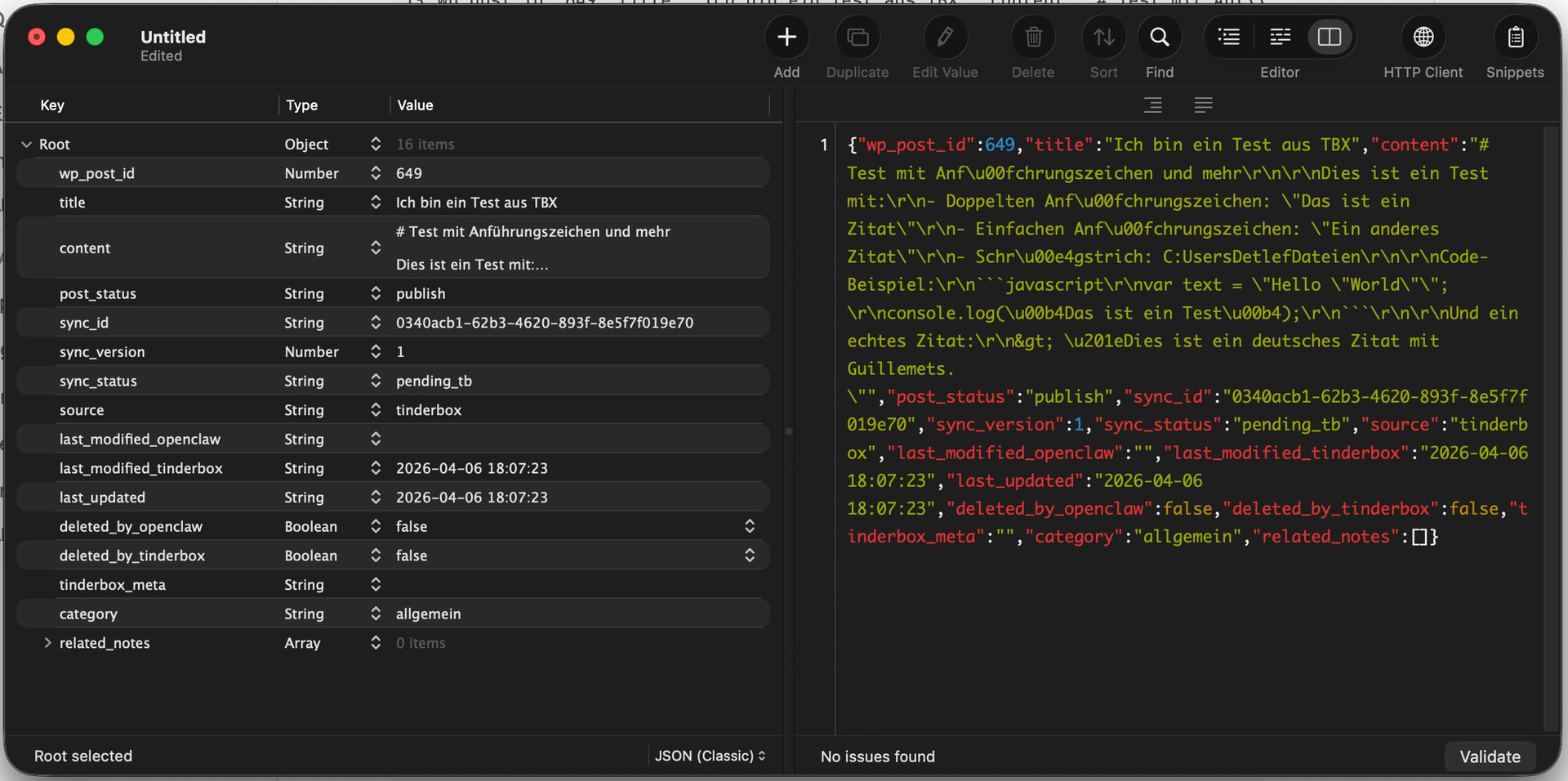
I did check if the JSON is valid and it is - maybe you experience a copy&paste thing caused by the forum software:

I removed the single quotes from my test since they break TBX easily. All other parts are escaped properly IMHO. I can change the data on the server side - but since this is valid JSON, TBX should be able to handle it?!

Validation. Sorry, I just use the original code I saw when added extra markup to stop forum software messing with quote types. If it validates tfor you, then ignore my comment on that. :slight_smile:

JSON parsing is an internal function not addressable by users so I’d suggest emailing Eastgate. That isn’t the be unhelpful, but if the process is failing it is a place where other users can’t probe. I’d suggest also sending a minimal TBX test file that demonstrates the feat, plus a note indicating what you expected to be able to retrieve. The latter is useful as the first parsing issue might otherwise simply mask an additional thing—what you want to do with the parsed data.

1 Like

This looks like it’s likely a bug. For a starting point, please email me a text file (or Tinderbox document) with the JSON payload; I’ll take a look.