Map: 'bring note to into view' feature, please†

My maps are becoming a challenge for even a retina display. I’m drilling into a vast spatial map of references, into which I create annotations; but when I zoom out, I’m often lost. I know the note I was just working in is selected, but I have no idea where it is, and I fear searching when so many have similar long titles.

Could a menu item to bring the selected note to into view be considered? Just a simple pan, even lovelier if it was animated to help understand where it was in relation to the view, would be great. If notes can dance, why should views be denied self-expression?

† I could see this being useful on other types of display, particularly when switching between them (jumping from a map to an outline, f’rexample). Yes, I realise devils are in details, and that situations where a note might be bigger than the view can accommodate are possible, and people might have multiple notes selected, so there’s a risk some zooming may be required, so maybe there’s a limit in the name of ‘panning’ notes into view?

2 Likes

In map, outline, or chart view, if there is a selected note, the title of that note will be displayed in the text pane.

Blind type the name and the map view will scroll to your note. Or, use the Find Bar to locate the note with this name.

This is a good idea. Some edge cases come to mind, and thinking those through might be helpful. What happens if:

• several notes are selected?
• the selected note is inside a container that is in the current view?
• the selected note is not visible at all in the current view?
• the selected note is not visible, but an alias is?


Switching tabs: tabs remember the current scroll position. This is more reliable in 11.5, and that took quite a lot of work. This typically brings the selected note into view, as selecting a note sets the scroll position. But if you have drag-scrolled the view to another place, the tab respects that.

Aptly named term for dyspraxic typist: the fingers don’t press the keys the brain sends. So, ‘blind typing’ is a less inclusive/useful general approach than might be assumed.

Not bad, but only helps a sub-set of users. Plus any match (possibly not the right one) results in a selection-scroll.

I’d envisage a basic ‘bring note to view’ to assume:

  • a(t least one) note is selected
  • the selection is in whole/part in scope of the current view
  • if a multiple selection the first selected note is the scroll target. Failing that the top left of the selection. Failing that, the first note in the selection in scope of the current view.

One might argue that as no one note is shown in the text pane when there is a multiple selection, a \scroll into vie’ call might only be available with a single note selection.

It may vex the developer that scroll isn’t where the user expected it—as the users intent is not always easily divined, but… having a (single) selection and it not being in the visible view pane is a fairly unambiguous context for a user-invoked [feature] to scroll the note to view. The user doesn’t care if the current view area is right or wrong—or why, it’s simply the case the do know it isn’t what they want and what that do want (to see the selection) is an unambiguous ask—in the context of a selection in the current map (i.e. not nested, etc.).

Trying to cope with wider cases, e.g. not in current view, IMO overloads what might be asked for, noting too that the OP’s context is a Map view (only!). As such, selections occurring outside the current map (level) are an edge case: the latter imply a recent view change or map drill/hoist event.

Some good points. I’d expect multiple notes to focus to their centre, as an element of least surprise; if it were to jump to the first, I’d be wondering how it makes that decision when selecting multiple notes.

And to confound things with least surprise, I’d hope the feature would work consistently in other views - timelines, particularly, would really benefit (perhaps because I spend all my time in timelines, maps and outlines!)

If a selected note is a child of a note in the view, I’d hope it would focus on the parent; I’m not as deeply intimate with Tinderbox’s internals to fully appreciate when such a circumstance might arise, but I’m not going to doubt @eastgate. The alias question is also another I’m not so familiar with: from a naive perspective, surely the alias is still a conceptually distinct note from what is selected?

I’m sorry what seemd a simple feature request has expanded so throroughly and is now indulging premature feature creep (and faintly thrilled by the prospect, to be honest - sorry!)

1 Like

It probably helps to understand that however you are used to viewing your document, it’s structure (in the TBX) is as seen in the Outline. IOW, open outline view at root and expand all the branches. Numbering in visible vertical order (i.e. down each branch in order before backtracking to the next branching point, etc.) is the ‘outline order’ $OutlineOrder.

If in doubt, this is what Tinderbox falls back upon. Two notes with the same name? In an agent both will be listed, but in much action code, silently Tinderbox will match the first-by-$OutlineOrder.

Different views, if switching view type within the current tab, use the same scope. So, say my Outline is at root-level (i.e. showing everything) and I select note as path /B/bb/bb1 and then switch the tab to Map view. The map displays the root map, showing container ‘B’ and the text pane shows ‘bb1’ even though the selected item is not visible in the Map.

Why? A map only shows the sibling children of a single container - in this case the root-level map.

If I repeat the above but select notes at path B and /B/bb/bb1, the map would show container ‘B’ selected and the text pane would show a list of 2 items ‘B’ and ‘bb1’. At this point ‘bb1’ is selected even though we can’t see it.

I think it likely that selections are likely to hold their listing (the path or IDs of those items) in outline order, as opposed to the order (manually) selected. For action code work that would certainly be a sensible assumption.

Note that map X/Y position or presumed left-to-right/top-to-bottom order is not connected those the outline order, although the Z-order (overlapping order) is the $OultineOrder. See more.

Different tabs in the same window can have different selections. There is no mechanism to tell tab A to adopt tab B’s selection (other than via possible using AppleScript).

If there are two or more windows open, the front tab of each will take the (changed) selection of the current tab of the active window. There is a cromulent reason why, but let’s avoid that rabbit hole. So using 2 windows to see 2 views at once, comes at the cost of the selection being the same in both windows.

FWIW, there isn’t an order in Timeline view. There are 3 sets of in-scope (i.e. under the root container) notes:

  • those with no date
  • those whose date is before/after the (optional) start/end dates of the view
  • those with dates in range drawing in dateline order: oldest date (left) to newest date right

Further points when leaning on one’s expectations of what should happen:

  • different users employ different views and use them different way
  • intuition generally doesn’t scale
  • user A’s choice/need of behaviour may completely wreck user B’s longstanding usage. This is why changes of this sort aren’t rushed into.

As view (changed in current tab) keeps scope, selection changing the new views scope likely hits bullet #3 above.

I think sorting out a command/shortcut to scroll the current selection to view on the Map before widening the request makes sense. This map thing is a long-running head scratcher. ISTM delaying to find out why the map isn’t showing what the user expects is false quest. This issue has been round for over a decade. It seems simpler, given an assumption the the selection (or at least one item) is selected on the current map to check it is in visible bounds and if not, to scroll the map so it is. Indeed, such a feature might allow the app indicate to itself where/when its view-area guess and the user’s differ.

†. Possible, as each note (and alias) has a discrete ID value ($ID).

On a separate note, I would welcome thoughts (in another thread, or by email) on Timeline View. Timeline is due for a major revamp.

2 Likes

It essentially allows the note to be displayed as if in two different places (in the underlying outline structure) at once, for instance to be ‘in’ two maps (two discrete outline containers) at the same time. Most attributes, eg.g. title and text, are common to note and alias. But, perforce some attributes are ‘intrinsic’ and differ between note and alias. Why? In the example just given, the position ($Xpos, $Ypos) of the note in container #1 might differ from the position in container #2.

Separately another driver for aliases is the way an agent works. Any note matching the query (or any alias whose original is not matched) creates a (new) alias as a child of the agent containers. If X/Y weren’t intrinsic then sorting the agent would wreak havoc on the layout of maps where the alias’ originals reside.

Sorry for all the detail, but part of figuring out the changes discussed is knowing if ‘unwanted’ behaviour, is:

  • correct, just not the individual user’s intuited result
  • an oversight

There’s no implied censure in the first bullet, but rather it aligns everyone’s differing perspectives on the mater at hand.

HTH :slight_smile:

…and I’m a +1 for a “just scroll the selection into view” (Iteration #1: map view only and only one item selected and work out from that base)

+1 to this!

This has been for me TB’s largest pain point, and the reason I haven’t done more with network maps in Tinderbox. I think maps are the distinctive feature of TB, yet they can require much time zooming and scrolling to find things. However, TB Map view is somewhat more usable if one uses colors and (colored) adornments, which help mark “neighborhoods” where notes are likely to be found. Also, the new Information City view is very helpful for putting me in the general vicinity of a note, if I have it in my mental model properly!

1 Like

Interesting discussion.

For a while I was obsessed with.the idea that my Notes be clustered around 0,0 for easy centering of thoughts/ideas.

That led to my using the Ctrl-Opt-Cmd salute a lot so i could zoom out to get my bearings. This action is also invaluable for locating those pesky Notes that.were dropped into a Container and ended up far from the cluster.

I would’ve liked a hotkey to have the zoom level jump to and stay at the “zoom out fully” level

I think a useful way to approach this might be to implement hotkeys for the following:

  • zoom out fully

  • centre on 0,0 without altering zoom level

    • centre around a selected Note/s (which may have been selected in a different View)
    • if no Note selected, then centre around 0,0 (also effected by first clicking in bg to deselect all)

    Preview app does a simpler variation on this theme

I think the recent change to map scroll animations should make life easier. If not, a short screen capture of the problem would be nice to have.

Specifically, this feature would only be effective if the selected note were not in the view. Is that a common experience?

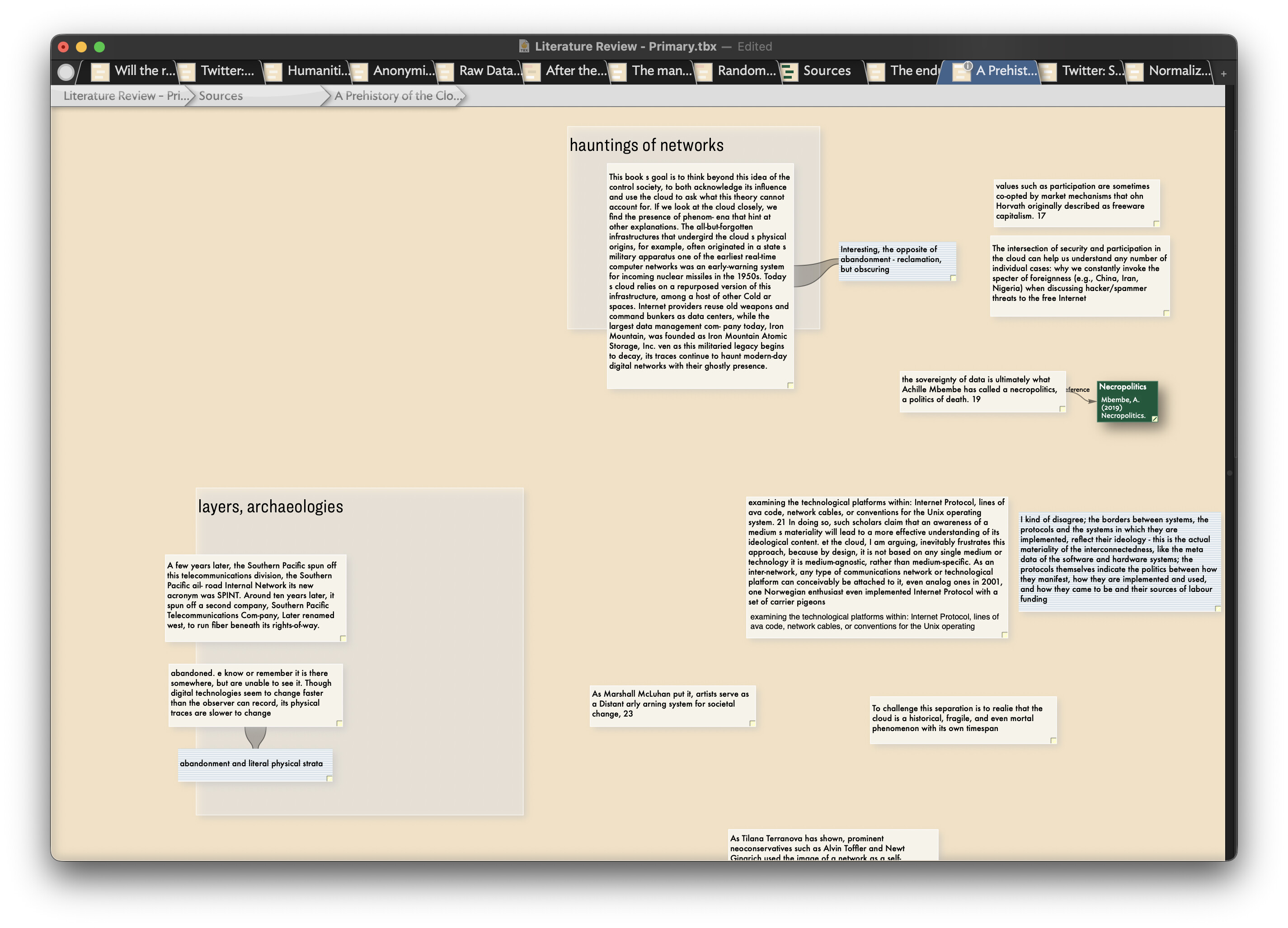
One of the things that brought up this request was this situation, which seems to happen to me a lot. In this first screenshot, I’m looking at notes taken from a book (“A Prehistory of the Cloud”, which is the note name)

To get back to my map of references, I click ‘Sources’ in the navigation bar, and I’m dropped into this map

I’m expecting the note I came from to be selected; certainly, for it to be in view, but it’s way outside the view.

My dream solution would be to be able to animate and zoom into (and out of) notes, but I’d be content with a keypress that (animatedly) panned me over to it, so I can understand the context of where I’ve ended up and where I’m going to. I’d expect the view to be centred on the note that’s selected (“A Prehistory of the Cloud” in this case) but I realise selected, focused, and nuances of view cover a lineage of edge cases!

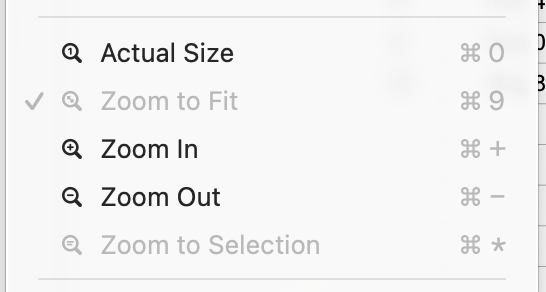
I like @archurhh’s idea of ‘Actual Size’, ‘Zoom In’, ‘Zoom Out’ and a ‘Zoom Selected’ (on a fewer-fingered key combination!); I liked the old ⌃⌥⌘ overview, until I had to stop using it as it was fighting with BTT/KeyboardMaestro/etc; maybe a way to trigger that with a keypress (while allowing pans and selections) would be neat. Max/MSP has some neat features for managing huge diagrams of displays - the ‘loupe’ feature might be a useful way to work with dense, zoomed-out maps, for example.

(I’m also aware that ‘zoom’ and ‘centre’ features that only make sense to map views aren’t the best idea, as there will be sudden realisations that they’re wanted in all the other views as well!)

1 Like

Forgive my confusion, but there is nothing selected in the first map, and notes can only be in one map (aliases) aside.

So where is the selection in the first map? If it is a stand-alone text window that is not a ‘selection’ from the map’s point of view .

Slide #2 does seem a familiar scenario. ‘Hoisting’ the map view up a level (you are essentially traversing containers in the underlying outline structure of the document) to look at the map of container ‘Sources’, i.e. the parent of container ‘A Prehistory of the Cloud’. If you were to have the text pane showing, I’d wager container ‘A Prehistory of the Cloud’ is selected. The problem is it is not in the visible part of the map.

Tinderbox has a dilemma here. Does it show you the ‘Sources’ visible are as last viewed or does it always re-scroll the map so the selected note is visible. One might think the last is desirable but, for instance in Outline view, it’s been a long-standing bugbear that if you scroll and forget to select a note in the visible part of the view, Tinderbox scrolls the view back so the selection is visible.

The problem here is either of these outcomes is unhelpful depending on what you are doing. Both are valid user desires: show me the (part of) the view I set up (i.e. the scroll position) vs. show me the selection.

I think the way to accommodate both is to use the last used map position (if any) for the newly entered map and have a shortcut/menu option to ‘scroll to selection’ (selecting the first selection item by $OutlineOrder if >1 item) and placing the selection in the top left quadrant of the view (as generally we work right-and-down, ar least in the majority of writing systems).

Another side note. If I scroll the selection, does this then overwrite the stored last-used view co-ordinates. If so, I can see that being the next complaint. The challenge is how best to support both aspect is work.

I’m all for a scroll-to-selection for the user to call if needed and otherwise let the app helpfully remember where I last viewed the map—though a linked issue it that—for reasons unknown‚ttbx sometimes seems to forget that.

It is worth bearing in mind, for map users—or those using multiple views—that it is quite easy yo ender map one has never viewed as a map before and which has content. The container could have been created in a different view.

†. Except for the moment when the note is selected in the map to first open the stand-lone window.

‡. But, we should note that view scroll state (ScrollX and ScrollY stored in the <tab> XML tag is stored per-tab. If I go the that same map to two different tabs, the stored scroll position likely differs. Closing a tab means all saved positions are lost—though tabs can be saved if preserving this data is paramount.

Perhaps I read the interface differently; when I click breadcrumb item along the top, it selects it; so if I click the grey “A Prehistory of the Cloud” item along the top, the selected note seems to be the container I am looking at - certainly, if I open the text panel on the right, it shows me the text and attributes for this whole container note.

So when I click a parent breadcrumb item, I interpret that as both navigation, and selection. This makes sense to me, as it’s a ‘selection’ first, ‘navigation’ secondary action†; but (without reading documentation) the breadcrumbs could be seen as serving two functions, causing my interpretation.

† as I can select the note acting as the current view/container, without triggering navigation.

Apologies for replying to myself!

Another situation has just popped up where ‘bring note(s) into view’ would be useful . I use Hookmark to link items in Bookends to DEVONthink, files, and Tinderbox. The default Hookmark behaviour is to link an item (from Bookends) to an outline view in Tinderbox†. When I later follow that link from Bookends, it opens a link in Tinderbox in outline view with the item selected - but when I switch to map view, it’s not in the view. The Hookmark link encodes the files, view, and note ID; stripping out the view parameter worked, but left me panning around trying to find it.

† I appreciate I could go raise this as an issue with Hookmark, but I think it simply exposes a missing feature in Tinderbox.

I think what this feature request is expressing may be mistakes in corners of Tinderbox we don’t often discuss.

Suppose Buchan is selected in outline view. We now switch to Map view (⌘⌥-M). I agree that Buchan should be selected in Map view and ought to be inside the viewport. Is that not the case?

Similarly, if you are in map view and click on the left-most breadcrumb, I think that you ought to see a top-level map of the document in which the ancestor of the previous map view is selected. It, too, ought to be inside the viewport. Is that not the case?

Sorry for crossed wires - yes, your understanding is correct.

Another factor here may be the “switch to…view” is actually ambiguous as it correctly (to the lay user) describes two different things:

  • changing the view type of the current tab (tabs retain their selection, even if not in scope of the current view(type)).
  • changing to a different tab with the desired view type (as tabs creating their own selection, different tabs don’t inherit the selection of a different tab when tab-switching)

Here, I think we are discussing the first only. But, as the default TBX opened with a Map view and an Outline view tbs there is understandable scope for unintended miscommunication.

Unclear for the user, as it is not formally documented, is what the map aims to show: the lust used scroll state or a the portion of the map showing the current selection. If the selection is not on the last used map area, some users will not gat what they expect.

I don’t think it is possible for the app to guess correctly, every time, what the user wants (even for a user with good understanding of map dynamics). Thus I’d re-iterate that the sensible thing, ISTM is to show the last used scroll state (or top left of map if none stored) and give the option, e.g. a shortcut, to let the user scroll the selection to view if the later is what they want.

If it turns out there are two tribes of users attached to each of those outcomes, I guess one could argue for doc settings preference, but I’m not sure that extra level of work is indicated.

As with so many edge cases, I suspect lots of people are doing very slightly different things within the broad description of moving up/down a map level and this is why person A’s description doesn’t make sense to person B. Nothing is wrong, except the full context isn’t on the page, so to speak.

[edit: typos]

Having just checked, the selection persists between views in the same tab, but the viewport does not bring the selected note into view when switching to map view (but going the other way, to an outline view, the note is in view - although whether this is due to it being near the top of the outline is something I didn’t check).

I get why preserving viewports when switching views may be an established standard going back years, which is why I think having a menu item to perform the pan would be a safer way to manage this.

If I step back a single level in map view, I don’t necessarily know what the viewport will be; having checked now, it preserves the selection, but does not explicitly bring it into view. I’m assuming that at some point, each note has its own viewport set up, and switching between views and notes restores the last one associated with it.

If I click the left-most breadcrumb in map view, I don’t see an overview; I just check flipping into and out of a note, and it seems to be an arbitrary position of whose provenance I cannot tell, but either through my cack-handedness or a convention that’s not explicit, all my notes are positioned offscreen, to the right.

I absolutely agree; I think this is why I originally envisaged an ‘bring note(s) into view’ menu item as a solution, rather than changing (breaking) established expectations.

Generally, outline will re-scroll to bring the selected item into view—this is why is scolling a long outline to check something, it helps to select a new item or the before you know it the outline has re-scrolled to somewhere you didn’t mean to be.

It is a different facet of the map view problem: the app can’t reliably guess what the user is trying to do. it’s not a cause for us complaining about the design, it’s just that our minds run a bit faster than computers—in terms of unguessable shifts in perspective or course—do and we’re not always signalling our intent.