Hi, I’m creating containers and trying to move them around freely in map view to arrange things. When moving them, inevitably one gets stuck and I cannot move it again. I can only move the entire map or the visible map within the container, but not the container itself.
For a note, alias, or adornment, click to select then drag. Avoid the top right corner lest to try to set $Badge. If the click opens an edit box you have clicked on the title ($Name) or subtitle ($Subtitle) area. click outside that to just select the note. You can then click-drag the object. Once aware of badge, title, etc. You can in fact click, select, and drag on one action.
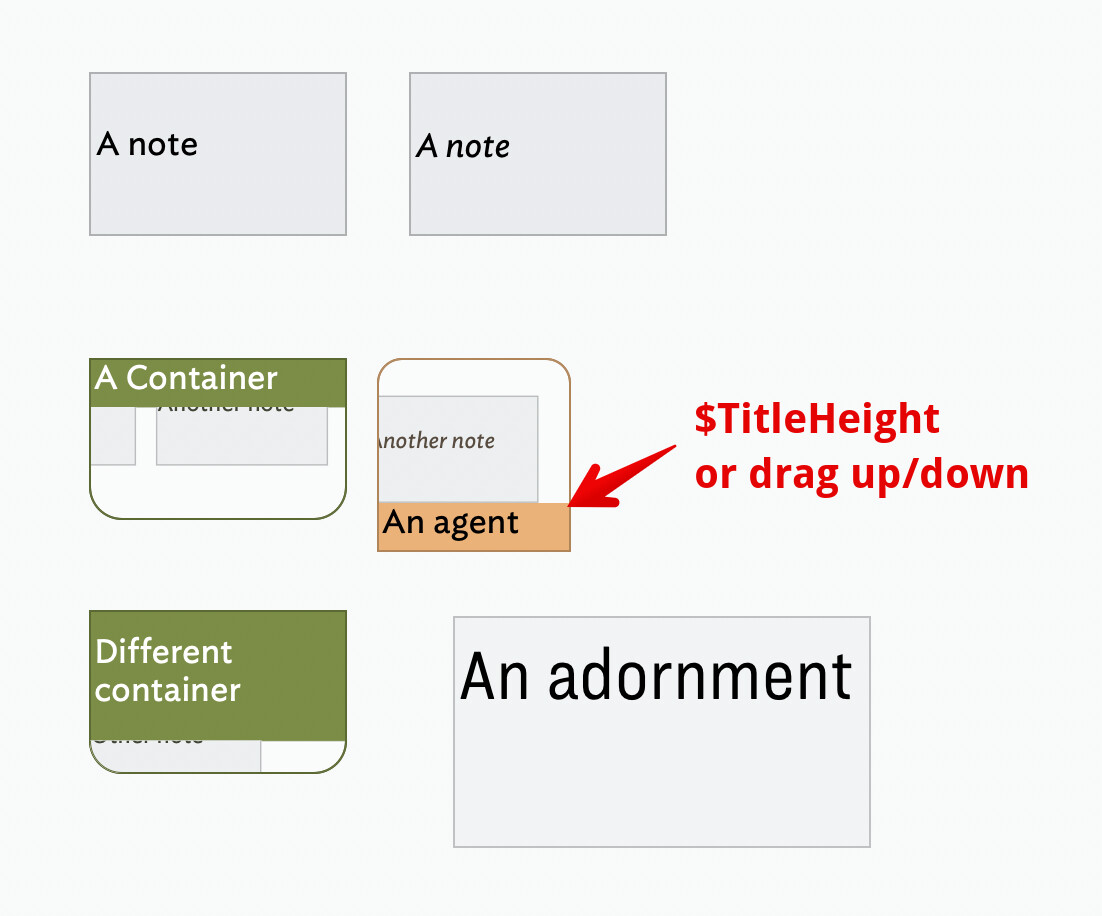
Containers act a little differently. In the image above, for containers I have set a non-default $Color set only to indicate their titling difference from a basic note icon. Note that agents are always drawn as containers (i.e. even when they have zero aliases of query matches) but the title is drawn at the bottom of the container. Note container icons have two rounded corners, on the non-title area corners.
The amount of the container given over to its title can vary. The screen grab shows a default sized container and agent, and a second container (‘Different container’) where the user has made the title area larger. The amount of vertical space used for the title can be changed by clicking and dragging the edge of the title area bordering the container’s viewport area (of the child map): the bottom of the title in a container, top of title in an agent.
The height (in map units) of the title bar is stored in $TitleHeight. Setting a value directly in that attribute does the same as dragging the title area edge. Note that setting $TitleHeight the same as $Height hides the container’s ‘viewport’. In this state the two rounded corners indicate the object is a container (at bottom for a container, at top for an agent).
For a container (normal or agent) to move the object, click on the title area only—again be aware of badge location and editing title or subtitle. Otherwise, apart from a small area on which to click the process is as for a note.
For containers, avoid clicking unintentionally on the viewport rather than the titlebar of containers. Click+drag on an item displayed in the viewport allows it to be dragged up a level onto the current map. Click+drag on the background of the viewport scrolls the child map, i.e. allowing a different part of the child map to be shown in the viewport.