Need help to parse an XML file and extract information

Because TextExpander v 4 no longer works under macOS 26 Tahoe, I need to rescue lots of abbreviations which are deep in my muscle memory and transfer them to Alfred snippets.

Fortunately, the XML file that holds the backup of these data looks easy to parse, but on trying (every cloud has a silver lining and so I regard this as a “teachable moment” :wink:) I found that parsing such a file in Tinderbox can certainly be done, but finding out exactly what is needed to succeed demands more knowledge than I have at the moment.

So I ask for some kind help from Forum members.

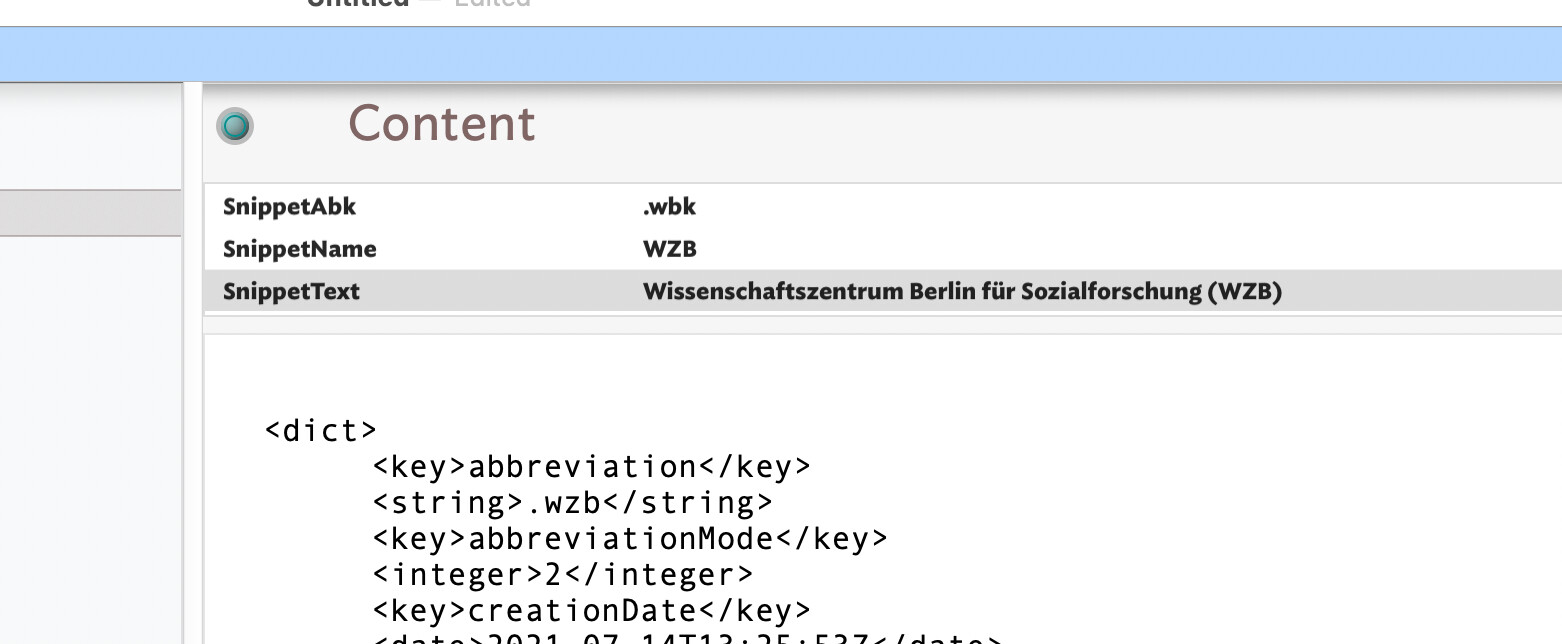
What I have managed to do so far is to split the very large XML file into the <dict>-entries which hold the individual snippets. Here is an example:

	<dict>
		<key>abbreviation</key>
		<string>.wzb</string>
		<key>abbreviationMode</key>
		<integer>2</integer>
		<key>creationDate</key>
		<date>2021-07-14T13:25:53Z</date>
		<key>flags</key>
		<integer>0</integer>
		<key>label</key>
		<string>WZB</string>
		<key>lastUsed</key>
		<date>2023-01-13T14:35:58Z</date>
		<key>modificationDate</key>
		<date>2021-07-14T13:26:17Z</date>
		<key>plainText</key>
		<string>Wissenschaftszentrum Berlin für Sozialforschung (WZB)</string>
		<key>snippetType</key>
		<integer>0</integer>
		<key>useCount</key>
		<integer>2</integer>
		<key>uuidString</key>
		<string>FC2E3FAB-753E-46EC-BD9D-21FF0FBE72AD</string>
	</dict>

What I am interested in are the first three <string>s - which hold respectively the abbreviation, the label and the content of the snippet (in this case: .wzb; WZB; Wissenschaftszentrum Berlin für Sozialforschung (WZB)).

So I created a prototype pSnippet which has three attributes ($SnippetAbk, $SnippetName and $SnippetText) into which I want to save the abbreviation, the label and the content of my TextExpander snippets.

But how do I best parse the content? Here I am stuck. I tried a stamp with the content

$Text.skipTo(“<string>”).captureTo(“</string>”, “SnippetAbk”);
$Text.skipTo(“<string>”).captureTo(“</string>”, “SnippetName”);
$Text.skipTo(“<string>”).captureTo(“</string>”, “SnippetText”);

but that doesn’t work - it captures the first string if not completely ($SnippetAbk correctly contains “.wzb”, but rather than moving on to the next occurrence of <string> (as I expected) fills the other two displayed attributes with the same content.

Another attempt I tried was the following code

$Text.captureXML().xml(“//key[text()=‘abbreviation’]/following-sibling::string[1]/text()”).show();

but that doesn’t work either.

Any ideas where I go wrong? I am sure others have successfully extracted data from XML files - any help or suggestions are much appreciated!

And by the way, perhaps we could have a “How-To” section in the Forum - as valuable a resource as ATbRef is, it contains no example solutions for common problems, and that would be a great asset in the Forum!

Thanks for any help!
Norte: your code samples have curly quotes not straight ones. Often the is it the forum software inappropriately prettifying code. If not, all quotes in code should be straight "" not curly “”.

Thanks, Mark - that’s indeed the forum software; in my Tinderbox file, everything is straight quotes, as required!

1 Like

Just working on a test now.

So, for the sample XML our intended result is attribute content like this:

OK, this works for me to get the above result:

$Text.skipTo("<string>").captureTo("<", "SnippetAbk").skipTo("<string>").captureTo("<", "SnippetName").skipTo("<string>").captureTo("<", "SnippetText");

Oddly when I used "</string>" as the .captureTo target the $SnippetText returned just "W`". Odd. I’d assumed the issue might be the ‘ü’ or the parentheses. I’m still not sure but as the shorter capture target terminator works, I’m not too bothered.

Assumptions:

  • The keys always occur in the same order.
  • The target values of target strings do not contain a literal <.

Here is my test TBX. Run the stamp “XML stream parse” on note “Content”: TE XML parse.tbx (223.8 KB)

A nice afternoon puzzle. HTH. :slight_smile:

1 Like

Thank you very much, Mark, for this help! I now see that I merely need to string the “skipTo / captureTo” parts together - logical, once you think it through. My version had the process start afresh each time which is why I had three times the same result.

Any idea why the “captureTo” part does not work when having it look for the more complete ”</string>”?

Lastly, do you have a suggestion how to set up the general process of extracting? There are 190 snippets - i.e. 190 s. Should I just go brute force, get them all to the prototype and then run the stamp on them? Not very elegant, but probably does the job most speedily…

Thanks again!

I am tied up right now, and you seem to be making good progress. But here’s a way I might attack the problem.

  1. To begin, you have:
<key>abbreviation</key>
		<string>.wzb</string>
		<key>abbreviationMode</key>
		<integer>2</integer>
		<key>creationDate</key>
		<date>2021-07-14T13:25:53Z</date>
        ...
  1. This is reasonable to parse, but I might be tempted to transform it to an even easier format. Perhaps:
abbreviation:.wzb
abbreviationMode:2
creationDate:2021-07-14T13:25:53Z

You could do this easily in either BBEdit tor in a Tinderbox action. Or, since it’s the flavor of the week, you could ask Claude to do it for you.

  1. Now you have a pretty straightforward Tinderbox task. eachLine() grabs a line, split gives you the attribute name and value, and you’re all set.
1 Like

Oh: you could also have Claude transform this to json and ready the json. If you needed to do a lot of this, we already parse a lot of XML in Tinderbox and so could parse your xml too.

FWIW, my first reaction to the initial question was to use BBEdit to turn the XML into a Tinderbox Dictionary-type attribute value, but using stream parsing seemed easier in the end and didn’t need an extra app.

For @abusch if you look at the stamp ‘XML stream parse old’ you’ll see my first go at the stamp building off your questions:

$Text.skipTo("abbreviation").skipTo("<string>").captureTo("<", "SnippetAbk");
$Text.skipTo("label").skipTo("<string>").captureTo("<", "SnippetName");
$Text.skipTo("plainText").skipTo("<string>").captureTo("<", "SnippetText");

As you see each target attribute is populated with a discrete stream parse call, i.e. three discrete actions. But if our targets come after a the text <string> and there are three of those, then .skipTo("<string>") will go the the first occurrence of string. Fine for the first expression, but not for the next two. So the extra .skipTo() in the first expression isn’t needed (I tested!) so we could use the following which reveals the logic a bit better:

// read to the first '<string>'
$Text.skipTo("<string>").captureTo("<", "SnippetAbk");
//  read to the first '<string>' after the text 'label', i.e. the 
// second occurrence of '<string>'
$Text.skipTo("label").skipTo("<string>").captureTo("<", "SnippetName");
//  read to the first '<string>' after the text 'plainText', i.e. the 
// second occurrence of '<string>'
$Text.skipTo("plainText").skipTo("<string>").captureTo("<", "SnippetText");

Of course the word label might occur in the value of a key, so this is a safer (tested) version of the last above (without the comments above:

$Text.skipTo("<string>").captureTo("<", "SnippetAbk");
$Text.skipTo("<key>label").skipTo("<string>").captureTo("<", "SnippetName");
$Text.skipTo("<key>plainText").skipTo("<string>").captureTo("<", "SnippetText");

By including the <key> tag in the first skipTo() call in expressions #2 and #3, we avoid skipping to ‘label’ occurring in a kay vale and opposed to a key name.

The reason I didn’t use this is by chaining the calls, the skip for the second match starts after the position of the first capture. As we know there are only 3 occurrences of <string> there is no chance of mis-detection. So, due to all the chaining it might look more complex than 3 separate actions, it is perhaps simpler!

2 Likes

Further on this, I actually tried the XML snippet with Claude. Claude had no difficulty transforming the XML into a tab-separated table, which is easier to parse with eachLine. It also had no problem turning the XML into json, which can be loaded into a Tinderbox dictionary.

When I asked Claude to simply make a note from the XML, it forgot to make the attributes before using them. In Tinderbox 11.0.1, Tinderbox will treat this as an error, returning an error message suggesting that it might want to create the attribute first. This is an interesting aspect of designing a user interface for the machine.