Simple rule not working

created a prototype folder and added the 'Person’ prototype. I added the following custom boolean attributes: ‘Requested’, ‘Accepted’. In the rule I added the code:

$PendingFor = days($DateSent, date(“today”));

if($Accepted){

$Color = "yellow";

} else if($Requested){

$Color = "red";

} else {

$Color = "grey";

}

I applied the ptototype to a few notes (in root). When I checked accepted, the color is not changing,

Smart quotes is off.

Any advice?

Thank you

It looks like the problem was using the in built ‘Person’ prototype.

For later readers, the problem wasn’t the prototype as such but that the rule code had been inserted accidentally in the wrong attribute (most likely when using the Action Inspector). The code is supposed to be a rule so goes in $Rule (the ‘Rule’ sub-tab in the Action Inspector), but had had been placed in $OnAdd (the ‘Action’ sub-tab in the Action Inspector).

The result is the code now only fires when a child note is add to the prototype or notes using the prototype.

As to the code, Tinderbox action code lacks an ‘else if’ operator. But it can be simulated by nesting the extra ‘if’ in the else branch of the initial ‘if’. The code also has unclosed branches (a missing }. So I think your intended rule code is this:

$PendingFor = days($DateSent, date("today"));

if($Accepted==true){
   $Color="yellow";
} else{
   if($Requested==true){
      $Color="red";
   }
} else {
    $Color="grey";
}

Note, before setting this (via the Inspector) un-tick the ‘Enabled’ box bottom left as you don’t want this code run by the prototype, but only note inheriting from the prototype.

Not setting up the latter shows a very large $Pending for, as both dates have not date. So, you want to set $PendingFor if there is a date set for $DateSent:

if($DateSent){
   $PendingFor = days($DateSent, date("today"));
}

Also, the document’s default $Color value is named colour 7 (confusing naming!) which looks like but is discrete from named colour grey. However, I assume the aim is to reset $Color to document default value. The code for that is:

$Color=;

Putting this together, as $Rule [sic] code, you should use:

if($DateSent){
   $PendingFor = days($DateSent, date("today"));
};

if($Accepted==true){
   $Color="yellow";
} else{
   if($Requested==true){
      $Color="red";
   } else {
      $Color=;
   };
};

Note: using semi-colons after the final }of an if(){} or if(){}else{} block is not required but also does no harm. But for the learner it can help you check your logic.

In the same way, the above rule can be written with no line breaks and still work. But, again for the learner, indenting the contents of the if branches can help one understand if the logic will work as written.

A last thought, from testing this. The colour scheme you are using has very muddy colours (the scheme is optimised for map view). I suggest using ‘bright red’ rather than ‘red’ for requested-but-unaccepted state.
1 Like

@mwra Thank you for the clear explanation of where I went wrong and how to correct it, as well as for the solution.

I did spend 4-5 hours trying to crack it. Thank you for the guidance!

1 Like

Why is that when I change the code for '$Rule in the prototype, the change is not reflected on the notes that had previously had the older version of the same Prototype (and older $Rule code) applied? Thank you!

Almost certainly you broke the inheritance of the $Rule from the prototype by editing the rule in the note using the prototype rather the actual prototype note. If unclear about that read this section of aTbRef on Inheritance of attribute values.

How to fix this? Let’s assume the problem prototype is called ‘Person’. Now:

  • Select the ‘Person’ prototype.
  • Confirm the prototype note’s rile is correct. If not correct it before moving on.
  • Make a new agent:
    • Query: $Prototype == "Person" (Find al notes using Person as their prototype)
    • Action: $Rule=; (Any query-matched note will reset $Rule to use the inherited code)

Check one of the note’s that was not using the expected (inherited) code before the fix. If now correct, inheritance has been fixed. Delete the agent as it is no longer needed.

@mwra, yes the Agent has fixed the inheritance problem!

Thank you!

I created a simple Query to find all the noted that had $Accepted checked. However, try as I might, it the Agent is not running. $Accepted is Boolen. I have not made any spelling mistakes for the parameter for $AgentQuery. Priority is 5.

Where might I being going wrong? Thank you!

singapore_appraisal_2026.tbx (101.4 KB)

With Agentpriority = 5

singapore_appraisal_2026.tbx (101.4 KB)

I’ll take a look at the later post now.

@mwra Thank you! Within “agent’ there is a note called 'Accepted’. It has the, AgentQuery: $Accepted

Thank you!

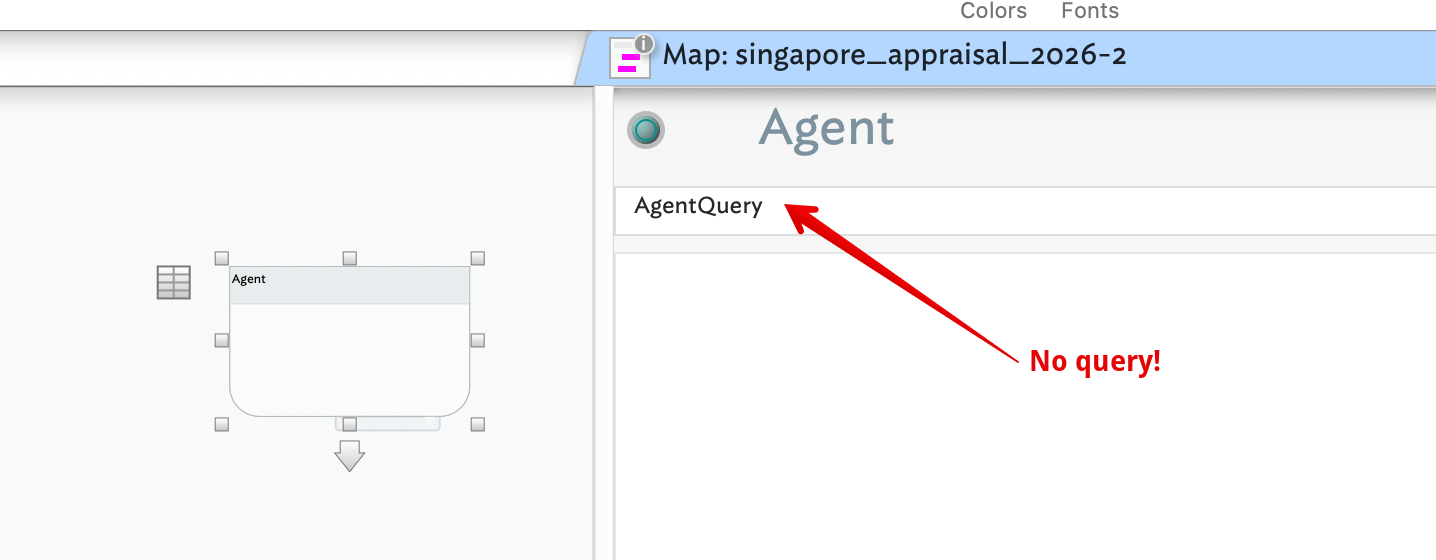
Also, in the last, the container is not an agent. Agents and notes are not interchangeable. I suspect you’ve assumed that giving a note [sic] an $AquentQuery is acts as an agent.

I suggest reading Chapter 10 of the Help ▸ Getting started with Tinderbox PDF, as it explains the basics of making your first working agent.

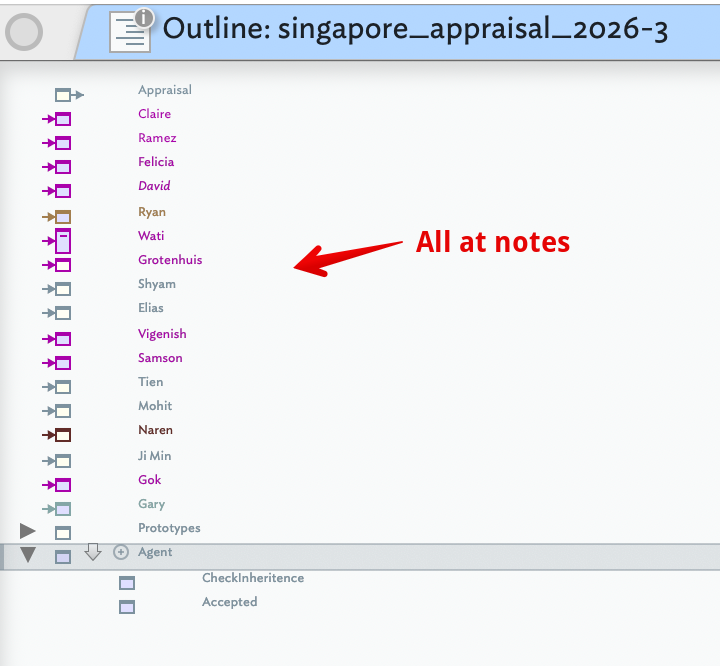
I checked the second upload you made and it has no agents:

How do I know? By looking at the note icons in outline view: see more.

In map view container are laid out differently, depending on whether they are note containers or agents.

@mwra Thank you!!! All sorted now!

1 Like

Great, thanks for letting us know. :slight_smile: