Sorting Notes (?)

I’m not sure what to call this…

I have a prototype I use for some notes that I want to stay with the map/file(s) in which I create them.

But I also want a copy of that note to automatically go to one container on my main/home page (sorry if my terminology is poor). Perhaps the copy is an agent?

Do I need to do anything to the prototype? Is it all done via an agent? How do I create the agent so those notes will always go to that one container (location) on my home page?

TIA

WD

It sounds like you’re planning a web site, but I’m not sure you’ve said that. Correct me if I’m wrong.

If this is to be a web site, could you give us a general sketch of (a) what pages are to be on the site, and (b) the outline of the Tinderbox document you’re envisioning?

No, no website.

Do you really want a copy (a duplicate) or an alias. What is the difference?

  • A ‘copy’ is the same—for most attributes—as the note of which it is a copy. But if the original note changes, the copy remains unchanged
  • An alias is essentially a way of showing the same note in different places. It has some intrinsic attributes, so allowing the original note and alias(es) to have a different position on the same or differing notes.

What is the purpose of the copy? Understanding this might make it easier to assist with giving you an appropriate solution, e.g. whether you want a copy of the note or an alias of it.

The only way to make a copy that is an agent is to start with an agent, but I suspect this is not what you mean. If you are asking “Perhaps the copy is made by the agent?” then the answer is ‘No.’ . An agent cannot copy the note (i.e. duplicate it) but it can make an alias of the original note.

Prototypes should generally (unless you are an expert user) only live in the /Prototypes container. To use a prototype, you set the $Prototype of a note to the name of the prototype you wish to use.

So, I think you have two different misunderstandings here about howe Tinderbox works:

  • how to make and use prototypes
  • how to make and use aliases

Can you upload a small TBX showing what you are trying to do? Show the parts you are able to achieve, and add note(s) describing the parts to can’t do and the outcome you wish to achieve.

†. For instance, two notes must have different $ID values.

Thank you.

I want to make aliases. I want that as part of my prototype… or I want to attach an agent to my prototype. My goal is that anytime I use that prototype an alias will automatically be created/sent to one location.

Respectfully, this isn’t how these things work. I sense you are misunderstanding how prototypes work. But, we have established to want aliases, not copies, and this helps.

Let us assume you have a prototype called ‘X’ for simplicity. Is your task that you want an alias of every note using prototype ‘X’? Or all such notes but only if within certain container(s)?

Without rushing to a—possibly wrong—solution, it sounds like you need an agent to generate aliases. Agents are containers and their children are aliases of any note matching the agent’s query.

The confusing part is how you describe the relationship with the prototype. The role of a prototype is, in simple terms is to customise various attributes for easy application to larger numbers of notes. Prototypes don’t ‘have’ agents.

But, here is a very simple example of the above:

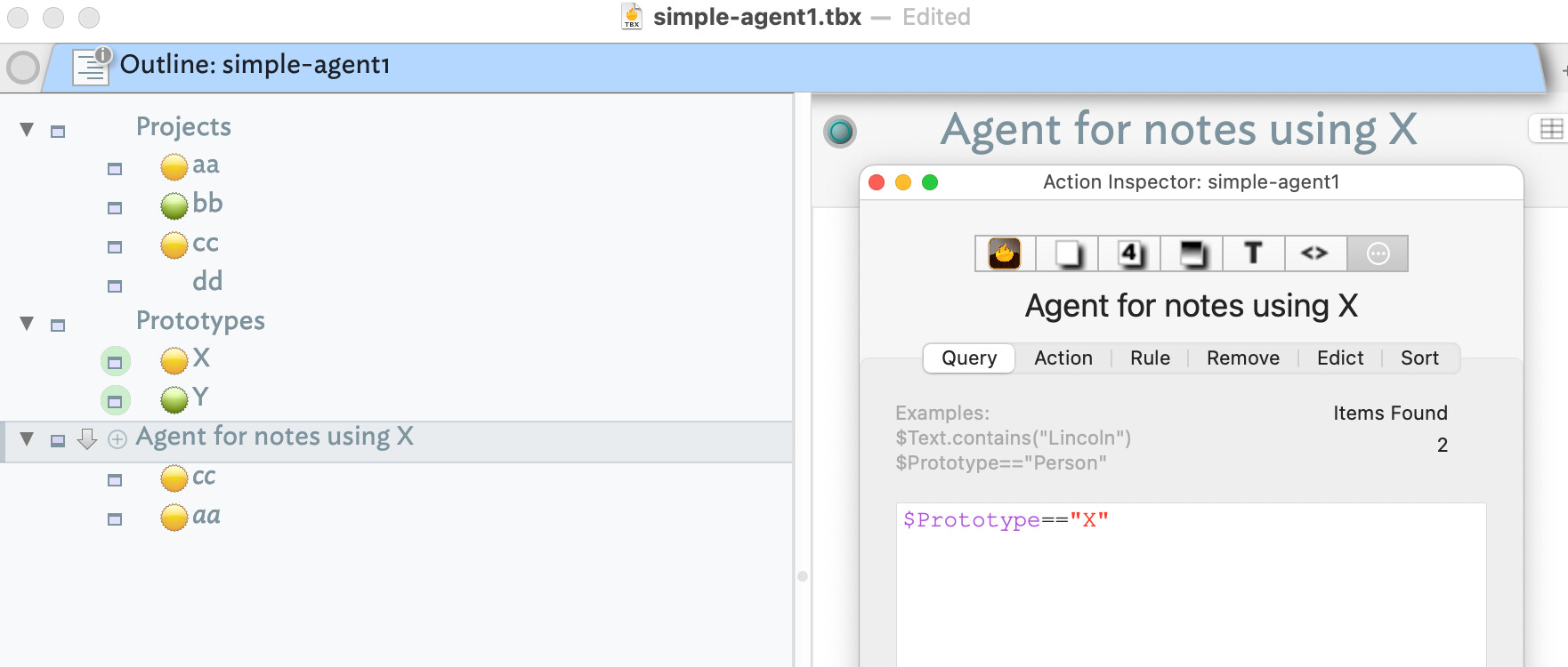
We have a container of projects, ‘aa’, ‘bb’, etc. WE have two user prototypes ‘X’ and ‘Y’. Here the only customisation is a badge. You can see the of the 4 projects, 2 use prototype ‘X’, 1 prototype ‘Y’ and one uses no prototype.

Now an agent, totally unconnected with any prototype uses the query:

$Prototype=="X"

to create an alias of any note (in the whole document) that uses the prototype ‘X’. As expected, it has just 2 aliases. They currently don’t sort in the same order as their original notes but that can easily be resolved by configuring the agent some more. The aim here is to the main idea.

Here is my test file: simple-agent1.tbx (131.0 KB)

†. By adding extra query terms, the scope could be narrowed, e.g. to only match notes inside the ‘Projects’ container.
For every time I use prototype ‘X’ in any file, container, box or what have you any where in my whole Tinderbox application/world/maps/constructions… for everything I may ever do involving Tinderbox, when I use THAT one prototype it will automatically create an alias AND automatically send that alias to one specific container.

I have the “Getting Started with Tinderbox” PDF open and “Making an Agent” starts on p.68.

If it makes your life easier, if you could just tell me/copy the relevant info/sections from that area of the GSwT PDF that would be most appreciated.

NO! This is not how prototypes work—I’m being direct only becauseI’ve already stated prototypes don’t work this way. You can achieve what you want but you need to use the app’s actual features rather than features you assume exist because you imagine them. Wanting different won’t change that.

The demo I posted already does what you want. An agent is a container. The only difference is that:

  • it only contains aliases
  • those aliases are of notes that match the query

Indeed, if an aliased note changes such that it doesn’t still match the query, its alias is deleted from the agent container. So, if a note using prototype X, it has an alias inside the agent. If that note changes its prototype, then its alias is deleted. Which is correct - the container only aliases notes using prototype X.

Given this, why do you need a container of aliases that mimics the agent’s contents. Can you explain what the extra container does that the agent doesn’t?

Be aware that the tutorial PDFs you are looking at explain the broad strokes of the main features. Unlike a single function app from the AppStore, Tinderbox is a tool for thought. It gives you a toolbox of features and methods to achieve the outcome to want but not by a single fixed method. You questions suggest you are used yo apps that only allow things to be done one way. This is not such an app. Here, you—the human, not the software—is in charge. so some thinking is involved. Tinderbox users want that, being an escape where you are fighting what the app does not allow. Don’t confuse ‘does not allow’ with ‘does not work in the way you intuit’.

So, as the way to make the container

You state, “An agent is a container that contains only aliases” which is very helpful. Thank you.

You then ask,”… why do you need a container of aliases (I’m with you) that mimics the agent’s contents.” (sic) I don’t understand “mimics” in this context as you stated an agent is a container of aliases. Mimics isn’t necessary for something that is. At this point I am lost again.

Understanding agents are containers, I assume there can be multiple containers of different agents. Is this correct?

Further, can those containers be renamed or must they all be titled “Agents”? The former makes more sense, but I don’t want to assume.

TIA

No an agent is a special type of container. It can only contain aliases generated by that agent. The container only contains children as aliases cannot themselves have children

An agent cannot contain other agents, for the reasons stated above, but a normal container can contain both agents and normal notes.

A container’s name is, as for a note, its $Name. An agent’s name is also set via its $Name.

An agent is a special type of note and can only be created as an agent. A normal note (or container) cannot be converted into an agent, not is the reverse possible. An agent has to be created as an agent (see the Note menu).

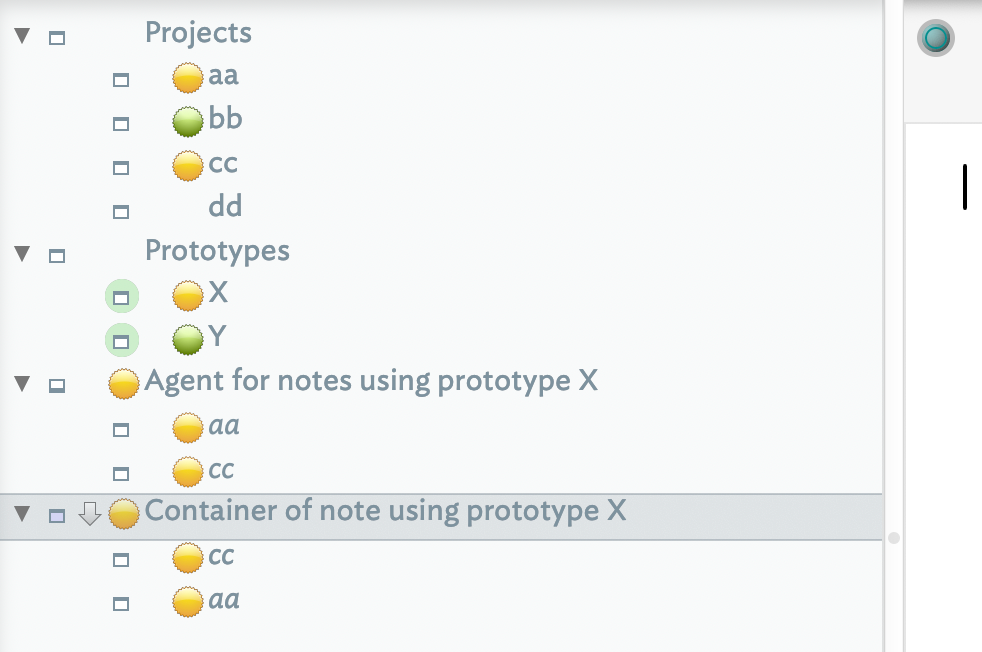
Building on my earlier demo, let’s assume the agent, which I’d here names “Agent for notes using prototype X”, copies all its aliases to a normal container—as you’d earlier asked. I’ve called that “Container of note using prototype X”. The result is like this:

Notice how the container contains exactly the same content as the agent. So why bother with the container.

I am working on creating an agent; I have not yet worked in Outline View.

  1. You mention the tutorial pdf. I have that here as well as your supplied simple-agent1.tbx and find what appear to be differences. The tutorial says to first collapse the triangle, then choose create agent from menu; this then opens a dialogue box.
  2. Your image has not collapsed the triangle and places the agent line in a specific section. Does the agent line need to be near/above/under the relevant note? I assume you create that line by double clicking (?) the return key (?) either under or above the note to which you are attaching the agent?
  3. the pdf says to type Prototype==”X” and your example shows this as $Prototype==”X”. Will either suffice?

I now wonder if the location of the agent line is irrelevant, as once I open “Create Agent” the Prototype==”X” (or $Prototype==”X”) will apply regardless of location, ie location of instruction is irrelevant.

TIA

Yes, but the correct form is with the $-prefix. Back in the early 2000s the form without a $-prefix was used but as action code got more complex it got harder for the parser. So, now, if referring to an attribute, use the prefix.

So, in queries:

$Prototype=="Story"

$MyString.contains("X")

In an action:

$Prototype="Story";
$MyString = $Prototype;
//etc.

The triangle simply expands collapses the contents of the container so you can see it. It has zero effect on whether you can make an agent. Select the note/container/whatever in the position immediately above the place in the Outline that you wish to insert the agent. Then use menu NoteCreate Agent to make the agent. The agent is added beneath the selected note as its next sibling.

My demo has nothing to do with the tutorial PDF and was created to try and understand what you are trying to do.

Thank you.

I notice your “queries” and “action” are different. This additional information confused me as I don’t know your context for sending this addition. As I reconsider them I notice queries has two == and action has one =. So did you add this to tell me I need to know whether my agent is a query or an action? And as I want my agent to create an alias am I correct in assuming my agent is an action and therefore only requires one = ?

Further, I don’t understand the additional line(s) in your two examples. Are they also required in the process of creating my agent? Do I need to use all 3 lines you provide for “In an action:” not just the initial line presented earlier? TIA

No I added them to give examples if where the $-prefix should be used when referring to attributes. I gave two examples of query syntax and two for actions.

You are correct that the examples use ‘=’ differently. The assignment = and equality test == do different things. These are all documented in aTbRef which I commend to you for further reading.

Thank you for telling me about TbRef.

1 Like

My pleasure. :slight_smile: Disclaimer: I am aTbRef’s sole author and have been for 21(!) years now, ever since v2.3.4 which was the first version I started using in 2004..
aTbRef is deliberately a reference as opposed to a ‘how-to’, as covering every scenario for the latter is just too much to do. The how-to questions best asked here; I link to aTbRef in answers as the links should help fill in detail if needed by the reader. But, what menus hold/do and the purpose of systems attributes, action code operators and their syntax, etc. is all there and in some detail.

There are many dark corners in the Tinderbox toolbox that aTbRef has to cover but individually few of use need more an a few parts of this whole in any given project. Don’t worry about tools/features/views you don’t need. They are still there if later you do find a need for them.

At the top and bottom of all aTbref pages is a yellow bar of quick links to major listings, e.g. system attributes, action operators, date formats, designators. I use these daily myself as there is a lot of detail—too much to remember fully. The same yellow bar also links to a site map (a listing of article titles) and a fuzzy search that looks at your search terms and associated terms. IT’s actually pretty good—just don’t ask me how it works as I didn’t write the search code. :slight_smile:

1 Like

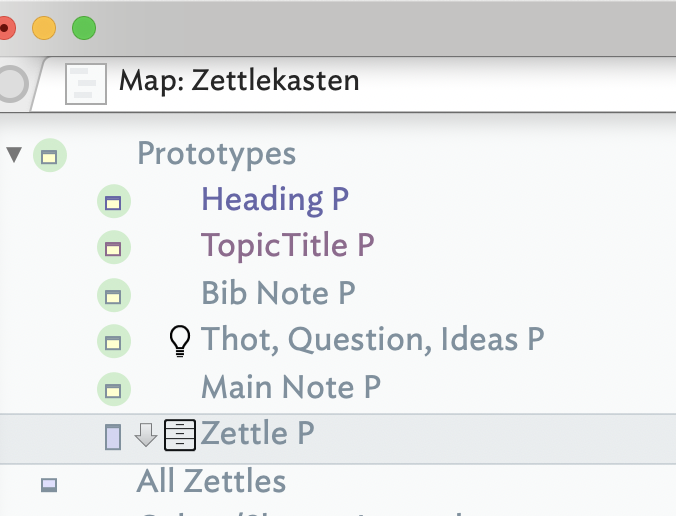
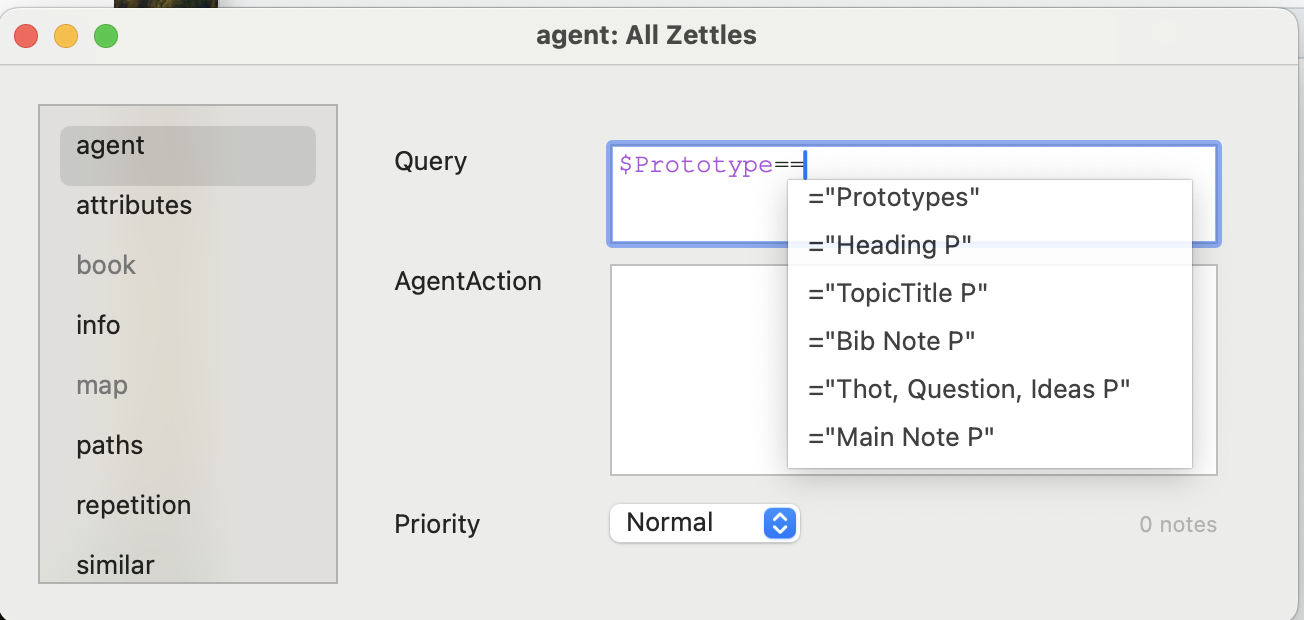
Attempting to follow your instructions; Zettle P is in my Outline View, but the agent Query box is not showing it as an option.

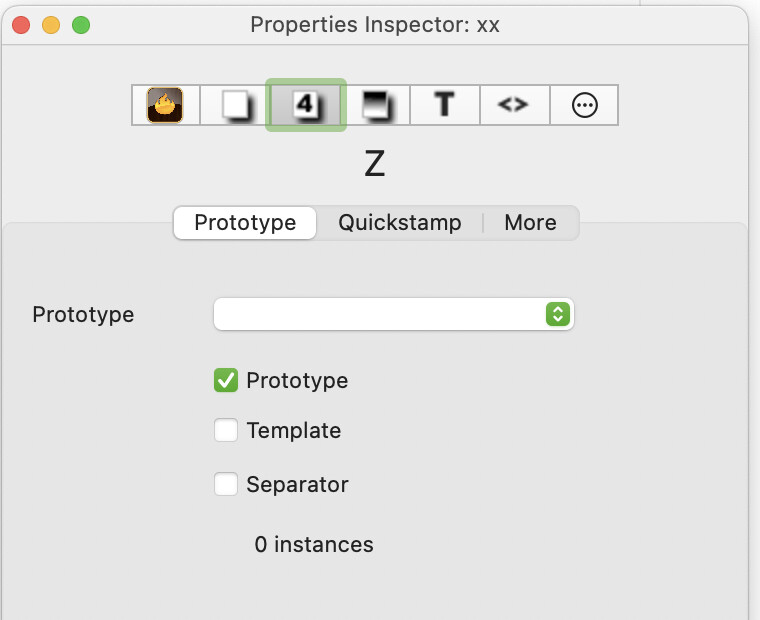
Zettle P is not currently marked as being a prototype. Notice that its icon lacks the mint-green halo that the other notes in Prototypes display.

You can mark it as a prototype by setting $IsPrototype to true, or by checking Prototype in the Properties Inspector:

As someone who has not yet mastered all the details of Tinderbox, here is my tip. When I haven’t worked with Tinderbox for a while or want to deepen my knowledge, I like to watch Michael Becker’s tutorials on YouTube.

He starts by creating a note and explains each part of the application step by step.
Everything is explained in a very practical and user-friendly way.

Along with Mark Anderson’s aTbRef, this is one of my most important sources of information, alongside this wonderful forum.