Tinderbox for non-technical people

I just reviewed the recording of the Tinderbox meet-up from yesterday (14 feb 2026) on the opportunities and barriers of tinderbox for non-technical people and women. It was a very thought provoking session. I could not join the session because I am on the other-side of the world and it was already after midnight here, when the session started.

I am a surgeon with academic and research interests. I First new about Tinderbox aabout 18 months ago. I can see th immense potentional of Tinderbox and is my favourite program. However, I have seen the barriers to using it. I will outline the barriers I have seen:

  1. The UI (appearance) could be updated to resemble other modern programs. I find this is a issue when I try to introduce my colleagues to Tinderbox.

  2. Tinderbox and Obsidian are powerful. However, one can easily spend more time customising both of them, then actually usuing them. Best to just use the basic features and be productive; then later on slowly trying to get the most of the software.

  3. Opening the various pallete windows are not intuitive.

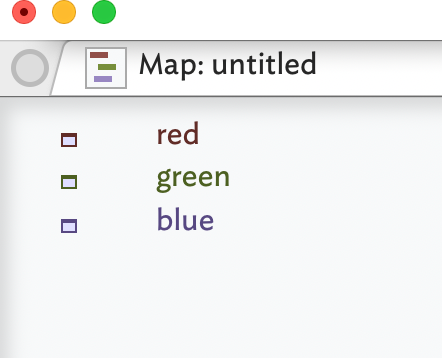
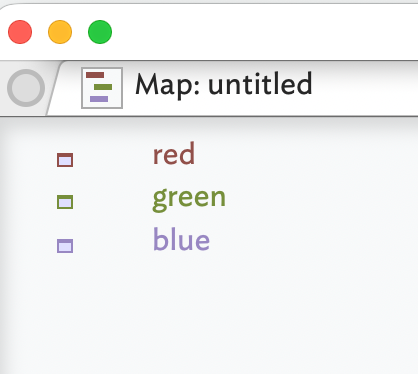
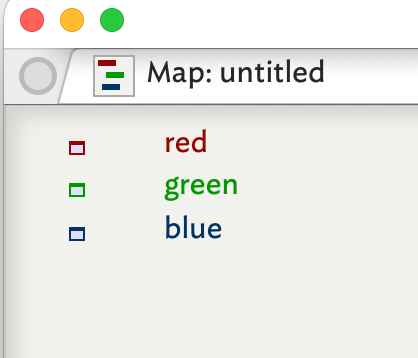
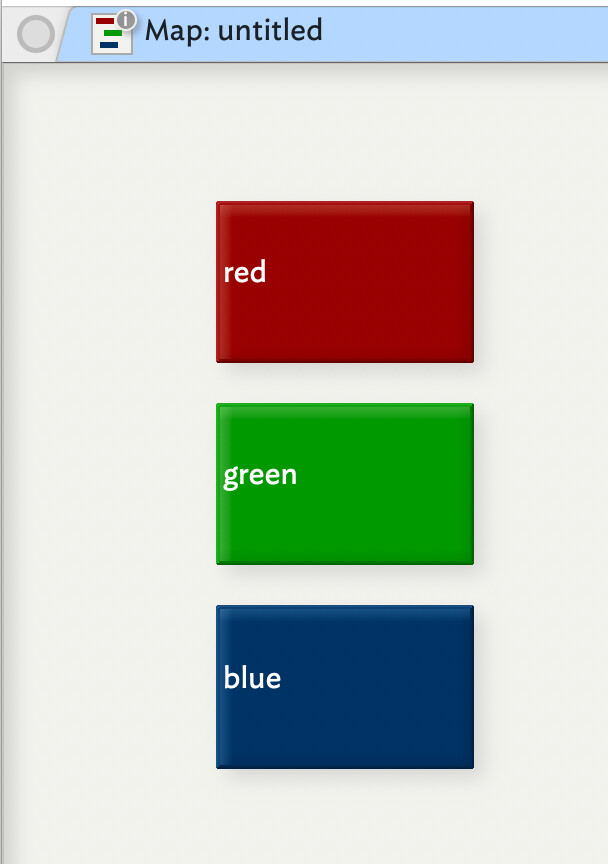
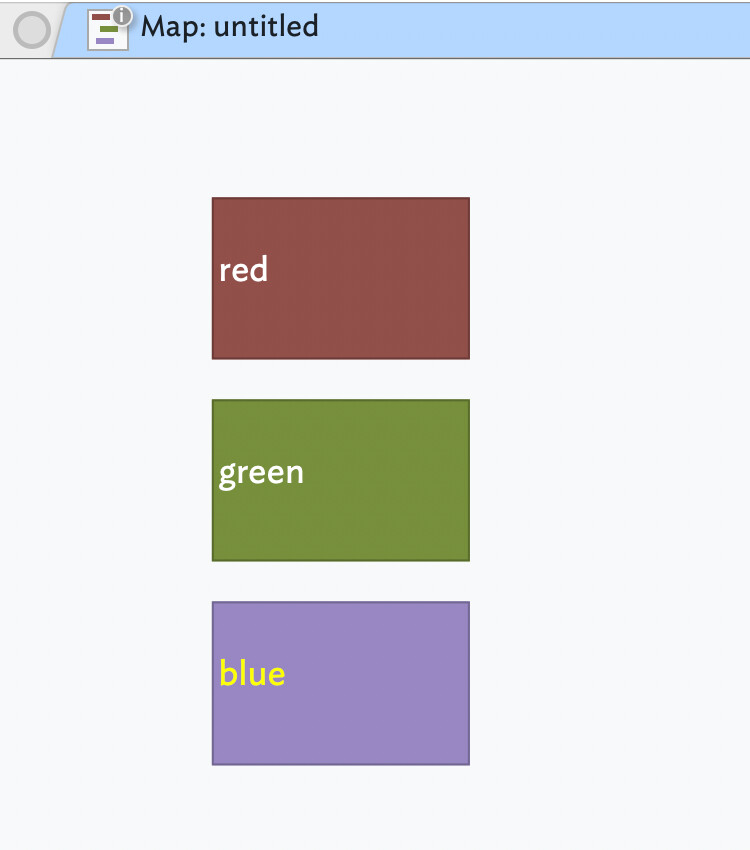
  4. Some times get the feeling colours are not what thet should be. Red looks more like brown.

  5. The action code is more like macro; for those who come from some programming background it is a challenge to get the get around the action code

  6. There should be widgets with built in action code that you can install for addition functions (e.g.a widget for the highlighted texts in different notes to be pulled into a new note and have backlinks)

  7. Adding images and videos should be similar to Obsidian. You add an image to a note. The image autoatically gets put into a subfolder and the image is linked to the file. Re-sizing the images should also be easier.

  8. Simple, short video tutorials on the basics of Tinderbox would be usef (similar to what Adobe has now done for Adobe Captivate)

  9. After 18 months, I still donot have a grasp out how to output from Tindrbox. I hear Pandoc but, have now seen a video on hos pandoc works with Tinderbox (I am sure there is already a video on this).

  10. When I come back to tinderbox after 2 or 3 weeks, I am back to basics. They relearn again (happens with most software that are powerful)

I think there should be two-tier Tinderbox. ‘Tinderbox’ and ‘Tinderbox Pro’. The Tinderbox just having mapview and outline view and Pro version being the current version. So, non-technical people can start on the ‘Tinderbox’ (should be cheaper or even free) ad the once they like the ‘Tinderbox’ they can purchase the ‘Tinderbox Pro’. For many of my friends and colleagues, the current Tinderbox is too complex (‘aircraft carrier’) and expensive for what they might be able to get out of it.

The tbx community is fab! It is the main reason why I am still with tbx and confident I will progress with tbx! Thank you all!

These are few of my thoughts from using tbx.
I use a lottof modern software. I( don”t know what you’re trying to express.

Again, I have no idea what you’re trying to say. The Inspector window is entirely standard, and exposes menu choices and has keyboard shortcuts.

Enitirely under you control. Pick a different color scheme, or make your own.

The action code is not “like a macro”. Action code, at present, is LISP with Smalltalk syntax. Or, more succinctly, a Smalltalk dialect intended (unsuccesuly, perhaps) to be open to novices.

  1. Adding images and videos should be similar to Obsidian. You add an image to a note. The image autoatically gets put into a subfolder and the image is linked to the file. Re-sizing the images should also be easier.

Tinderbox did this a decade before Obsidian.

@eastgate Thank you!

I was of the impression if I added a photo to a note, tbx renders it as a large file; therefore, I have to put the images in a folder and then make a link to the images.

As I mentioned tbx is my favourite programme. I have tried my best to introduce my friends and colleagues to tbx but, for some reason, they find it intimidating. They, having grown-up with a passive software like MS Word, probably cannot get their heads around tbx. A lite version of the tbx with a different pricing tier might tempt more to enter tbx and realise the power of tbx and then graduate to the standard version. Thank you!

This used to be an issue, but isn’t such a headache any more. You might keep images externally if you have a vast number, or if you need great image quality since Tinderbox compresses its images.

Hi Naren17

I hear what you say, but…

Tinderbox is not gender specific. I’m unsure why you specifically think that women are somehow disadvantaged when using the software?

Your other points need clarification. I think it would be far more helpful if you can state the exact issue, and what a good solution could look like. Stating the precise issue and presenting a possible solution is far more valuable.

On your point 8. I would suggest you have a look at Dr. Michael Becker’s excellent tutorials:

The following is a list of our Tinderox educational videos that we’ve collected. If you have created videos or know of any that we may have missed (also see Mastering Tinderbox: Training Videos (Complete List 2)), please message @satikusala with a link so that he can add it here. What is Tinderbox [Tinderbox] What is Tinderbox? from Mark Bernstein on Vimeo. Tinderbox Meetup and Course Calendar Check out the Calendar for future meetups and courses. Tinderbox Meetup Calendar (2024, 2025) [imag…

And here:

The following is a list of our Tinderbox educational videos that we’ve collected. If you have created videos or know of any that we may have missed (also see Mastering Tinderbox: Training Videos (Complete List1)), please message @satikusala with a link so that he can add it here. What is Tinderbox [Tinderbox] What is Tinderbox? from Mark Bernstein on Vimeo. Tinderbox Meetup and Course Calendar Check out the Calendar for future meetups and courses. 5Cs of Knowledge Management School @satikus…

Don’t despair. I’m MANY years using Tinderbox, as only an occasional user, and I still find it awkward and unintuitive in many areas, but I get by.

Best of luck!

I’d note that it is really hard to help people if all we get is a list of complaints and what they won’t do or won’t learn. Not least, pointless moaning is demotivating for those in the community who would rather be helping fellow users.

A small amount of time perusing these forums will show that those who make progress do so by thinking [sic] about what they are trying to do. Tinderbox is not a slot machine where you get a prize by pressing the right buttons in the right order.

If you don’t have a goal or task beyond writing a few things down, you likely won’t get more value out of Tinderbox than a simpler program like Obsidian, or Apple Notes. No shame there, some people just need a shopping list or simple to-dos.

Those who stick with the app tend to both have a task in mind and one that is hard or not possible in less capable noting apps, i.e. Tinderbox has a purpose for them.

But, as with any deeper tool, just watching a video or looking at other people’s work only gets you so far. Working on your own real, not invented, task and doing so using your own information is how the learning settles.

So the reason you are likely struggling is that you don’t have a real task to do or you have one but instead of figuring the tools in the box needed to do the task you’re looking for a ‘do my homework’ wizard. MS Office is the app for that sort of approach, and that tools are OK at what they do.

Thus on a positive note could you perhaps share with the community what you want to achieve in Tinderbox using your notes?

I don’t recall seeing this asked before, which is why you may not have found it addressed directly. There is an explanation, even if perhaps not the one you expect…

The root of what you observe is that the method by which Tinderbox makes different colour schemes interchangeable is by having a selection of ‘named’ colours but each scheme can redefine the colour value of a given named colour. So ‘blue’ could be blue, a blue green or even orange if that is how you set up your colour scheme.

So why does colour ‘red’ look brown?

Simplistically, because that is how your current document colour scheme defines it so. Yes, but why? To underlying problem is what gives clear difference in Outline view can be harsh/over contrasty in the likes of Map view. So the app has two groups of views with contrasting colour needs:

  • Large colour blocks: Map, Hyperbolic, Timeline, Treemap
  • Colour used for text labels: everything else

In a default Tinderbox file, the active tab is set for Map view, so it helps to have a colour scheme that suits that … which is why Tinderbox uses (as at v11.x) the ‘Modern’ colour scheme. This uses values for named colours that are optimised for Map use, for instance this map in ‘modern’:

Nice, easy on the eye. But, in Outline view, not so good:

Hard to tell apart. We can untick the Drker colours document preference (see) and its a bit better:

Now if we apply the ‘Tinderbox 7’ with more ‘natural’ colour mapping we get more useful colours for text ($Name) based use:

But, go back to Map view and the colours are now a bit strident:

So, you may choose a colour scheme that best reflects your use.

Before anyone asks, the original design could have gone a different way and have the app adjust colours based on the type of view in use. But it didn’t and I suspect that would now, 20+ years on, be a non-trivial change to make.

Bottom line, the app ships with multiple colour schemes. If you don’t like the default, choose one you like. :slight_smile:

As a result of this issue, I tried using the Mac OS color picker to choose specific hex codes. The results were wildly unpredictable, in both Outline and Map views.

Might I suggest that if the user is specifying a hex code, rather than a color name, TBX should take that as a strong preference and honor it?

There’s abundant research on why women often feel both disadvantaged and unwelcome in technical spaces. (Hint: It has a lot to do with culture and almost nothing to do with mental ability.)

I agree. I do what I can. Sometimes this has come at significant personal costs. I’m very open to concrete suggestions.

Tinderbox does honor hex color codes, both 3 and 6-digit (e.g. #880000 or #321). We also support RGB and HSV color codes.

As @eastgate has note, Tinderbox absolutely does support hex values. In fact, short of using a Tinderbox named colour, a short or long hex code is the only way to set a colour attribute value.

I wonder which colour picker are you using - the Apple palette has quite a few. It’s not clear if the colour you thought you were setting wasn’t correctly captured or something else is amiss.

Assuming you are using the UI and not code, are you setting colours in the Inspector panes, in Get Info:attributes or in a Displayed Attributes table. Knowing this might help track down the cause of confusion.

This is (unintentionally) a bit cryptic. Can you unpick what you mean by ‘unpredictable’. Are you saying you enter a value and different one is stored† or is the problem something else?

Here I’ve tried various colour pickers and if click a colour chip or listed value, the Tinderbox Color-type attribute gets a 6-digit hex code. If you don’t get that, some UI-interaction edge case may be occurring what might need a bit of screen recording to spot. A wrong result observed doesn’t imply error on user or app’s part, just that an expected data input did not occur. The why and how are he proximate question.

†. A bit of an edge case, but if you are running active colour profile management software (as graphics/creative professionals sometimes do), that might be a factor.

I’m trying to deal with a deadline this week. I’ll be back with more on this and other issues in a day or so. Short version: I followed the advice to “use Tinderbox for something concrete.” In the process I discovered quite a few mismatches between my expectations and Tinderbox’s behavior, which I’d like to revisit once I have time.

1 Like