Toward emergent structure

Following the advice to learn to use Tinderbox by actually doing something with it, I tried to use it to organize the research and notes for a short article. This is a small project, involving only a few dozen notes, but the hope is to use it to generalize to book length projects with hundreds or thousands of notes.

There are going to be several posts on this topic: I have too many comments for a single post. I’m happy to make new topics if the moderators would prefer, but for now it makes sense to me to keep everything related to the same project together.

First step: collect research materials in a folder in DevonThink. Configure a new TBX file to watch that folder.

The good news: Setting up the watch folder was very easy. Adding new items in DevonThink created new items in TBX.

Unexpected/less good: Changing the name of an item in DT did not change the name of the item in TBX. Metadata like Tags did not transfer, either.

Question: Can changing the “Imported from DevonThink” prototype in TBX improve the link between the two programs? In particular, the tags I use in DT are the beginnings of the structure I’ll use to organize my notes.

RTFM: The “Search Tinderbox Help” command was useless, as it only pointed me to the help file, not the specific location within it. I did ultimately find the section on “Watching Shared Notes,” but it didn’t answer the above questions.

aTBRef seems to indicate that the TBX $Name and $Tags fields should draw from the corresponding fields in DT and should update periodically. That is not the behavior I observed.
Second step, actually read the source materials and take notes.

This worked fine. I set up a simple prototype to show tags. (See previous post, it would be helpful if DT-assigned tags were visible in the watched folder.) I’ll ultimately want to be able to bring in notes taken with other tools – notably GoodNotes – since I usually prefer to read on my iPad, not my desktop. That’s not this week’s problem.

I used the Quickstamp function to give each group of notes from the same source a tag identifying that source. I realize I could use a container to automatically assign tags, but I wanted to keep a “flat” hierarchy in the Map view. I’m ultimately going to want to group the notes by topic, not by source. I also used the Quickstamp to assign colors: the basic assignment functionality worked fine, but the color picker gave unexpected results as discussed in detail elsewhere.

[I’m assuming the context—for those trying to help—is Tinderbox v11.5.2b771 and DEVONthink v4.2, on macOS 26.3, these being the current versions of all at time of writing. If using different, that might be a factor. DEVONthink-related changes were made to Tinderbox as recently as v11.5.0b759 - see.]


In short No, but for a perfectly logical reason. The Imported from DEVONthink prototype simply styles the notes generated by the DEVONthink Watched Group. The prototype itself has zero effect on the DEVONthink/Tinderbox interchange.

I don’t know for sure as the process is internal, but the interchange process likely runs one per agent update cycle (fast, unless you’ve a massive amount of action code running—the latter is not common). If the general process is running regularly, then we should expect the Tinderbox note in the watched group to update.

When unexpected gremlins like this, for the few seconds it takes, it might be worth restarting not DEVONthink and Tinderbox. Why, it starts a fresh session and that sometime resolves whatever got hung up behind the scenes (and which is not leaving diagnosable traces). Even if it doesn’t fix the issue, we know the latter is not the fix. Does this occur in all watched groups, or only this one? Does the issue occur in all TBXs or just this one? We simply don’t know until we check.

If you sure the problems are within the app, you are better emailing Technical Support directly (tinderbox@eastgate.com) as here your fellow users can only work on the externalities of the app.

†. There is no direct repeater for the interchange, but this Inspector can give you a good idea of whether background updates are working.

‡. Quick sense check, I assume the affected Tinderbox note is still in the watched group contain and not moved elsewhere in the TBX? The ‘watch’ process only affects notes in the watch container. But, you can make an alias (⌥+L) of a note in that container and move the alias elsewhere. The Alias will reflect any changes made to the original note, still in the watched folder.

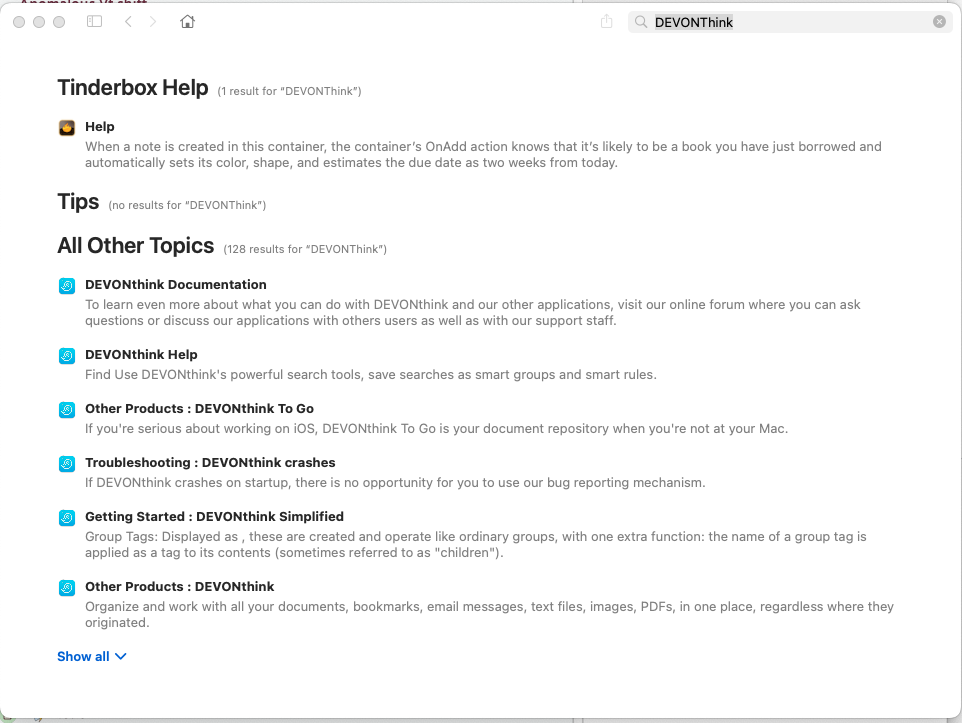
I can’t see such a command. The Search box in the Help menu of macOS apps searched for matches in menus. The Search bar built into Apple app Help, i.e. into the ‘Tinderbox Help’ on the Help menu is known to be flaky. Apple seem to have no interest in assisting developers to make useful Help content. Still using the latter with the term ‘DEVONthink’ matches at least 7 articles.

Or you can use aTbRef . Or, https://atbref.com/search.html will jump you straight to the search page for the current aTbRef baseline (v11 at time of writing). The search is a fuzzy search of title and full article text of the site.

The most pertinent content for this is, I think, this article on DEVONthink watched groups. If your issue isn’t covered it is likely not (yet) a known issue.

In recent macOS versions OS-level access (security) permissions are a factor to consider for inter-app work, but I don’t think it seems a factor here. But, one to bear in mind.

†. Necessary disclaimer: I am aTbRef’s sole author/maintainer. The resource is online and it is free for anyone to use. About aTbRef.

Fully agree with you on Apple’s Help tool. While it isn’t Eastgate’s “fault,” it does contribute to the overall difficulty in finding the information I need.

Searching for DEVONThink on my system gave one response from Tinderbox and the rest from DT’s own documentation. That’s “7 articles,” but only one that I’d expect to be relevant to Tinderbox. Searching with the Tinderbox Help file open just kicked me back to the top level search.

I do want to thank you for maintaining aTBRef. As noted, that’s where I found the information I was looking for.

Tried that. The problem survives multiple restarts of both applications and the Mac itself.

Yes, the notes in question are still in the watch group. Yes, current version of TBX. Mac OS 15.7.3. Still using DevonThink 3.9.17, as I don’t want to upgrade to DT 4 until some bugs in the iPad version are fixed. (Which they may be now, but hadn’t been while I was doing this work.)

Third step. Organize notes topically. This is where things started to get interesting.

First, I created an Agent to pull notes with a few related keywords. As discussed elsewhere, this involved reckoning with the case-sensitive behavior of the “contains” attribute, but otherwise it went smoothly.

Next, assign a tag to the items retrieved by that agent. I did that by using the “Action” pane of the agent’s Inspector, with the text $Tag=”BTI". For reasons that remain unclear, this assigned the tag to every note in the file, whether retrieved by the agent or not.

(My best guess is that while experimenting with the agent, I inadvertently made it overly broad. I’m assuming that the tag was correctly applied, but apparently changing the agent doesn’t “unapply” it from notes that no longer meet the criteria. Tips on fixing an error like this welcome.) (Undo wasn’t available, since I didn’t discover the issue immediately.)

In which case it is an issue beyond the community to solve, I fear.

I’d note this:

watched groups are allowed though be mindful heavy use of this feature may affect overall performance, i.e. the feature is not designed as a fully-synced system but rather for importing/updating some DEVONthink data.
[from here]

A note in the Tinderbox watched group container will, in $URL, hold the DEVONthink pseudo-protocol link for the item in DEVONthink. When you click that link does it open the right (if renamed)m item in DEVONthink?

Whilst we may not see the DEVONthink data we expect in Tinderbox, it is not necessarily the Tinderbox app to blame. For instance if edits to the DEVONthink record aren’t making the record as dirty/changed, the watch process may be unaware there is new data to send. Note that, as stated above watched folders are not a synch process (where target must == source). A subtle difference but synch is more resource intensive and thinking one method is like the other is our (i.e. user) error not the app’s. I’d note I don’t use this feature and don’t regard myself as the export on it—others here may be.

Yes.

The revised information is transferring between DT on the Mac and DTTG on the iPad using DT’s own sync mechanism. So at some level DT is “aware” of the change.

While this is what you saw, it must arise another way unless the agent matched every note in the document. The Agent’s action $AgentAction, which you can see in the UI via the Action Inspector’s Action tab (as you did) or the Get Info:agent pop-over. The action can act only on aliases contained within the agent container.

This is likely a typo caused by the forum software ‘prettifying’ the straight quotes you type but this code looks wrong:
$Tag=”BTI"
Dote the first double-quote is a typographic quote and thus not the same # character—to the code parse as a straight double quote. Scope for unintended hilarity. For clarity (no criticism, as said this might simply be an error in the forum post parsing), the code you meant was:
$Tag="BTI"
So, for a note where this code runs, the existing value of the attribute ‘Tag’ is set to the string ‘BTI’.

I did wonder if you were setting the system attribute ‘Tags’, which is a Set type and thus multi-value. That is of note as this replaces all existing values with ‘BTI’. Assuming $Tags already has the value “XYZ”, then:
$Tags = "BTI";
results is a value of “BTI” as = replaces all existing values with the new value. In contrast, this adds the value to existing ones:
$Tags += "BTI";
resulting in “BTI;XYZ”

Correct. You’d need to edit the current agent or delete it and make a new one to fix things. This is, annoying as it may be, very much user error. Only we as the user can spot the result is the error and know what needs fixing—or might need to ask for help. But the app can’t guess. Computers, even AI, don’t think or understand like a human mind.

If you overwrote existing values with a wrong value, that can’t be undone. Why, because, as you asked it to the computer replaced [sic] one value with another. The old value is not kept. In this scenario, Time Machine or other back-ups are your friend. Roll make to when the error was made. You’ll lose any other edits made sense. But, we can’t blame the app for user error.

If tripping up on agent queries, it is a good idea to take time to make a new file and experiment before letting rip on your unsuspecting main work file, or at least using a copy of the latter. for things like querying, people learn in different ways and at a different rate but once past the initial error stage the training wheels (testing first) quickly become less necessary.

†. Being a Set-type attribute, $Tags, de-duplicates input and A-Z sorts the values, so you’ll see ‘BTI’ listed first even though it was essentially added to the end.

The DEVONthink/Tinderbox relationship for Watching is opaque. It would be helpful to have a “Refresh” (or use some other name) command in the Edit menu that would force an update of Tinderbox’s copy of the watched data.

Also, watching in general (Tinderbox, Notes, etc.) has been around for a dog year. Maybe we can someday have a version that is reliably bi-directional.

2 Likes

Certainly not as counter to the last Lest it appear so!) but to fill in some context…

I think the existing methods—for good or bad—were deliberately not designed/billed as a full synch due to all sorts os of implicit tasks in that. Synching cross-app is, I suspect, even more prone to issue. As these features are arguably fairly mature is software years (added c.Nov 2017). I wonder if there are other apps synching with DEVONthink whose experience could be tapped?

I suspect that I did indeed inadvertently match every note. Lesson learned!

I’ve since deleted the offending action, but based on the results I did indeed use the '+=’ assignment. The new tag was appended everywhere, but existing tags weren’t wiped out. (And thinking back, I do remember being wary of the straight ‘=’ assignment.)
(And yes, the smart quote in my original post was a forum error, not actually in TBX.)

Fourth step. At this point my deadline was starting to loom, so I decided to leave messing around with agents and attributes for another day. Instead, I just dragged notes around on the map to cluster topically-related items together. Then I put adornments under them to name the clusters. This all worked fine.

It would be nice to be able to assign a tag to all notes on a particular adornment. I know that’s possible with containers, but it doesn’t seem to be possible to both manipulate objects inside a container and see the overall Map view. Keeping the notes in a flat list and using adornments seems to work better for this quantity of notes.

With hundreds or thousands of notes, tags, containers, and other non-visual ways of organizing things will definitely be more important. While I have some time, the next step with this “toy” project will be to experiment with tools like the Attribute Browser and some of the other views.

Oh well, join the club, we’ve all done it starting out. On the plus side, it’s definitely a learning experience of the uncomfortable sort.

Thanks for the confirm on the other stuff. the quotes thing is difficult. as often its a forum artefact as a genuine error, but I think it more useful to cover the latter in case.

Glad the += works, useful for Lists and Sets.

Well, you can.

When you place a note on, or partially on, an adornment it fires the adornments OnAdd action, i.e. the event a container runs when something is placed into it. Let’s say you have an adornment about topic ‘ABC’ and you’d like any note on the adornment to add ‘ABC’ as a $Tags value. So, this is your OnAdd code:

$Tags += "ABC";

Removing the note doesn’t reverse this, but you could try the OnRemove like so:

$Tags -= "ABC";

… yes, it works. I just tested in v11.5.2 (OnRemove is a more recent innovation).

See more on adornments.

Yes, and for a good structural reason, even if not to everyone’s taste. To get a handle on this aspect, see this group os articles on Outline vs. Map Interface.

I definitely recommend making an early visit to Attribute Browser view. Knowing its there and what is can do can save doing things with greater difficulty in other views. This is one of the hidden strengths of Tinderbox: multiple views. Same data, different presentations. Note, as with most features, not everyone needs every view but most would probably benefit from using more than Map and Outline or even using only one view.

†. A quirk of origin, the Action sub-pane of the Action Inspector presents a different attribute’s code depending on the current item. For an agent, it is $AgentAction (especially the agent\s OnADD), but for containers and adornments it is $OnAdd.

Excellent! I’m pretty sure that function didn’t exist the last time I experimented with Tinderbox, but that was a long time ago so I might be misremembering.

Adornment OnAdd actions were implemented prior to 2006, so they’re old enough to vote.

2 Likes

You can put an $OnAdd on an adornment, e.g, '$Term+=“New”`. Any note you drag on to the adornment will have “New” added to the $Term.

If it’s of any interest - I’ve got some (filthy) AppleScript that I used to send notes from Tinderbox to the current group in DEVONthink, and create bidirectional links. They’ll also update the text of the DT note if it already exists, but it cares not for tags or other metadata.

I have another (filthy) AppleScript I use that I launch from TB to look up a linked note in DT, find it’s disk location, then open it in a text editor. All this presumes you’re working with texts in an indexed DT group, and that you rely on DT and TB’s automating updating and auto-import (and updating) features, and that you have to remember to turn off autoimport on notes if you want to edit them in TB - you effectively are using TB to collate, organise and structure your texts, DT to mediate and give permanence to them, and your file system and Finder to determine how you edit once you’ve set the ball in motion.

I launch them though FinBar† which turns menubar items into a keyboard-driven popup, but also allows you to add application-specific AppleScripts you can trigger.

I’d need to weed out some of the weird stuff I’m using, but that’s not a huge amount. It would also might be useful to put it here to find out how much it’s doing the wrong way!

Let me know if it’s of any interest.

† not affiliated but I use the heck out of it.