“Variable interpolation problem” (as Claude identified it)

“Variable interpolation problem” (as Claude identified it)

I have a stamp, that has worked as expected in months gone by, that reads the $persons attribute in a note (List type) and creates a note for each of those persons (may be zero to many) in a container identified as /Resources Folder/Persons Folder.

This is the content of the stamp:

// PURPOSE

// - When this stamp is pointed at a note, reads the $persons attribute.

// - For each person found, it creates a note for that person in 

// -   Resources Folder/Persons Folder.

var: string vContainer = "/Resources Folder/Persons Folder";

var: string vAlphaContainer;

var: string vPath;

var: string vNote;

var: string vLinkType = "Person";

$persons.each(x) {

   if (x.substr(0,1) == "A" | x.substr(0,1) == "a") {vAlphaContainer = "/A/";}; 

   if (x.substr(0,1) == "B" | x.substr(0,1) == "b") {vAlphaContainer = "/B/";}; 

   if (x.substr(0,1) == "C" | x.substr(0,1) == "c") {vAlphaContainer = "/C/";};

   if (x.substr(0,1) == "D" | x.substr(0,1) == "d") {vAlphaContainer = "/D/";};

   if (x.substr(0,1) == "E" | x.substr(0,1) == "e") {vAlphaContainer = "/E/";};

   if (x.substr(0,1) == "F" | x.substr(0,1) == "f") {vAlphaContainer = "/F/";};

   if (x.substr(0,1) == "G" | x.substr(0,1) == "g") {vAlphaContainer = "/G/";};

   if (x.substr(0,1) == "H" | x.substr(0,1) == "h") {vAlphaContainer = "/H/";};

   if (x.substr(0,1) == "I" | x.substr(0,1) == "i") {vAlphaContainer = "/I/";};

   if (x.substr(0,1) == "J" | x.substr(0,1) == "j") {vAlphaContainer = "/J/";};

   if (x.substr(0,1) == "K" | x.substr(0,1) == "k") {vAlphaContainer = "/K/";};

   if (x.substr(0,1) == "L" | x.substr(0,1) == "l") {vAlphaContainer = "/L/";};

   if (x.substr(0,1) == "M" | x.substr(0,1) == "m") {vAlphaContainer = "/M/";};

   if (x.substr(0,1) == "N" | x.substr(0,1) == "n") {vAlphaContainer = "/N/";};

   if (x.substr(0,1) == "O" | x.substr(0,1) == "o") {vAlphaContainer = "/O/";};

   if (x.substr(0,1) == "P" | x.substr(0,1) == "p") {vAlphaContainer = "/P/";};

   if (x.substr(0,1) == "Q" | x.substr(0,1) == "q") {vAlphaContainer = "/Q/";};

   if (x.substr(0,1) == "R" | x.substr(0,1) == "r") {vAlphaContainer = "/R/";};

   if (x.substr(0,1) == "S" | x.substr(0,1) == "s") {vAlphaContainer = "/S/";};

   if (x.substr(0,1) == "T" | x.substr(0,1) == "t") {vAlphaContainer = "/T/";};

   if (x.substr(0,1) == "U" | x.substr(0,1) == "u") {vAlphaContainer = "/U/";};

   if (x.substr(0,1) == "V" | x.substr(0,1) == "v") {vAlphaContainer = "/V/";};

   if (x.substr(0,1) == “W” | x.substr(0,1) == "w") {vAlphaContainer = "/W/";};

   if (x.substr(0,1) == "X" | x.substr(0,1) == "x") {vAlphaContainer = "/X/";};

   if (x.substr(0,1) == "Y" | x.substr(0,1) == "y") {vAlphaContainer = "/Y/";};

   if (x.substr(0,1) == "Z" | x.substr(0,1) == "z") {vAlphaContainer = "/Z/";};  

   vNote = x;

   vPath = vContainer + vAlphaContainer;

   create(vPath,vNote);

   linkFromOriginal(vNote,vLinkType);

};

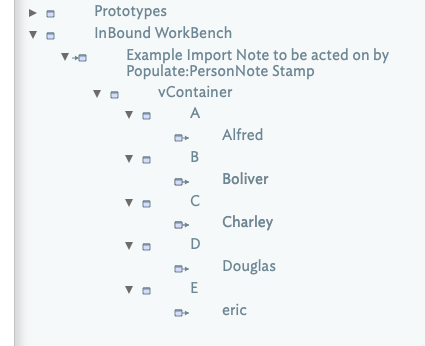
What happens is that “persons” notes are being placed in a container called “vContainer” right below the note to which the stamp is being applied.

Claude’s Response

This is a variable interpolation problem with the create() and linkFromOriginal() calls. Tinderbox is treating vPath and vNote as literal strings (the container name and note name respectively) rather than resolving them as variables.

The fix is to use ^value() to force variable resolution inside those function calls:

create(^value(vPath), ^value(vNote));

linkFromOriginal(^value(vNote), ^value(vLinkType));

I have tried Claude’s suggestion, but with the same incorrect result. I just upgraded to 11.7.0. How do I get the vPath = vContainer + vAlphaContainer to use the value of vContainer instead of the literal string “vContainer”?

I added some light code formatting as it strops things like the forum ‘prettifying’ quotes in code to typographic quotes.

Naughty Claude! I don’t know what is has read, but likely something very old as using inline export code (^codes^) in gene in action codes was deprecated decades back. So Claude’s probably only making things worse here.

Rather than take time to build a file to test the code, could you upload a minimal TBX with the stamp code, etc., and which displays the problem you describe?

One quick observation is that your variable declarations look a bit odd:

var: string vAlphaContainer;

should be:

var:string vAlphaContainer;

Note, the var command is colon-joined to the type declaration. The types is always lowercase (as you use), i.e. string, not String.

Thank you for your quick response. I corrected the var:string syntax. Most of the time I have formed it in that way, but I didn’t think it mattered. I see now that it does. However, that didn’t fix my problem.

I am uploading a small test document that misbehaves for me. When I point the stamp at the last note: Example Import Note to be acted on by Populate:PersonNote Stamp, the result is a new container just below the note called vContainer and it has the four letter sub-containers with the respective persons from the original attribute in the source note. What I was expecting was for those names to show up in the /Resources Folder/Persons Folder.

James Test Document.tbx (153.2 KB)

Your existing stamp works fine. The notes are all created, but the linking fails due veto an incorrect linking call you have:

vNote = x;
vPath = vContainer + vAlphaContainer;
create(vPath,vNote);
linkFromOriginal(vNote,vLinkType);

But it is trying to link the new nows to themselves. I think what you intend is:

vPath = vContainer + vAlphaContainer;
vNote = create(vPath,x);
linkFromOriginal(vNote,vLinkType);

Now each new note links to “Example Import Note to be acted on by Populate:PersonNote Stamp”.

Your stamp can be written much more simply. Thus uses an assumption, that people’s names being with a letter [A-Z,a-z]. Stamp “Populate:PersonNote revised”:

/ PURPOSE
// - When this stamp is pointed at a note, reads the $persons attribute.
// - For each person found, it creates a note for that person in 
// -   Resources Folder/Persons Folder.

var:string vContainer = "/Resources Folder/Persons Folder";
var:string vPath;
var:string vNote;
var:string vLinkType = "Person";

$persons.each(x) {
   vPath = vContainer + "/"+(x.substr(0,1).uppercase)+"/";
   vNote = create(vPath,x);
   linkFromOriginal(vNote,vLinkType);
};

Here’s the file, i with the fixed stamp and the more concise stamp: James Test Document-2.tbx (190.1 KB)

In this case, Claude is simply wrong. It’s working by analogy to other languages and making a guess that’s plausible but incorrect,

Well, there must be something corrupted in my installation. I did download 11.7.0 before these experiments. But when I use your revised stamp, I still get the same incorrect result. It puts the individual people in a folder called vContainer with its individual letter subfolders, right underneath the note to which the stamp has been applied.

This has been happening for the past few weeks. This code used to work just fine in other .tbx files.

Is there anything in settings that I need to check?

Hmmmm! I tried Mark Anderson’s fixed document, and I see:

I’m using the backstage build (11.7.1b807), as Mark Anderson likely is using. I don’t recall any reason that this would be affected by such recent changes. If you’re not backstage and want to try this, email me.

Apologies - I was using b807 as I had something else on the go.

This is what I get.

Using v11.7.0, and James Test Document-2.tbx (and using the edited original stamp), I get the same as @kdjamesrd with new notes in the wrong container. FWIW, using my shorter rewrite of the stamp also failed.

I moved the variable declarations inside the `.each(), they are only used in-loop anyway, and then nothing is created.

In b807, and with the variable declarations inside the loop, both stamps work.

AHA! In the test docs the first line of the original stamp had an incomplete commented code:

/ PURPOSE
not
// PURPOSE

This makes the first line not a comment and an terminated line of code.

b807 doesn’t trip up as a change in b803 made Tinderbox more resistant to user code which omit line end ; terminators.

So, cause—as seen in the original uploaded test doc was an un-terminated line of code. Correcting the broken comment restores comment status to the first line of the stamp and the stamp functions again.

Regardless, I recommend the correction to the linking code, i.e. use:

$persons.each(x) {

   var:string vPath;
   var:string vLinkType = "Person";
   var:string vContainer = "/Resources Folder/Persons Folder";

   vContainer += "/"+(x.substr(0,1).uppercase)+"/";
   vPath = create(vContainer,x);
   linkFromOriginal(vPath,vLinkType);
};

See stamp “Populate:PersonNote revised” in updated test doc: James Test Document-3.tbx (176.8 KB). [N.B. Tested in public release v11.7.0]

Well Hallelujah! Amen! The new code in version 3 works as expected. Thank you, Mark, for your detective work and persistence.

I have learned a way to code the solution for this task. As a toss back to Claude, it did recommend this new loop construction saying that “26 if statements was far too fragile!”

I do have one additional question. And that is when I want to select a stamp to use. When I right-click on a note to select a stamp, I get the drill-down menu, select “stamps,” and then the list of stamps is displayed. I do use the “:” format and I have many stamps in one of the categories. But only about 4 of the stamps is displayed. How to I get all of the available stamps to be displayed in that selection panel. The same problem when I access the “Stamps” command from the main command line.

Glad to help, and gladder still to find an understandable cause hiding in plain sight and not some gremlin.

Stamps. If you’ve only 5-10 using the colon-delimited name method to group them is little gain. As you’ve noted, if you nest them in groups then you can’t see them as one list. I tend to start with no groupings and then add as needed. Not every stamp needs a group. Often it is a way of simply ‘hiding’ them from the main list (including a grab-bag for stamp I think I don’t need but am not ready to delete). There is no one-size-fits-all approach, so:

In short, use a flat list! Don’t overlook the stamps menu in the main menu bar as starting at the top of the screen there is more room for a long list. Also, as you stamp count grows, don’t shun renaming them to give more declarative meaning. The “process input” you write 5 minutes ago may seem an intuitive title. In 6-months time and after working in other documents. comments, as you’ve used, are helpful but you only see those if you view the stamp.

A last thought on the 26-test loop, if you really had to do those, I’d put them into a user function with a return call at the end of the success branch. That way, if ‘b’ is a match we return that letter and don’t even run the other 24 tests. As they were, the stamp had to run every test regardless.