jded
March 18, 2020, 9:19am
1
Apologies if this is a known feature/issue.
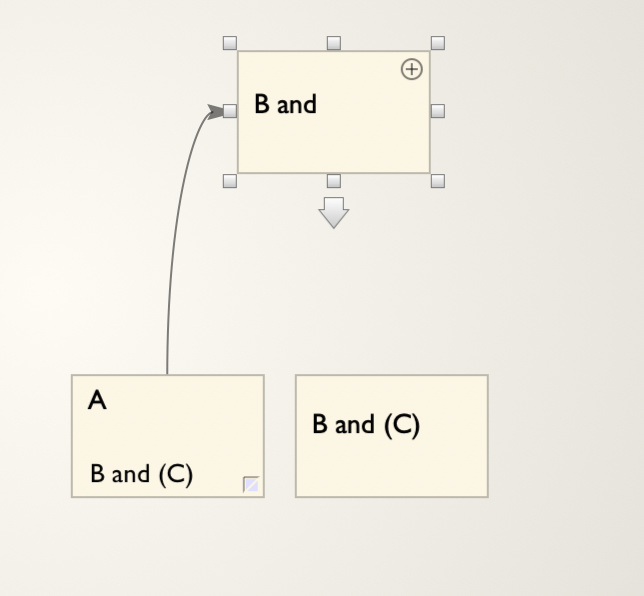
Create a note called A B and © A and then select B and © from the choicesB and will automatically get created and linked to A .
I guess the moral of the tale is to avoid having () in $name?
JDED
Discourse interpreted what you typed as the copyright symbol © – did you mean it to be (c) or (c or c)?
I can confirm that links to (c) do not work. For example if there is a note named (c) then
[[(c)]]
does not create a link to (c).
mwra
March 18, 2020, 10:07am
3
Yes, this is a known issue. If you want to use automation with Tinderbox avoid using the following in note titles ($Name, and by inference in $Path):
straight quotes, single ' or double ". These are query/action code string delimiters. Suggest using ‘’ and “” ‘curly’ typographic quotes instead.
semi-colons ;. These are query/action code list value delimiters. Suggest using colon : instead.
parentheses ( and ). Not sure why , but still problematic. Use [ ] or { } instead.
forward slash /. These are query/action code container delimiter in paths. consider using word ‘or’ instead.
backwards slash \. These are query/action code escape character. No simple alternative - avoid.
This list is not exhaustive but there is as yet no formal documentation of this.
All the above work fine in simple use in titles, but cause unseen/silent failures in queries, linking, etc.
jded
March 18, 2020, 10:10am
4
Opps - didn’t spot that.
Make the title second note $name “B and (something in parentheses)”.
A picture is worth a thousand words
JDED
mwra
March 18, 2020, 10:18am
5
If you really need $Name to render on screen with the ‘bad’ characters above:
Copy the correct string in a user String-type attribute and use a display expression to set that as $DisplayName.
Now ‘clean’ the actual name by removing or substituting the ‘bad’ characters.
Yes, a bit of a faff to do, but it does resolve the issue. I hit it a lot with scientific research paper titles with use these problematic characters a lot. A bummer if you want to have a note with the title of the paper that note is about!