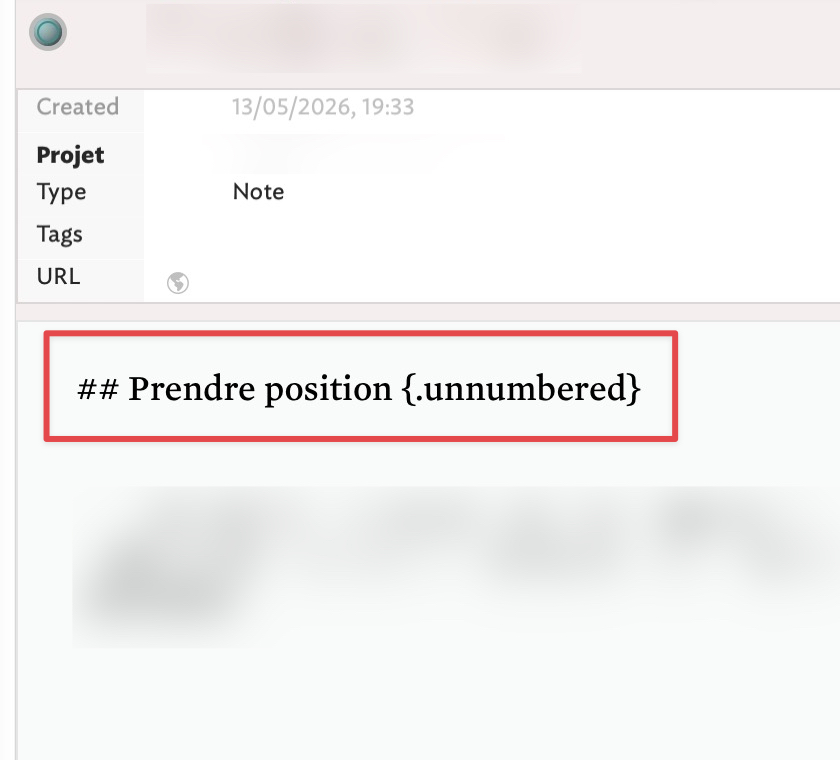
A few months ago, I wondered if it would be possible to configure Tinderbox to generate exportable LaTeX notes, but without including LaTeX tags in the body of my notes and @mwra had been a great help, providing me a ready-to-use-file, which is invaluable. Following this model, I would need now to configure a Tinderbox file in Markdown, and I don’t know how to do it. I wish I have been able to reproduce this model by myself by applying it to the Markdown language, but I don’t understand how I could do it.
Ideally, instead of writing # or ## followed by {.unnumbered} in the body of my note, I would like Tinderbox to export my notes in the following order:
the first note in a container has a top-level title, marked by a #.
Subsequent notes are all marked by two ## or ### symbols.
OK so you want a heading numbering that is not based on the outline but an ad hoc assignment based on sibling order:
That’s probably possible, if you can define the logic by which a heading is chosen. The above is—unintentionally—ambiguous. One reading is that the heading level of the exported note is its $SiblingOrder, i.e. sibling 1 is an HTMKL <h1>Title... thus Markdown # Title..., sibling #2 is <h2>Title... thus Markdown ## Title..., etc. But there are other interpretations. If choosing the former this means there can only be one heading N-1 inside heading N. So Section 1 can have a Section 1.1. but never a section 1.2.
Fear not, if the above is a too -restrictive reality of your described intent it is still possible to get a an export but it is waste of time to start coding before we’ve properly defined your ‘rules’ for which note gets which heading.
Also, with the LaTeX example we were setting heading in $Text but this scenario seems completely different. Not because it is Markdown but because the headings seem to be set form the $SiblingOrder (to choose the heading level mark-up) and $Name for the title.
It is worth bearing in mind that sequence ## ... at the start of a line is simply the Markdown hint that the HTML [sic] to render from that is to open an <h2>... element. Sometimes, especially if you understand the basics of HTML, it is easier to plan the HTML and only then work out what Markdown code will generate that HTML *even if all you produce/export is Markdown. I think most overlook that Markdown are just instructions for an Markdown of how to make valid styled HTML from inline Markdown mark-up.
Thank you for your answer. It’s funny, I feel like our exchange resembles to some of the logic questions found in Wittgenstein’s correspondence with Russell, but it’s probably because today is Ascension Day (…). I didn’t expect my question to have such logical aspects. Perhaps that’s why I’m not a computer scientist.
I don’t quite understand this part of your answer: why could there only be one section 1.1 and not other sections, 1.2, 1.3 and so on? But perhaps I wasn’t clear enough in my request in English. Let me try to re-specify it as follows: all notes inserted into a container must be of a lower level than the container above it. For example, if I insert two notes into a container titled Journal which is a fixed level 1 container, they will be of level 2 (2.1, 2.2). And if I create a new container within that same container, it will be of level 3, and the notes it contains will be of level 3.
Furthermore, I’d need each note of level 2 or 3 to be accompanied by the mark {.unnumbered}. The reason is this: when I compile my notes in my Markdown editor, it’s easier to remove this mark if I don’t need it than to add it to each heading if I need my notes to be numbered.
I just hope I haven’t misunderstood your request for clarification.
No this makes sense. We’re exporting the root note to a single ‘.md’. file and the heading level of the included descendant note is noe lower. So root note is # (H1), child is ## (H2), grandchild is ### (H3), etc.
I’ll have a solution in a bit, unless anyone else does first. I have to step away from the desk for an hour or so. But, lest you worry, there is a solution for this.
Yes, the development of LLMs does seem to lead to a practical Wittgenstein revival.
Just to clarify: you have an outline in a Tinderbox container. You’d like to export this outline to Markdown, writing the names as headings. We don’t use the text of the note—or, at least, we don’t use the text yet. Is this right so far?
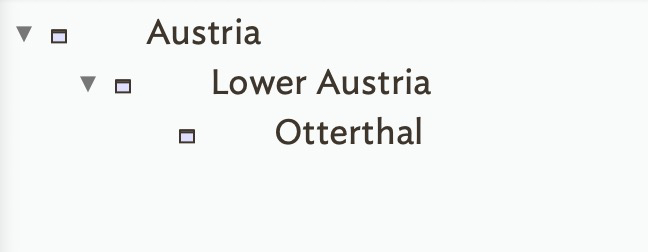
If so, suppose I walk in and choose some arbitrary note in your outline. Say “Otterthal”. How do we know whether Otterthal gets #, ##, or ###?
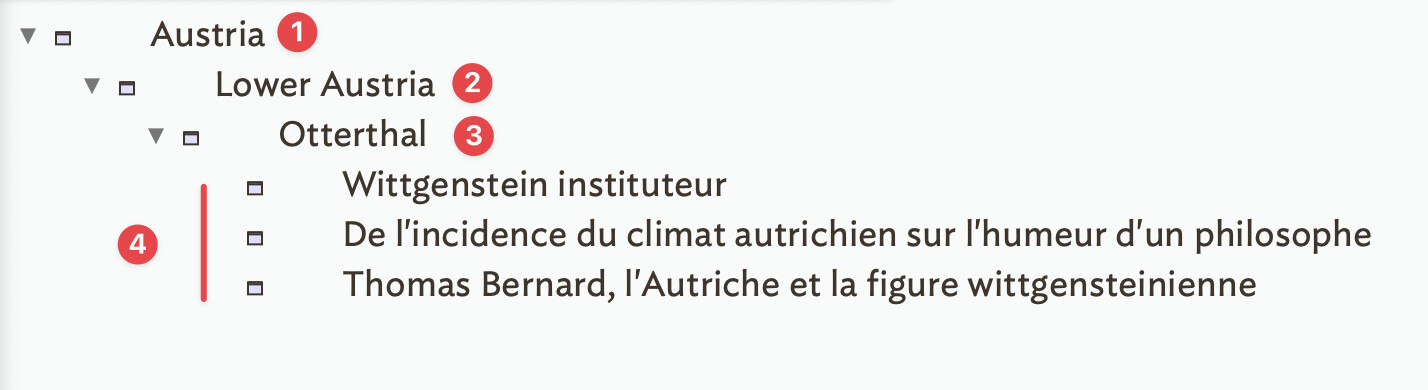
The Lower Austria container will be of level 2 and the Otterthal note of level 3.
Now, if I were to research Wittgenstein’s life during his time as a schoolteacher in Otterthal, I would need some material: an article by a French philosopher and a few reflections from my reading. This would make three notes arranged as follows:
The process is the same as the default HTMLO export template, in terms of process, we just need different code (Markdown not HTML for the headings. For the text of the notes, you just set up to use Markdown not HTML for ^text^.
So:
the exporting container uses a level 1 heading, and then H2 for child etc. (HTML/CSS generally only allows for 6 levels of heading
a note’s title ($Name) exports as that sections heading in Markdown form
a notes’s text ($Text) is included in Markdown form
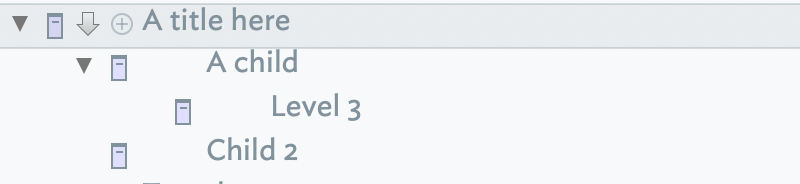
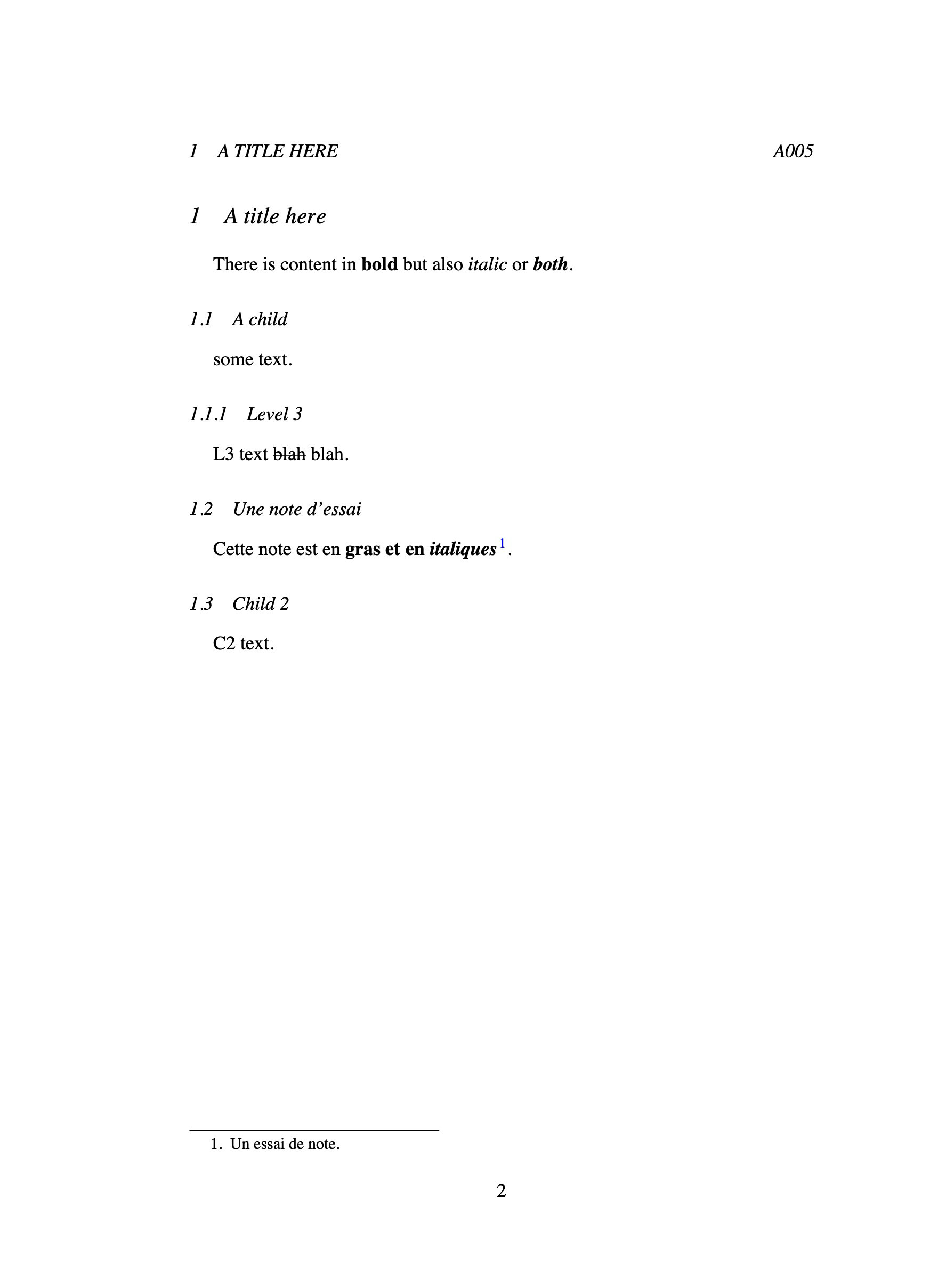
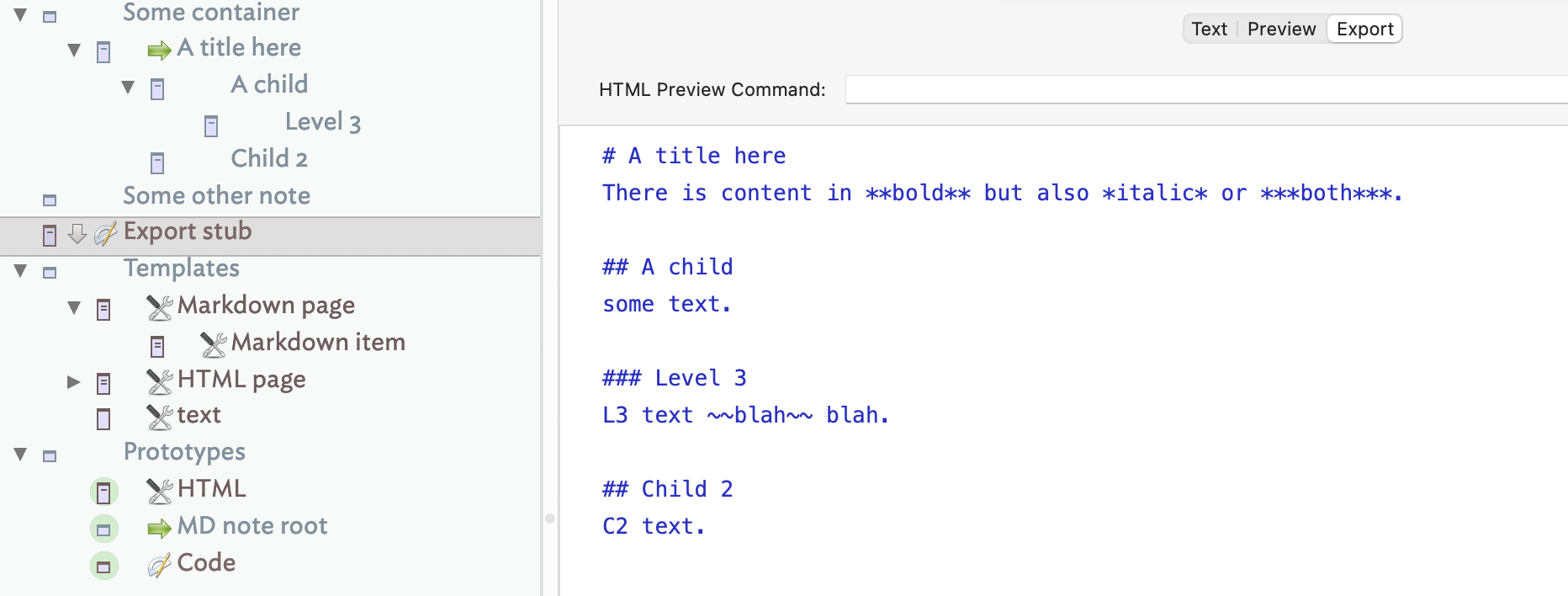
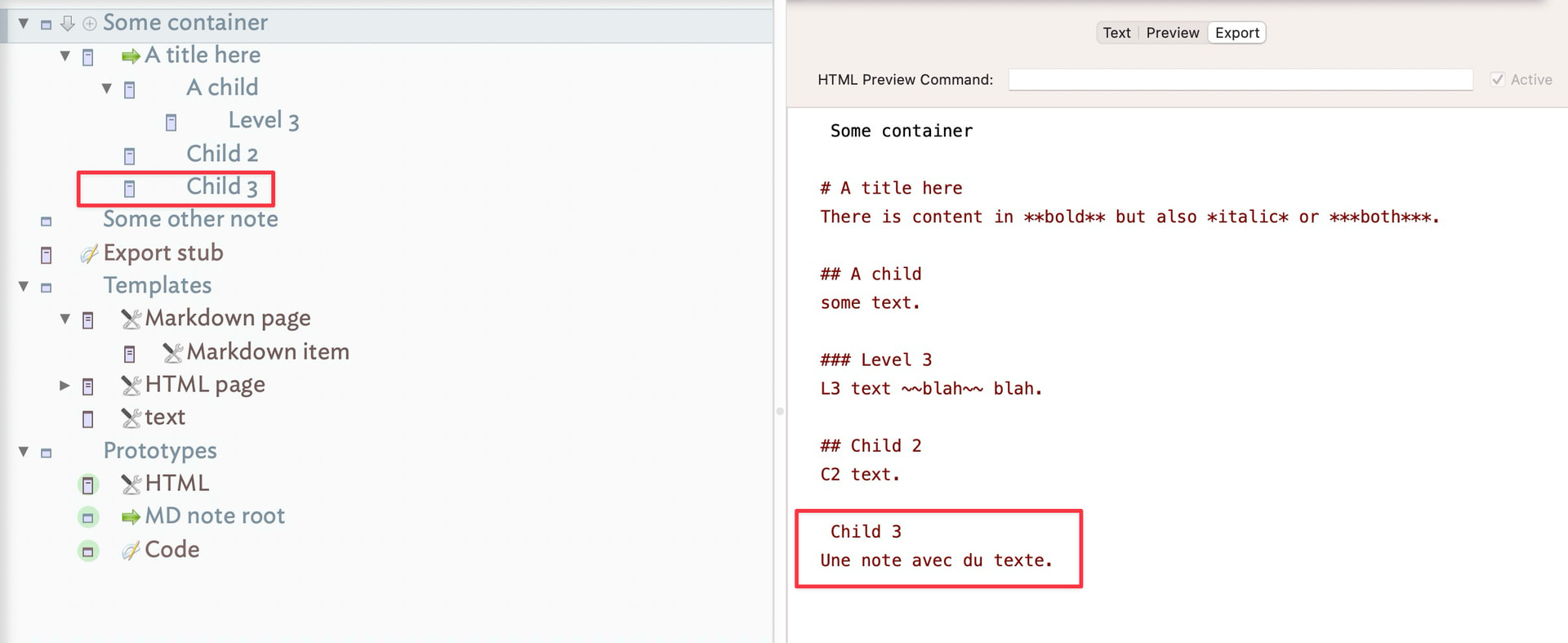
# A title here
There is content in **bold** but also *italic* or ***both***.

## A child
some text.

### Level 3
L3 text ~~blah~~ blah.

## Child 2
C2 text.
The templates (‘Markdown page’ and ‘Markdown page item’) were created by modifying the built-in ‘HTML page’ template. A copy of the latter templates is in the demo for you to compare
The $TextMarkdown attribute used by the templates in place of ^text^ needs v11.7.0 or later.
The heading level Markdown will only be correct if the exported container is at document toot level (where $OutlineDepth is 1). You can make that more flexible but I’ve not time to write all the extra code.
So some things to note but this does what was described as being needed. note there is different between notes whose $Text is written in Markdown but which export as HTML (or MD) but to write in styled text and export Markdown code you beed the new $TextMarkdown attribute.
The md-only-export1 file works perfectly, but when I copy and paste the Templates and Prototypes section and create my own notes, it no longer works. I fell like I’m missing something even when I try to reproduce the file you provided. I have the latest version of Tinderbox. I would like to understand what is happening so that I can then create similar files myself.
Furthermore, I’m wondering: how can I export once a file containing multiple level 1 notes? Currently, I can apparently only export a single container.
I’m going to give myself some time to try and understand. Thanks for your help.
One big convenience is to let all Level 2 notes share a prototype. That prototype (a) sets the template for the notes, and (b) has an OnAdd action that assign the Level 3 prototype to new children
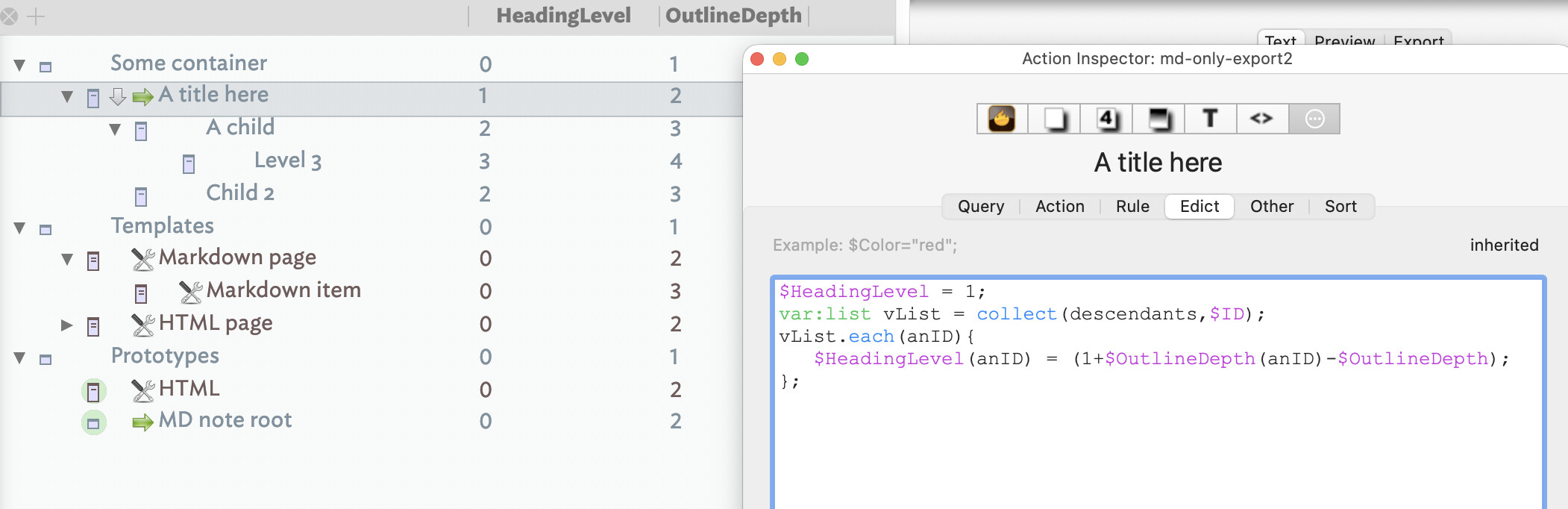
The displayed columns in the Outline are simply there to show the results of the calculated heading level.
Here, I use an Edict for the code but you could use a Rule, or even a stamp if you prefer. The method adds a prototype called ‘MD note root’, feel free to give it a different name but remember. Note the edict is disabled in the prototype. The code also uses a user Number-type attribute to store the calculated heading level for use by now revised Markdown export templates ($HeadingLevel replaces use of $OutlineDepth). If $HeadingLevel gets set for a non-exporting note in the descendants does no harm and is easier than filtering for such an occasional occurrence.
Here is the updated demo, versioned via a ‘Save As’: md-only-export2.tbx (88.2 KB)
I’d meant to do this for the original answer but today got busy on me.
Building on that, one other tweak. When the above example gets exported it goes to where it would export if the whole doc were exported, i.e. nested under several folders. Wouldn’t it be useful to have the content where needed but export it as if at root, so no enclosing unwanted folders? We can…
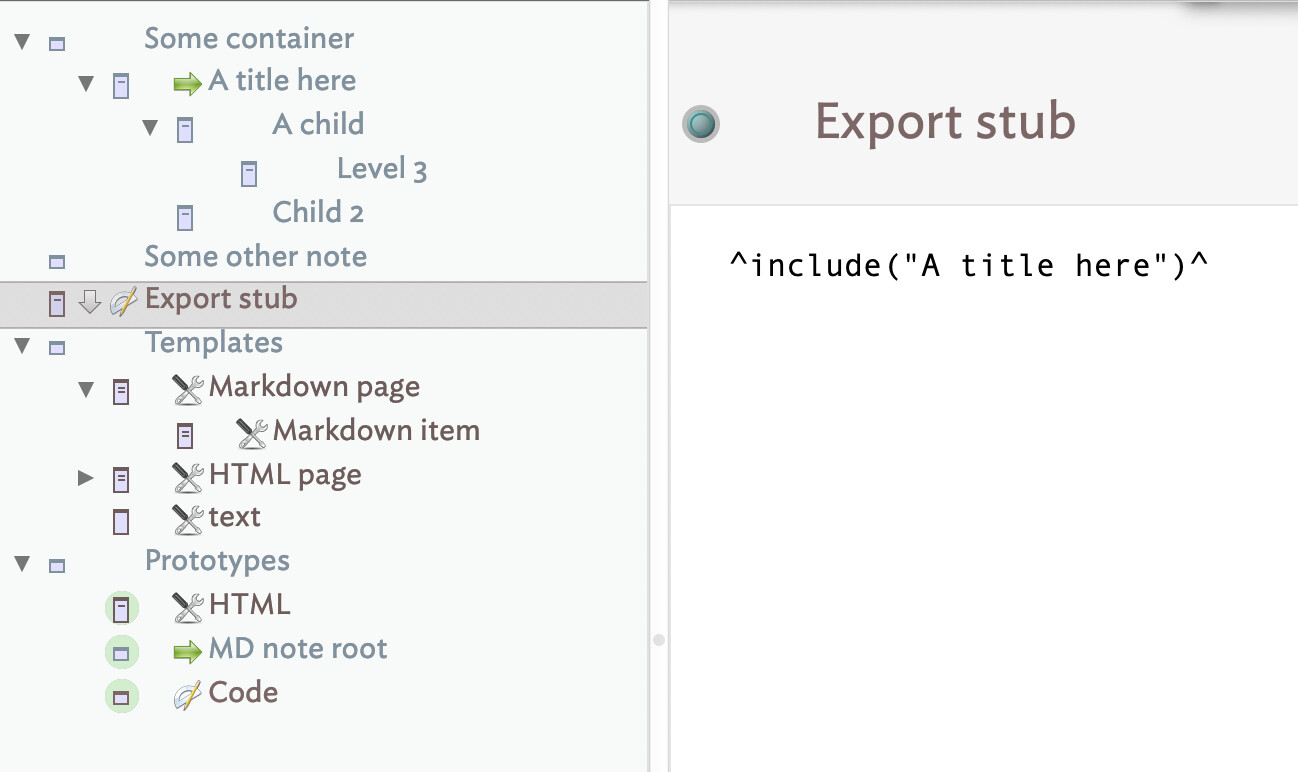
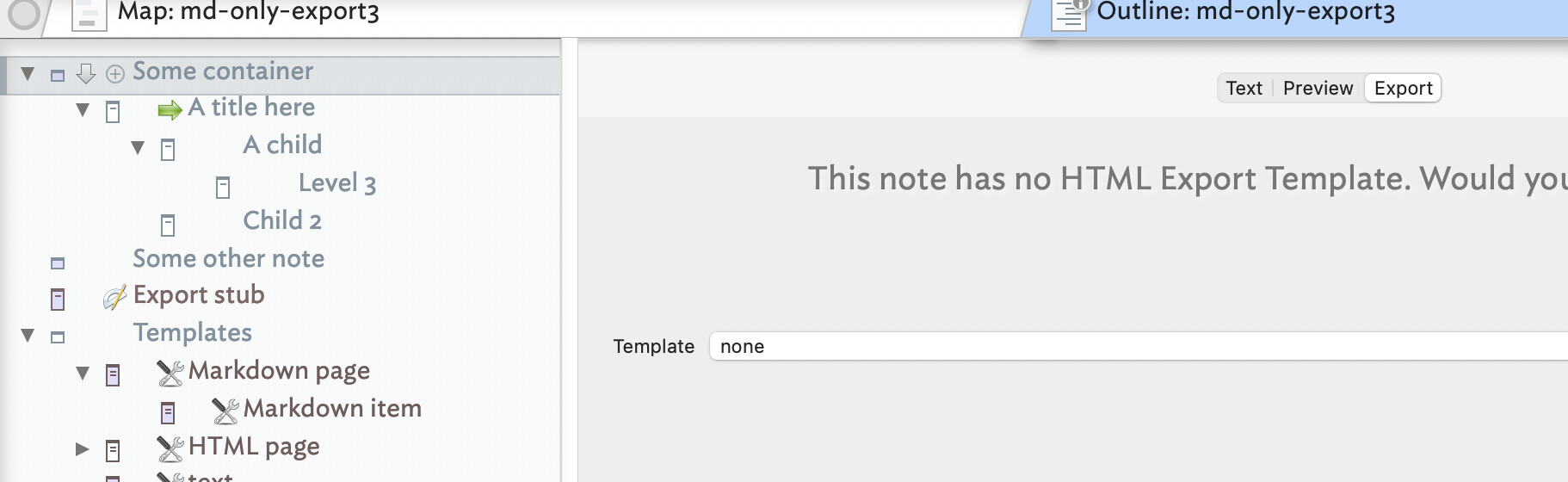
We add a a new root level note, which is now what we actually export. We give it the built-in ‘Code’ prototype so quotes used in export code in its $Text aren’t messed up. We add a new template ‘text’ whose only code is ^text^. Then, as shown above, we simply include the content from our actual Markdown report buried further into the outline using an ^include()^ call. The result:
So, as before but now our report is exported to the root of where the document exports. A small tweak, but a bit better fit & finish. I’ve TBX with 20-odd such reports exported at root but using content from elsewhere in the TBX.
Well, this broadens the scenario. I assumed you’d either be exporting to HTML as normal but wanted some parts to only use MD, or were only exporting one report.
Demos #2 and #3 just posted give you all the building blocks.
The chick-and-egg here is you have much control but you set it up. Note for instance, how the note ‘A title here’ is set to export but not export its children. The children are set to export, but never do as their parent container stops that. But, they are available to be using in the composite MD file we make. This are the details you as the document designer need to decide and implement. Help is on hand here, but as you’ve seen what in clear in out own mind needs more deliberate description in order for another reader to correctly catch all nuance of our plan.
Thanks for your precious help and, please, excuse me if my questions give the impression that I am the kind of student who does not listen to what is said to him and to whom things must be tirelessly repeated which, over the years, should be acquired, but when I try to reproduce the above procedure myself and add a note, it is not numbered and when I add a container to the container titled Some container, I am unable to export the entire document to markdown.
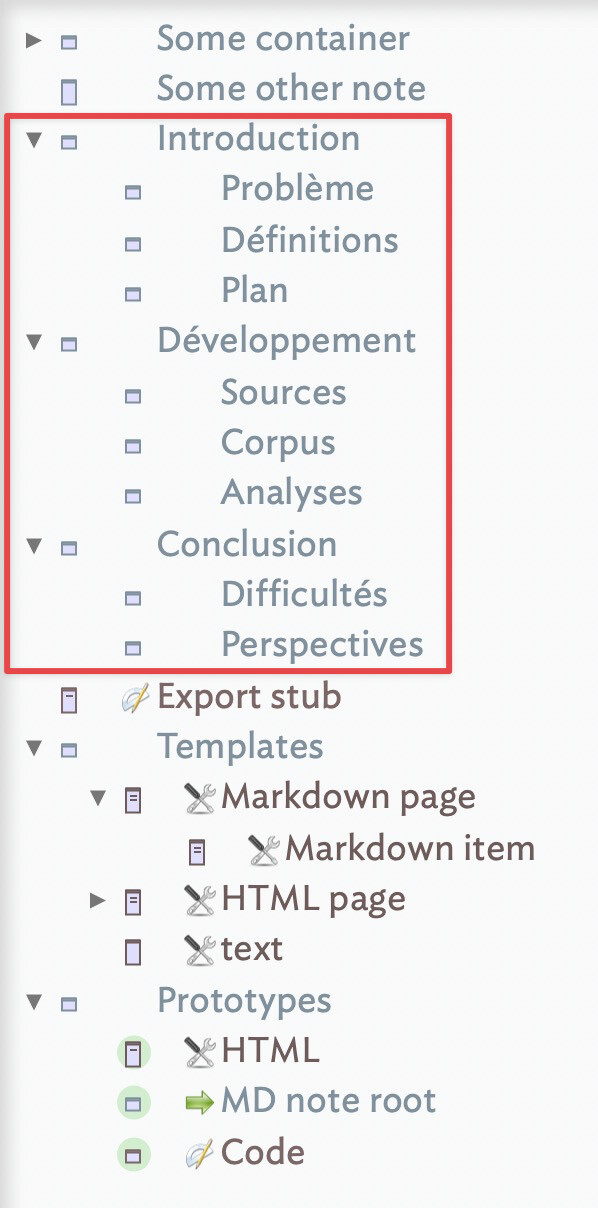
The document model I am thinking of has a very simple structure: like any research article, it has a level 1 Introduction, with level 2 or 3 sub-sections, as well as a level 1 Development, with level 2 or 3 sub-sections and, finally, a level 1 Conclusion with level 2 or 3 sub-sections.
My question is: how do I configure — what code should I use — my document so that I can export my entire file, from the introduction to the conclusion?
A good starting approach to your export questions is, having made sure there is at least one HTML export template in the doc, to export the whole document and look at what is exported. Why:
it gives you an understanding of where exported files of, e.g. they replicate the in-doc container structure in output folders. so a note at $OutlineDepth 3 will export 2 folders deep in the export location.
some contains * content like /Prototypes, /Hints and /Templates do not export by default—which actually makes sense. These are basically structural/control/configuration notes but which nonetheless are note in the document. Simplistically they are notes but not her ‘content’.
varying the template varies the content of a given file. so:
the ‘HTML page’ template export not only a note but the content of all its descendants, even though those descendants also export their own files.
the ‘HTML single page’ exports just the current note, so one exported file is one notes content.
regardless of degree of content, each exportable item exports to its relative outline position.
JSON, XML, Markdown, CSV/TSV, etc. can be exported instead of HTML. Export code is predicated on using HTML. But by customising templates and export-related attributes export can generated in non HTML forms. But you will need to consult available documentation, bearing mind the default no-configure approach assumes HTNML output.
^title^ and ^text^ encode for HTML, ^value(Name)^ and ^value($Text)^ give plain text version, ^value($TextMarkdown)^ gives styled text in Markdown encoding, etc., etc.
Top tip: don’t just work backwards from “I want it to result like this”. Think as well how the output is assembled: which codes are needed in the template, includes, etc. Otherwise you’re generally in a failure loop of “the outcome is wrong”. A wrong outcome is not always indicative of how it came to be wrong.
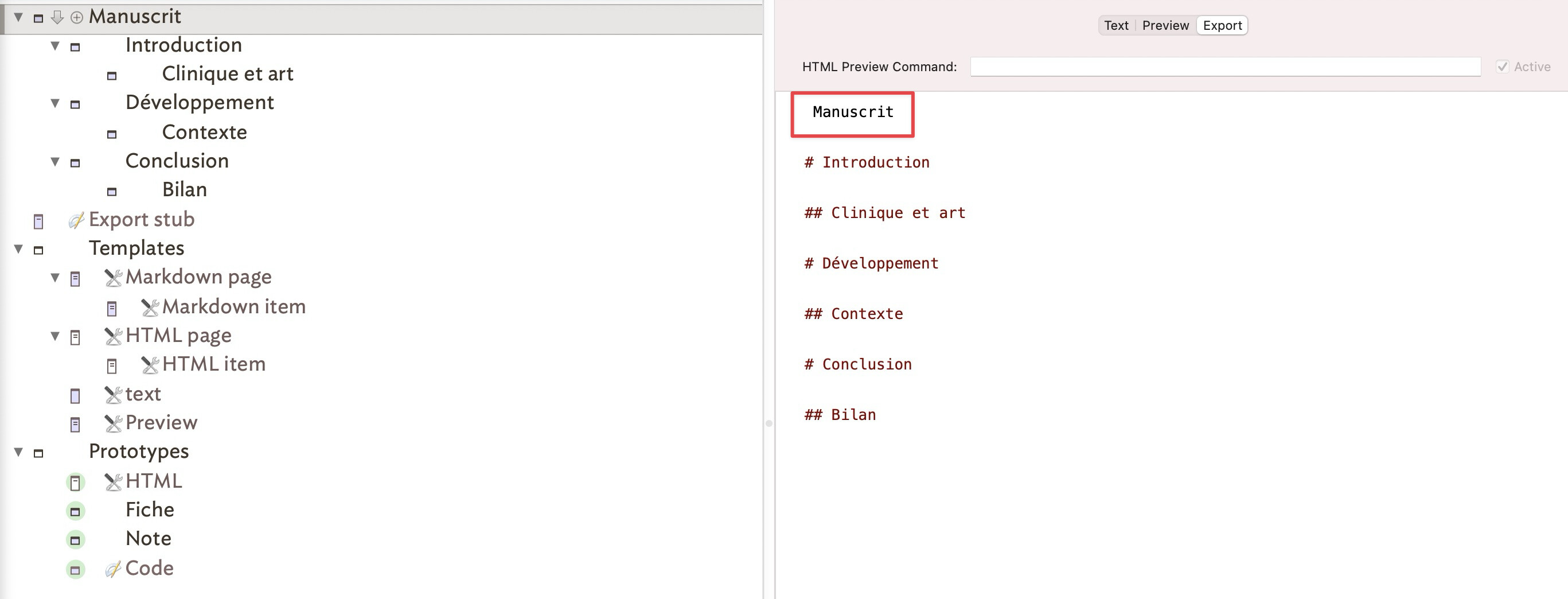
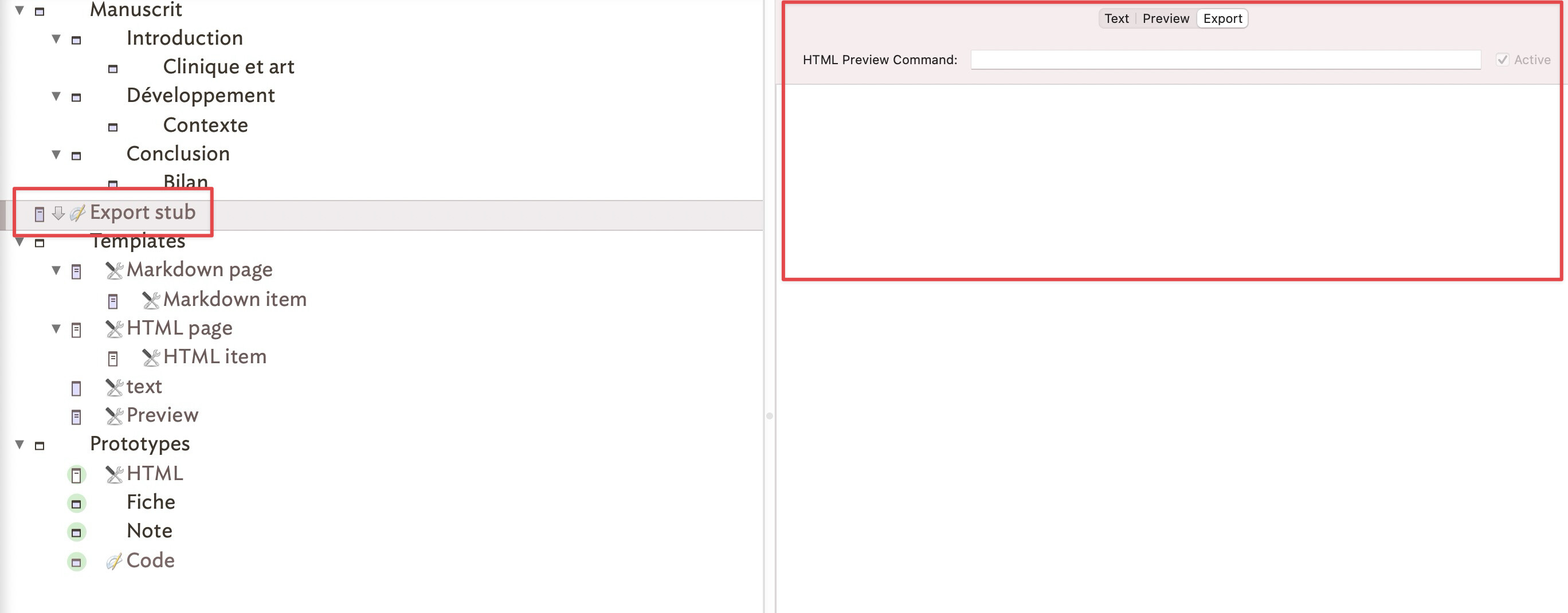
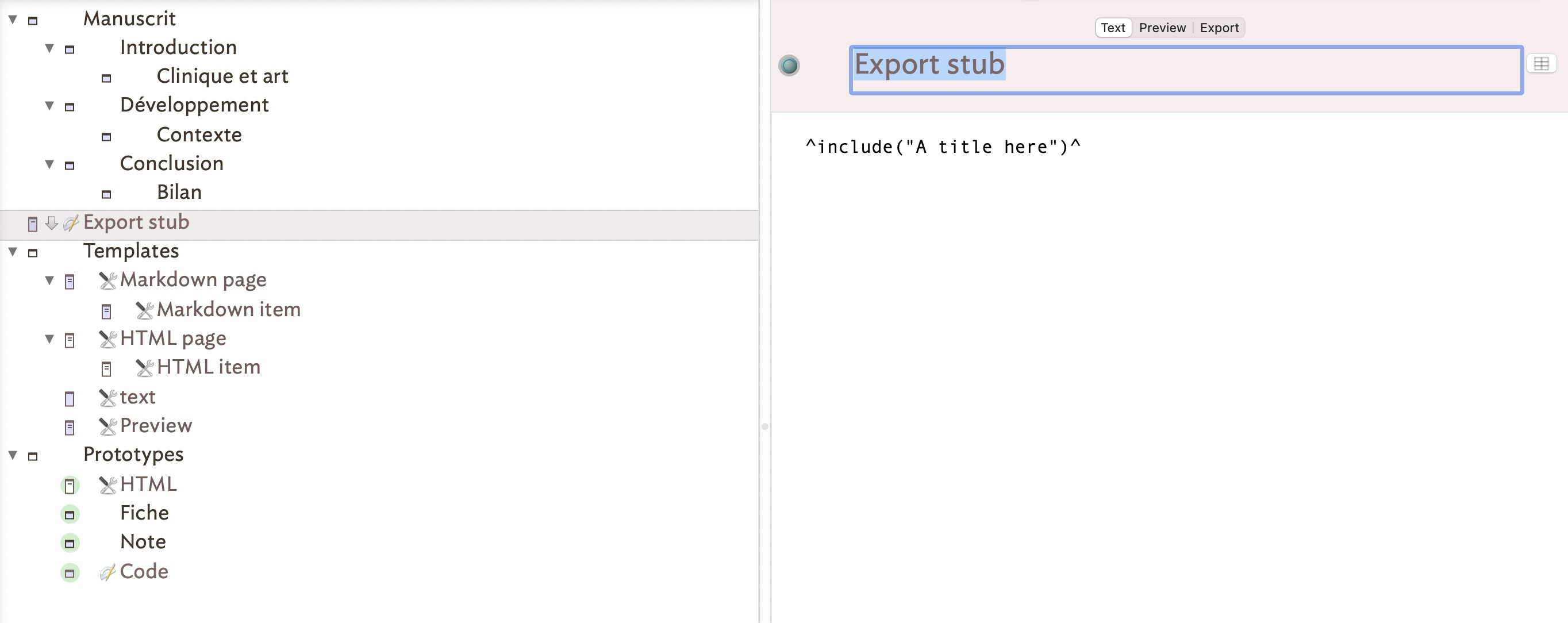
I’m almost there, but no matter how hard I try to understand and review all the elements of the inspector, I think I am clearly missing one element: as you can see on the screenshots below, the container name — Manuscrit — appears in the export section even though I don’t want it, and the section titled “export stub” does not show the container’s contents.
We need a bit more information. What is the $Text of your "Export stub’ note and what template is set? Is your ‘Fiche’ a copy of my “MD note root”? It’s my hunch but I notice the badge has changed so perhaps you made a new note prototype based on mine but didn’t copy all the customisations. The badge itself isn’t important, it is just useful when designing de-bugging to help give you a tell-back that you have set the right information.
I assume, thought is not stated, that you want ‘Introduction’ as the root container for export. in my demo, the equivalent (unwanted) container has no template set:
So I’m confused by your changes, given only a screen grab to work off . Can you shared the test document you show above. It’s probably much easier to look at that and see what isn’t working - though we also need a clear statement of what note(s) we are exporting (I think ‘Information’ and all under it) and from Where (I think via Export stub).
Side note, I can quite understand you would wish to translate my labels to French. A good idea is to change only one think at a time, check the export pane is still correct, then cane one thing, etc. Why, because the change might break code that refers to the original name of the home, i.e. don’t assume re-naming a note updates every reference to it. The same holder for attribute names. Still a look at your test document should indicate what has gone wrong.