NLNames and access to entries

Hi Folks:

I’ve found the following with NLNames … I am not able to use the pull-down arrow to see a list of these names … it might be similar to: Changed behavior with pre-populated set attributes which I reported previously. The difference here is that I am never able to see anything but none/normal in the pop-up.

NLNames.tbx (74.1 KB)

1 Like

OK, not 100% sure, but I think you need the built-in Hints container installed—it isn’t in your test file—for the NLNames built-in tagger to do its business (@eastgate, is this true?). It is important to understand that the $NLlNames is a calculated, read-only, system attribute. Furthermore, tagger-driven attributes are ‘owned’ by the tagger. It sets/removes values. In this context the ‘used’ values pop-up doesn’t really make sense.

Still, if the tagger finds names in a note, it adds them for that note. I’m nit sure how you set up your file, but, I made a copy, added the built-in Hints, reset the Displayed Attributes, re-added $NLNames. Note how the attribute name is in grey (because ir is calculated and a r/o value)?

Now, being read-only, the Displayed Attributes table row for $NLNames has not just no used values but, as expected, no pop-up menu at all

So how to report used values? The values() operator to the rescue! For all used values in the TBX:

$Text = values("NLNames").format("\n");

For all values for a given note, e.g. ‘List of Names’;

$Text = values("List of Names","NLNames").format("\n");

Or to use as a general rule/edict/stamp for the current note:

$Text = values(this,"NLNames").format("\n");

Here 's the demo file: NLNames-01.tbx (167.2 KB)
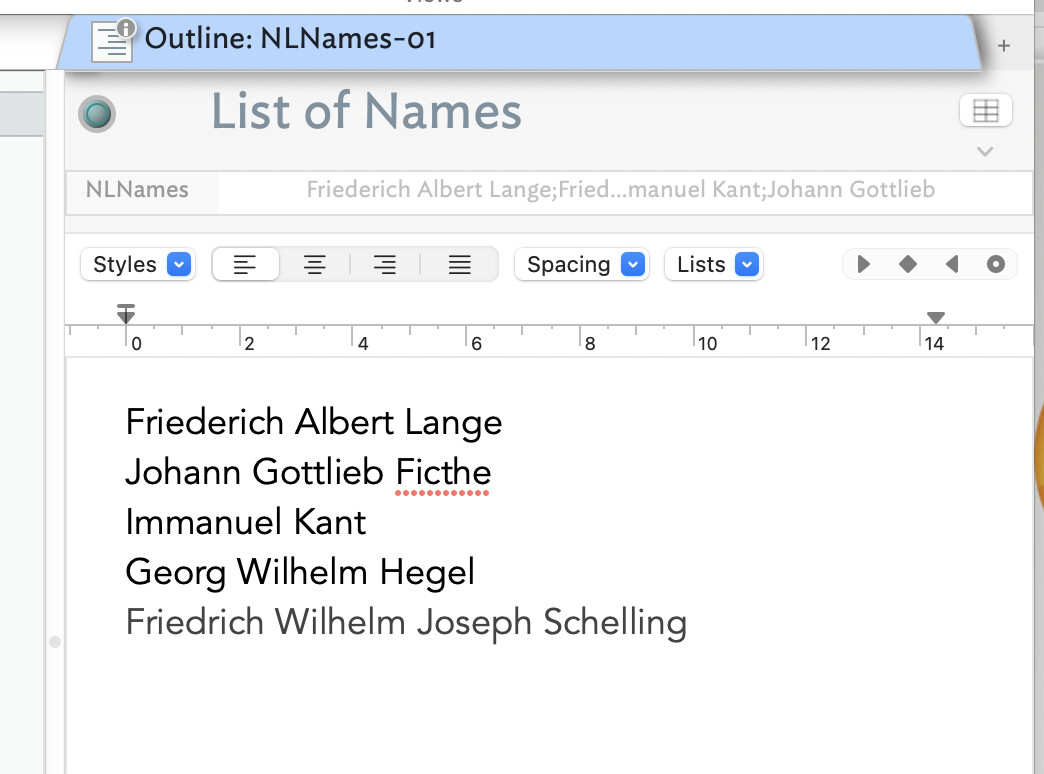
My example is artificial, however I do have a very large file which has a very long list of values populated in NLNames. It is quite ‘jammed full’ and when I look at the field the ‘…’ show that there is understandable truncation in the field. Naively, I had supposed that, while it is a ‘read-only’ attribute, I would be able to get a quick list of it’s contexts via the pull-down arrow to the right.

Here’s a riff on your file:

NLNames-02.tbx (168.3 KB)

I added TestPrototype and modified your edict there to create ReadableNames.
With this attribute I can enter the widget to inspect its contents.

In fiddling with this this morning I have also noticed that ‘sometimes’ there is a hover available on NLNames and ReadableNames which shows the full content … but this is unpredictable. Once or twice the ‘pulldown’ for ReadableNames was all populated with all values checkmarked as I would expect.

Thanks for the tip on parsing the built-in attribute.

I hear you. Have you considered setting the # lines setting for $NLNames to a higher values?

See System Inspector, and see the section on Lines. Note that you can have between 1 (default0 and 7 lines for String/List/Set/Dictionary (only) type attributes in Displayed Attributes.

Well you never disappoint!

This is a wonderful feature I was unaware of.

1 Like