Padding with leading "zeros" - trouble with function

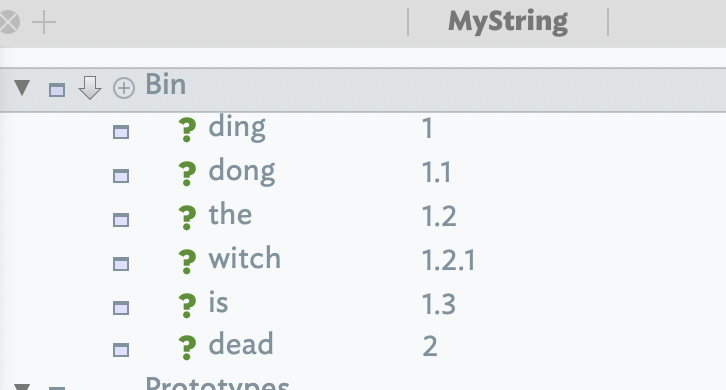
I have code that assigns section numbers to notes within a container: 1, 1.1, 1.2, 2, 2.1,2.2, 2.2.1, etc.

This is working well.

For better sorting I sometimes want to pad with leading “zeros”, e.g. 01, 01.01, 01.02, 02, 02.01, 02.02, 02.02.01 etc.

I would like to put this in a function.

I thought I had this going well until I ran across the problem illustrated in the attached tbx.

Test padlist.tbx (133.1 KB)

This is my padding function:

function padlist(aList:list,decimals,width,padchar:string){
	// pad section numbers for better sorting

    var:list result;
    aList.each(anItem){
        result += anItem.format(decimals, width, padchar);
    };
    return result;
}

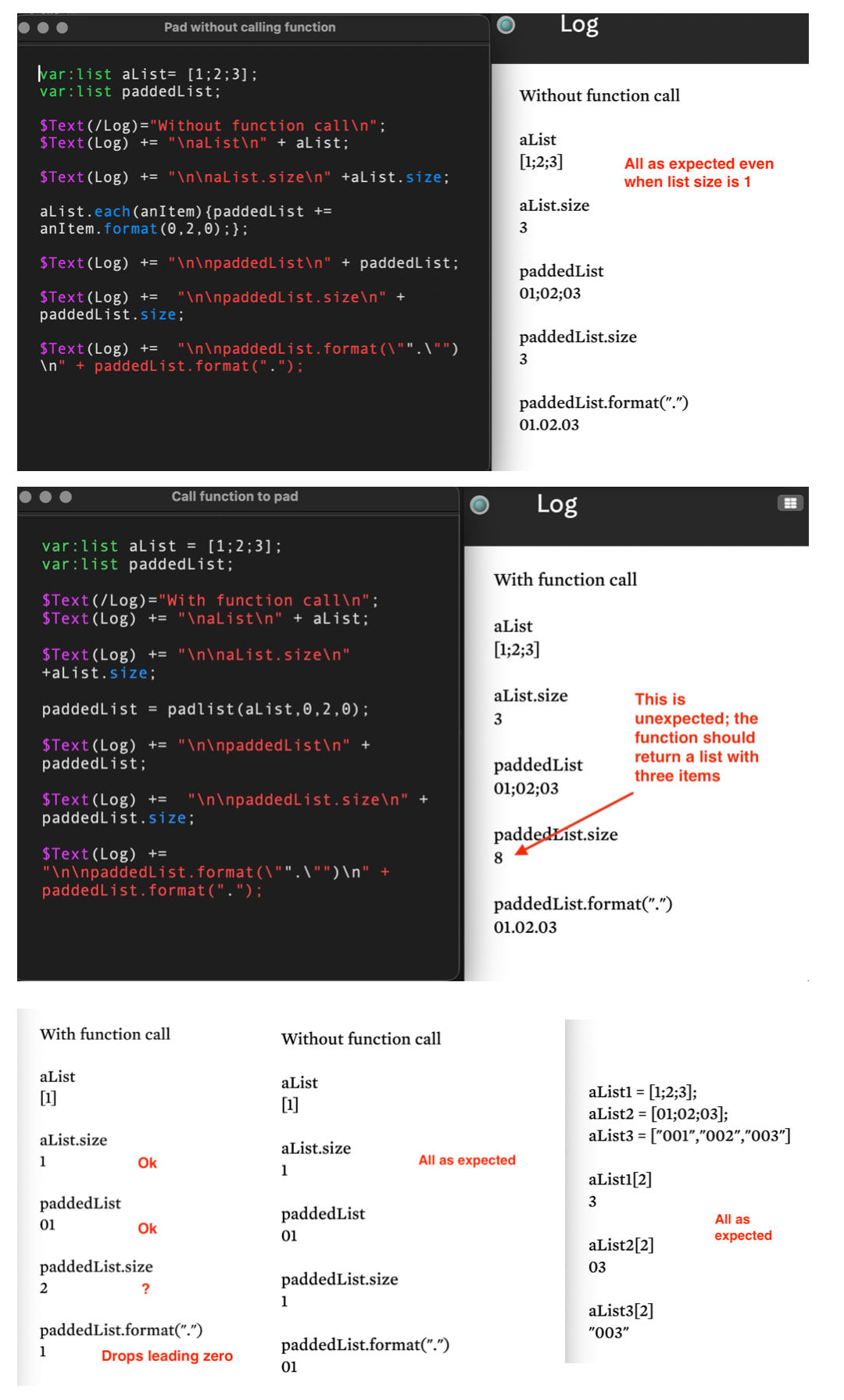
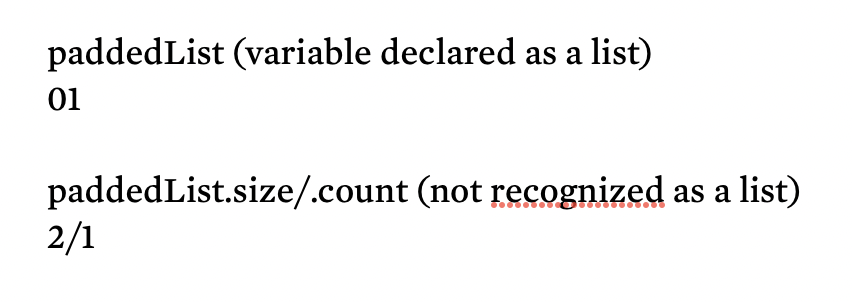
It works as expected when the list has more than one item. But when the note is top-level, i.e. the list of sibling orders has only one item, the leading 0 is dropped. Judging by .size, in all cases the function seems to return a string rather than a list.

Similar code not placed in a function gives the desired results, i.e. it does not drop the leading 0(s) when there is only one item, and list.size is as I would expect.

In the test tbx, I have two stamps, one calling the function and one not. The output goes to the text of the Log note.

I directly edit the list in each stamp to test for one item only.

What am I doing wrong in the function? Or is this an anomaly?

(Unrelated but discovered along the way: list.slice() perhaps deserves an entry in aTbRef if it is not already there-I couldn’t find it and for a while assumed Tinderbox didn’t have it.)
I may be wrong, but I suspect the problem is that, despite the format() operation, Tinderbox thinks that you are constructing a list of numbers and dropping the leading zeros.

That is what I suspected at first. But after flailing around I don’t think so. Here’s my inexpert reasoning.

When the list has more than one item, leading “zeros” are retained with code run directly in the stamp. They’re also retained when calling the function. Everything is fine.

But when the list has only one item (not infrequent with section numbers) the leading zero is dropped when calling the function. But not when similar code is run directly in a stamp.

There seems to be a problem with an edge case–when a list has only one item.

And another puzzle: even if Tinderbox did think I was constructing a list of numbers, why would it report the size of the constructed list as the length of a string, rather than as the number of items in the list, e.g,. [01;02].size as 5 rather than 2?

As demonstrated in the test file, this only happens when calling the function. Code run directly in the stamp reports the size of the constructed list as 2.

I’ve come up with inelegant workarounds. But I am puzzled by this.

I took a run at your rest do but have up, precisely for the type coercion issues mentioned. Stepping back, why make a just to make the new sort criteria. As the article numbers aren’t built-in you likely already use already use code to make the ‘print’ number. Why not make the sortable version (string) when adding the section numbers. Usefully, if the numbers need to change, the look-up value can.

FWIW, this container, sorted on $Name, gets the order right:

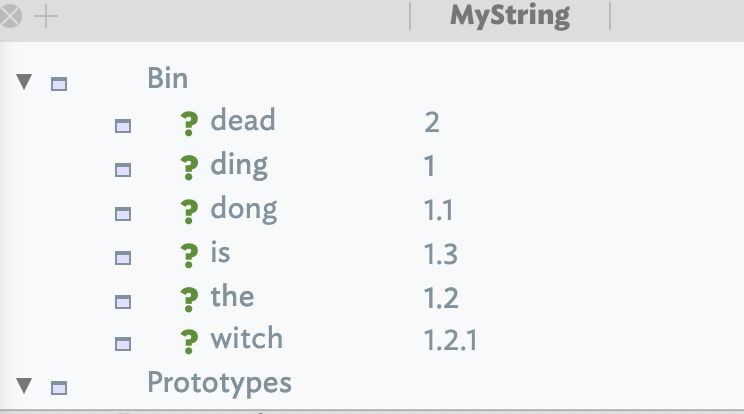
So, maybe, we’re overthinking this. Save the section number to $MyString (or other user string attribute) :

Now sort the container on $MyString and:

Another factor. It is highly unlikely, unless working in a single map, that the section numbering will not follow outline order. So, you could collect() the $IDs of all the notes with a section number, then sort that list if items based on their $OutlineOrder.

Of course this may be unsuitable due to additional contingent factors not stated in the original.description.

Thank you for the helpful suggestions! The attached test tbx gives more context.

Test MDHeadingLevel SectionNumber.tbx (186.1 KB)

The idea is to be able to select any container somewhere in the outline and “stamp” it to section number its contents (and also add markdown heading ##).

I think numbering has advantages when feeding exported material to an AI beast. When it does its thing I can ask it to regurgitate the relevant section number.

But once outside Tinderbox things can get messy and out of order. Padding the section numbers can help keep the sections sortable. (If I have over 10 sections,10.1 will sort before 2.1, whereas, padded, 02.01 will safely sort before 10.01, etc).

You will see that I have a “hack” in the padSectionNums() function to deal with the (frequently occurring) edge case of a one-item list. I wonder whether that hack should be necessary. Is there something wrong with my use of a function or could there be something a little off in the way Tinderbox is handling an edge case?

But code is good at this sort of thing ng. If your sort values are (re-)calculated by a rule or edict )or even a stamp, you can check fro the biggest child count (0?, 00?,. 00?, etc.) and recompute sorts.

Though it seems more work up front, experience taught me that if doing this sort of work, never assume where the root lives in the source document of the number of children/descendants. Hard wire anything and Nature knows to bite at our hubris. thanks fully action code today is capable of dealing with such emergent flexible needs.

Not sure I follow how you do that. Would love a few more details. It seems that would be within Tinderbox, and I could use that.

Once exported, though, I’m pretty sure I can save future trouble by having the section numbers associated with each chunk of text sortable. (Padding is an old trick with spreadsheet sorting.) I could export a separate sort field, of course, but that’s one more thing mess up.

In any case, I’ve got the padding thing going, with a hack. I still wonder. Is my function written wrongly? Or am I right in suspecting Tinderbox is coercing from list to string where it shouldn’t, with perhaps in addition some confusion with an edge case applying .format() to a one-item list?

Child count. At any given nested level of your hierarchy-you want to zero pad string-ified numbers so that they sort lexical in a ‘correct’ manner. So:

  • WRONG: 1, 12, 2
  • RIGHT: 01,02,12

but if there are >99 items in the first series, wee need to be using more padding, i.e. 001,002,112. The same consideration needs to apply to each nested series., i.e if my sectioning is 1.4.6, each of 3 discrete series needs padding though not all may need as much. You could use the highest padding for all series or as much as you need, e.g. 001.4.06 where section #1 is >99, section #2 is <10 and section #3 is <100.

TIP: an overlooked issue, as the human brain does the switch internally but code doesn’t, is the difference between lexical sort and numerical sort: Lexical vs. numerical sorting. Here we are using what we think of as numbers (although 1.1.1 is not a normal number) but are actually treating them as if strings.

As suspected, the ‘root’ of your numbering is not tied to $OuLineLevel but if we use code and cascade (recursive) down the outline sub-branch needing numbering was can easily just number that. The same code process can populate both the print-ready string (1.1.1) and the ‘sort-able’ version (01.00101. Whereas the former just uses $SiblingOrder for the latter, you need to first figure the last sibling number and use its length to inform the padding, e.g. if the last is >100 but < 1,000, you want all numbers to zero-pad to 3 characters regardless of initial number length: so, 001, 010, 100.

“shouldn’t” is the wrong framing here. Tinderbox doesn’t type, per-list-item, data inside a list, A list is a string [sic] of semicolon-delimited values. So I think Tinderbox will parse items (but not fully tested) different for these two lists:

$MyList1 = [001;002;003]; // $MyList1[2] gives '3'
$MyList12 = ["001";"002";"003]; // $MyList1[2] gives '3'

However, making the latter list in code as opposed to by typing can be challenging. Essentially we are in an unintentional fight with type-assumption/auto-conversion.

The method I outline above, that builds a ‘section’ label segment by segment rather than iterating of lists means the type coercion is avoided. A better of picking one’s battles. Neither app not user is wrong hear, just unable to always unambiguously signal their intent or to understand the other’s.

†. Edge case: if some siblings are not to be labelled/exported then you need to write code to figure the sequential per-level number.

In this case I think “shouldn’t” may be the right framing. I’ve always thought of the data inside a list as string, especially the results of .format(). Tinderbox does exactly the right thing (from my perspective) with code outside a function. But when doing the same operation by calling a function it doesn’t seem to recognize the returned result as a list (of string items). A clue to that is that it clearly gets the size wrong (whereas it gets the size right when no function is involved.) And then there’s the oddity of dropping the leading zero when formatting a one-item list, which doesn’t happen when no function is involved.

So I still think either my function is awry or Tinderbox is doing something that it shouldn’t, or both.

For illustration see the following screenshots generated by this successor to the first test file upthread. Test padlist 2.tbx (141.4 KB)

It would be great if another look could be given to this. I just edit the list in the relevant stamp and look at Log.

To be clear, my speculation was that the elements of the list were being incorrectly interpreted as numbers when they are intended to be strings. Numbers in Tinderbox tend to be duck-typed: if a string can be treated as a number, it typically is converted to be a number.

Tinderbox functions do not have return types; Tinderbox deduces the return type of a function from where the result is stored:

$MyLIst=foo(423); // returns a list
$MyString=foo(423); // returns a string

1 Like

Thank you! That clears away the fog (I think).

Here is my understanding in inexpert terms. Is this more or less right? Perhaps some more expert clarifications could be included in the relevant sections on functions in aTbRef.

Variable types can be specified in parameters of a function by something like parametername:list. A type can also be assigned within a function with var:list variablename. These types are recognized within the function.

But the types of any values returned from a function are not retained. For example, if the function returns a variable that has been declared as a list within the function, Tinderbox may–but does not necessarily–interpret that value returned as a list. That will depend on what the data looks like (“duck-typing”) and where it is stored.

Assigning the value returned from a function to a variable in action code that has been declared as list type is not sufficient for the returned value to be recognized as list. To be sure Tinderbox recognizes it as a list the returned value (currently) must be stored in a list attribute.

When I do that, my function works as expected, even with a one-item list, because Tinderbox knows it’s a list, instead of guessing it’s a number from which .format(".") strips the leading zero.

Or in a list-typed local variable.

Not sure what that is. My paddedList variable is list-typed. But it’s not a local variable?

I think the point being made is that as long as the receiving object, be is n attribute or a variable is of the desired type, that result should be as expected. Put another way, in an A = B operation, A’s type wins out if there is a possible coercion of different types.

I don’t think the means it is a bad idea that the return output of a function isn’t defined to a type at source, i.e. outputting a list from a List-type attribute or variable in the function. But, it matters as much that the receiving object of the output is of the desired (List) type.

I’ll see if this isn’t covered in aTbRef and if not, add some clarification.

1 Like

Yes I now see that, and have no problem with the idea. The flexibility with types is convenient in many situations.

But note that in my example on the receiving end I have:

var:list paddedList;

paddedList = padlist(aList,0,2,0);

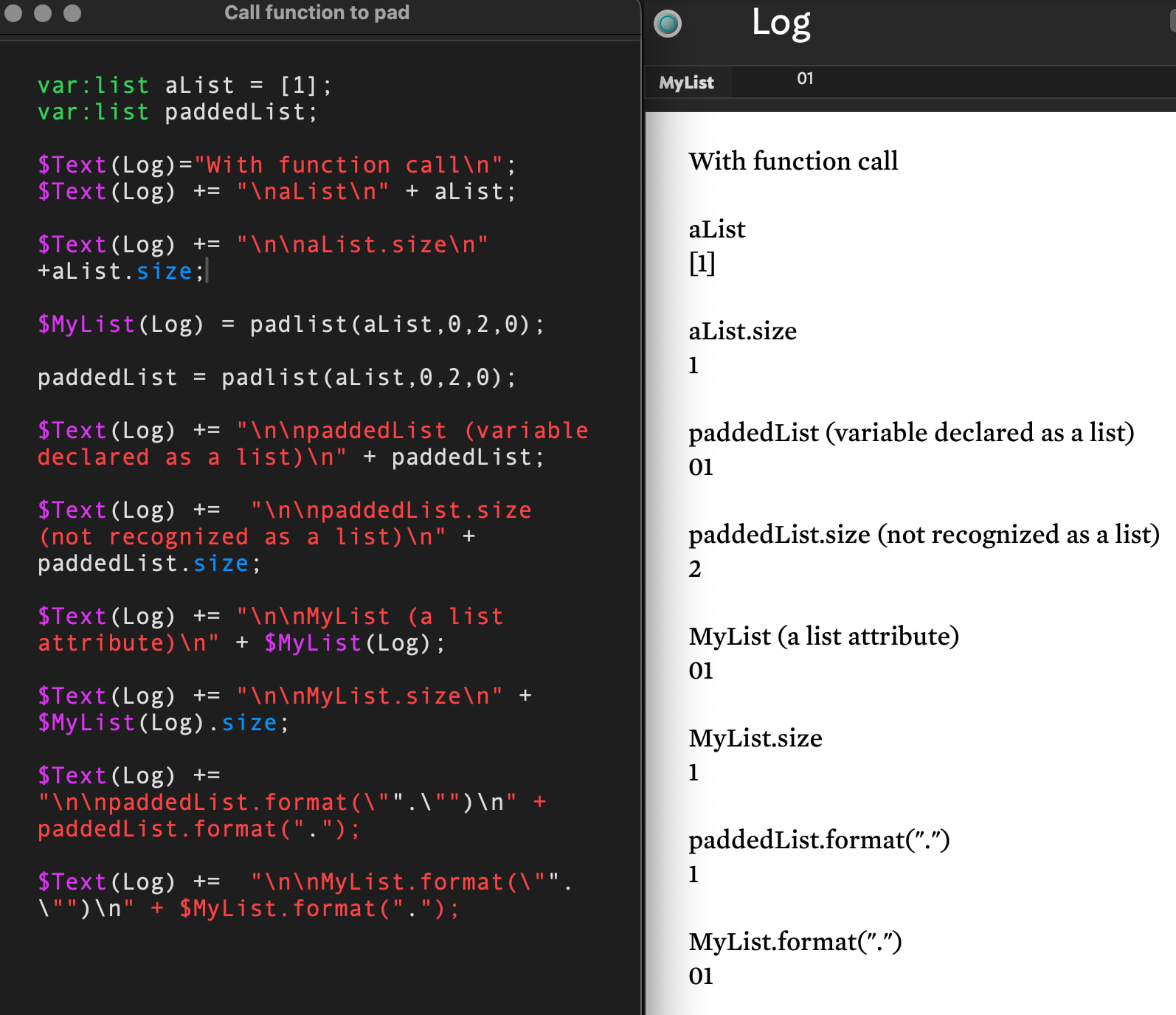
I originally assumed that a typed variable on the receiving end meant Tinderbox would recognize what is returned from the function as a list. At least in my tests, it does not.

But when a list attribute is on the receiving end, e.g.,

$MyList = padlist(aList,0,2,0);

Tinderbox does recognize what is returned from the function as a list, and I get the results I expected, even with a one-item list.

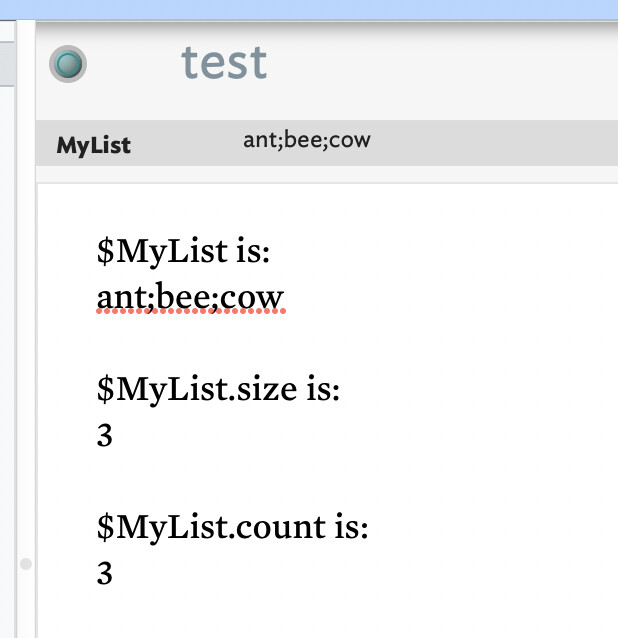
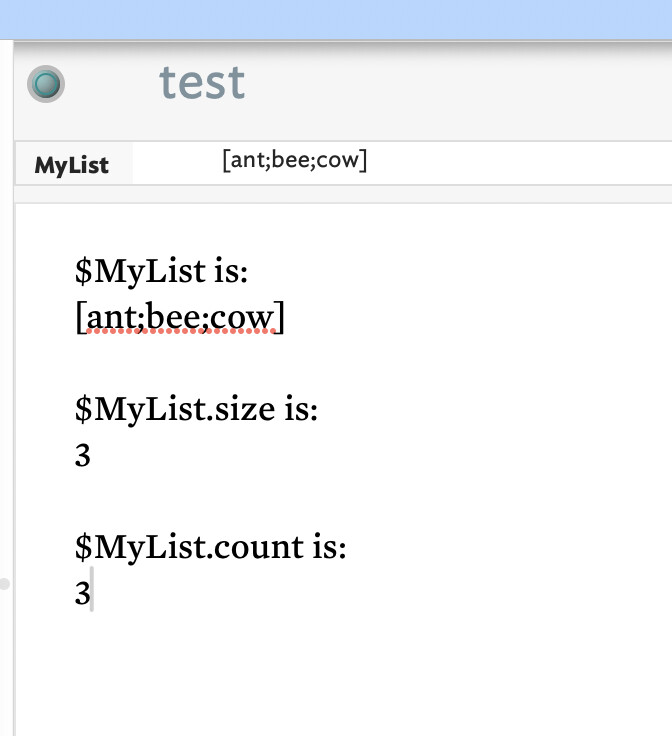
See screenshot above, or

Test padlist 4.tbx (149.5 KB)

1 Like

One oddity spotted:

function padlist(aList:list,decimals,width,padchar:string){...

Note the explicit typing of padchar:string. So we expect argument #4 to be a string. But in tests we see it passed as a number:

paddedList = padlist(aList,0,2,0);

when surely the expectation is:

paddedList = padlist(aList,0,2,"0";

Otherwise we’re now forcing Tinderbox to guess our intent and it may be this is part of the seeming edge-case fail. Regardless, on the principle garbage-in/garbage-out, if we stipulate a type for an argument we should provide a literal or typed-value of the stipulated type. Testing it makes no difference—Tinderbox guessed correctly our intent.

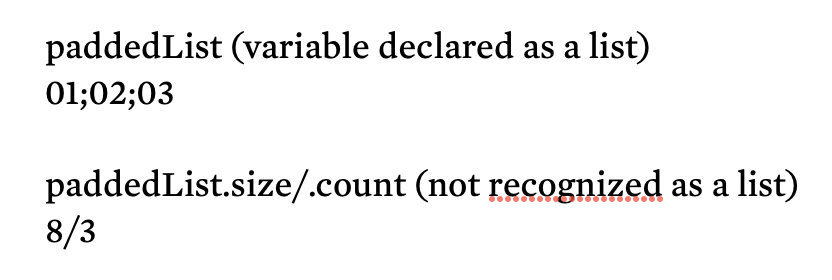
Testing with ‘Test padlist 4.tbx’ I note, whilst Tinderbox guess correctly with the above, I can see there is a difference between the behaviour of .size and count. We see .size gives the character count of the list as string, but .count the number of list items. Using a slightly edited stamp, for a list:

for a single item list

I note my docs show both list.size (added in v5.7.0) and list.count (added in v6.4.0) as reporting the number of list items. Checking in the v5 ‘Release notes.tbx’ and the v6+ ‘Notes.tbx’ from which aTbref builds out, I see no reference of a disparity.

I’m not sure what is happening here.