I’m pondering Tinderbox export to LaTeX, which seems to be increasingly prominent in academic publishing. I’m not very experienced with LaTeX, and would very much like to hear from people who are — especially if you’re doing Tinderbox ➛ LaTeX.
3 Likes
A related consideration: macOS 26 doesn’t install any form of LaTeX by default. So, there are two parts here:
- making valid TeX text (source for generating LaTeX documents)
- the downstream use
My observation is that very few (fewer amongst non-programmers) understand how it works or can configure their own LaTeX. Some know how to write basic TeX but likely do so in some form of an IDE (that helps with all the macros for style/structure/etc. Most just want a LaTeX generated PDF, which is why they use the like of Overleaf (certainly amongst academic authors†) as it needs near-zero configuration or installation.
TBH, I’m not sure lots of academic want to use LaTeX. It is more than it is less flaky (if more seemingly code-y) than MS Word. I don’t think most authors care about the finesse of their tools as their attention is elsewhere. Tinderbox users are atypical in that regard, or again are simply refugees from worse writing tools.
This article, which I wrote early in v5’s life c.Jan 2010 (see) seems to hold up pretty well on the basics. But the problem you face is that a whole generation of people have been used to working on styled render, or part rendered (styling codes+visual styling) writing. It’s a multi-denominational bunfight where most cleave violently to their tribe’s own ‘true way’ of how things work.
Plus, TeX—at least depending on the flavour you use—isn’t entirely sure footed when it comes to fully unicode text. Hit up the TeX forms and the longer residents will gently remind one that LaTeX is—at least to their view—for typesetting print so and this modern digital/online stuff is unwanted annoyance.
TL;DR I think ‘LaTeX support’ needs careful bounding and some expectation management. Still, we survived the arrival of the Markdown-istas about a decade back and that support doesn’t now seem controversial (even if it made preview a lot more complex). So, why not?
Disclosure: I use LaTeX but only for academic and academic adjacent writing. I keep the current Mac TeXLive distro installed and updated‡ but in recent years I really only use Overleaf. Why? (a) my academic affiliation lets my Overleaf account share projects for writing or just comment. (b) Though the Overleaf TeX engine is not updated between annual MacTeX distros and so is normally 6-9 months out of date, it is good enough for my needs. (c) I don’t have to maintain the LaTeX infrastructure nor understand how it works. (d) the mysteries of multi-pass rendering (as needed by thinks like numbered style referencing) are just done for you.
†. Another neglected upside is many academic authors have a licence allowing shared documents/projects. Rolling your own shared set-up and allowing for different user TeX update states, etc., is beyond most I’d suspect.
‡. Mainly because my PhD thesis needed something with standard Uni account installs couldn’t manage. I sort of understood my LaTeX code hacks then. Pertinently, I don’t now. 
I’m thinking, “What settings would make it easiest to move a Tinderbox note to Overleaf with as little friction as possible?” For example, I’d like italic passages to be exported as \textit{…} or \emph{…} instead of … .
I think this is common enough to warrant a built-in prototype.
3 Likes
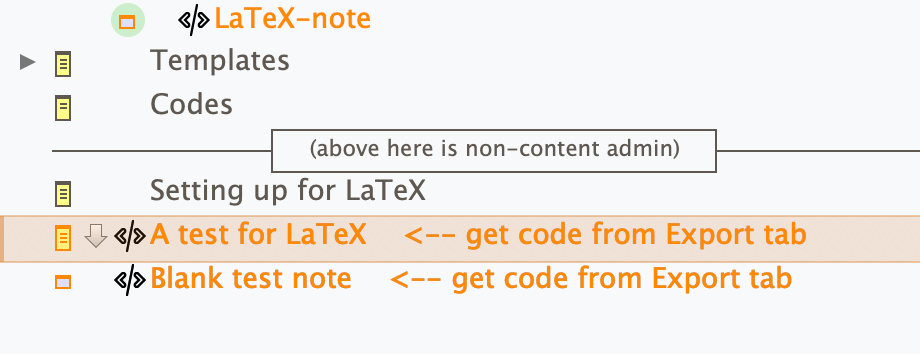
Well to get the ball rolling here is my old v5 file updated a bit. The LaTeX codes are stored in various HTML group system attributes which have been altered at document level. A ‘LaTeX-note’ prototype adds a Display Expression indicating that the LaTeX code is collected from the Text pane Preview tab and an export template ‘LaTeX template’:
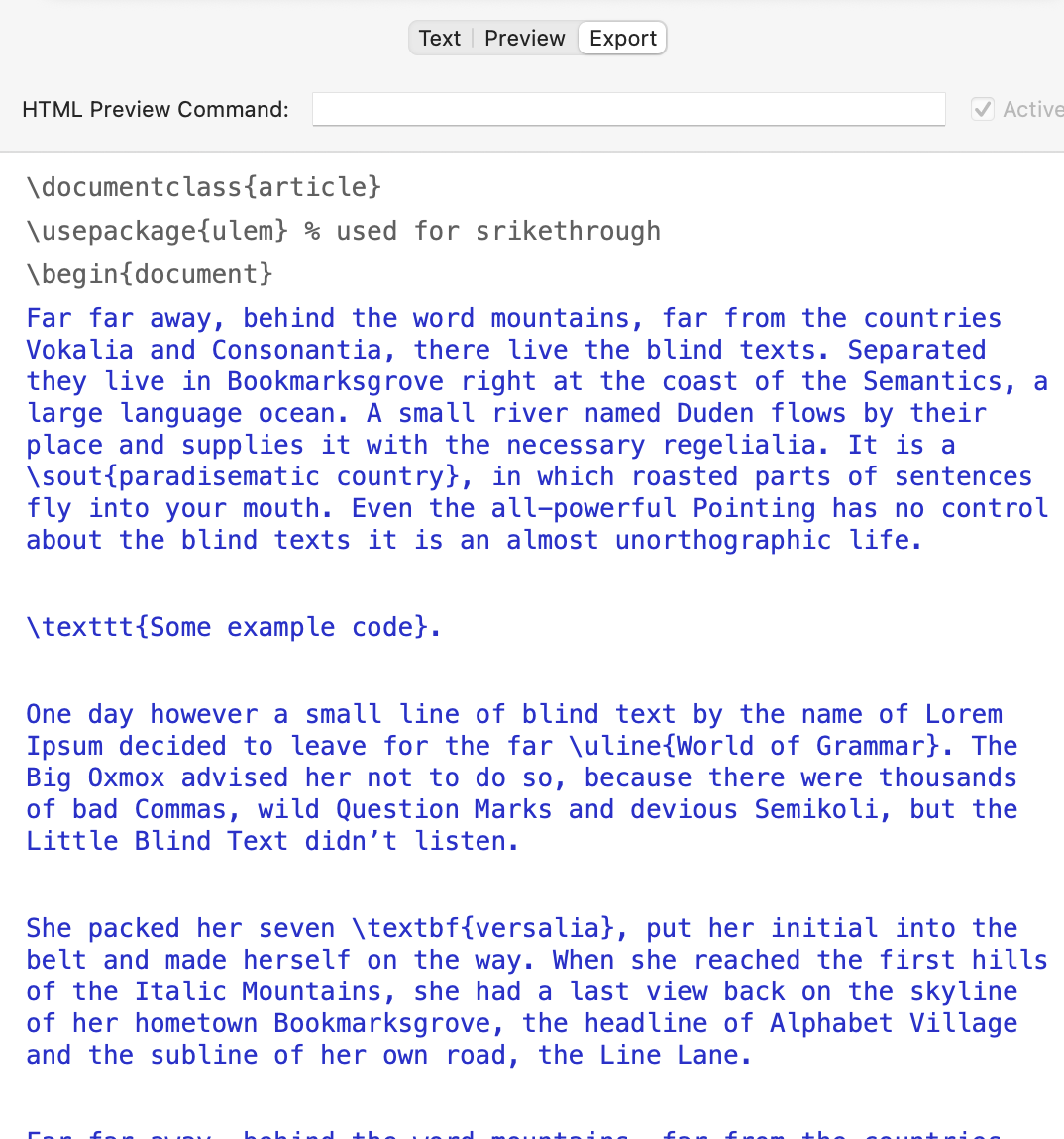
\documentclass{article}
\usepackage{ulem} % used for srikethrough
\begin{document}
^text^
\end{document}
Two specimen notes are provided, using the prototype. the second in blank, the first has $Text including some basic styling.
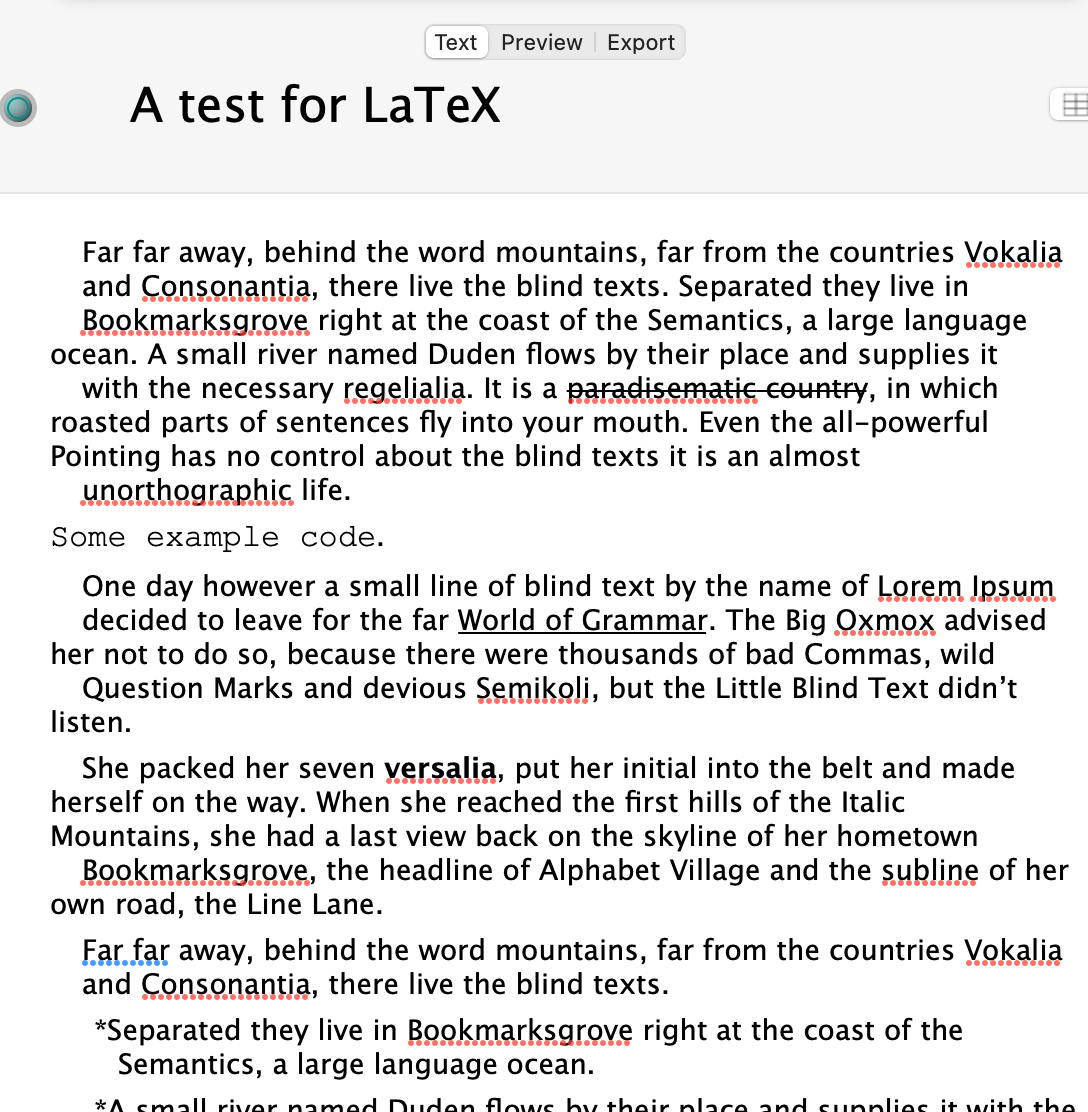
Look at note `A test for LaTeX’ and the normal, styled, text in $Text:
Now the same note in the Export pane:
You could copy/paste this into LaTeX or, as here, into an Overleaf project:
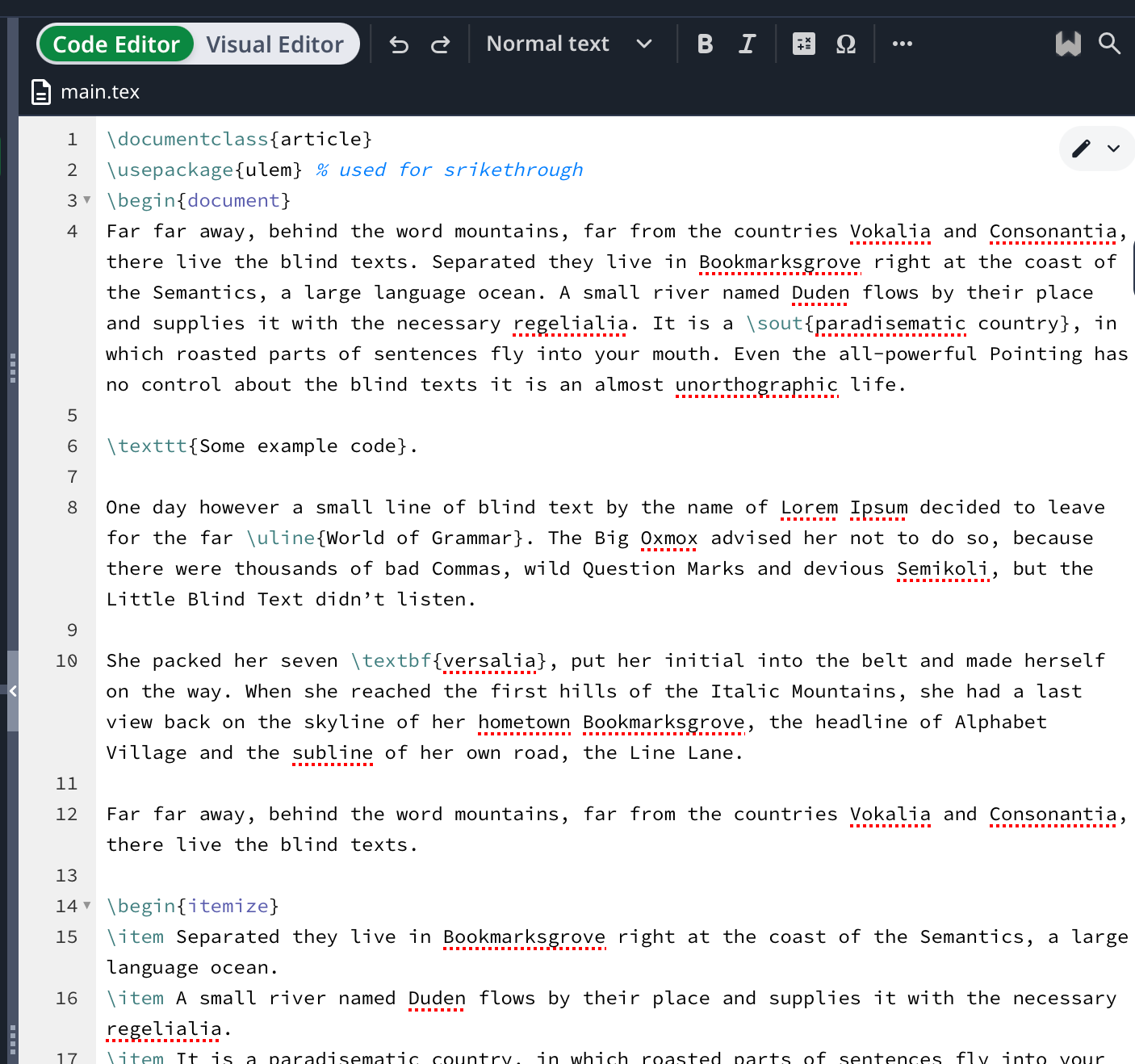
Which gives PDF content like so:
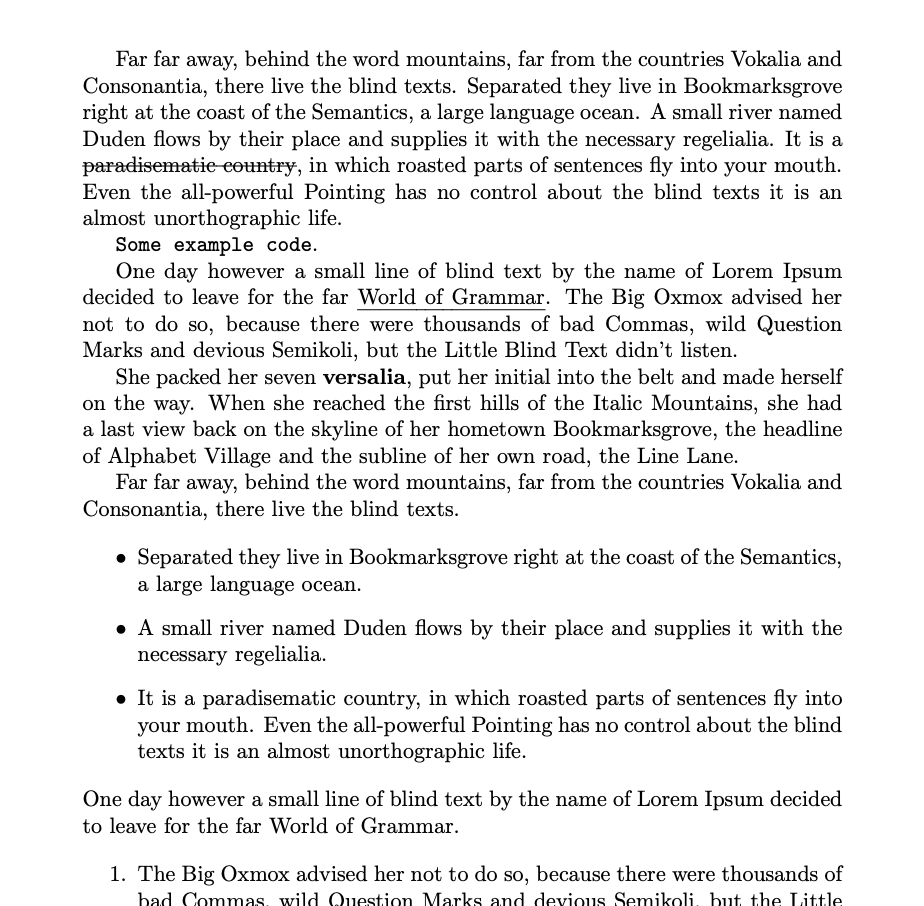
OK, this scratches the surface but indicates a start. Ideally, instead of hijacking the HTML group of system attributes on would customise a note’s attributes or perhaps have a variant of ^text^ that uses LaTeX not HTML mark-up.
This file was originally created in v5.x so some defaults (fonts, etc) may seem a bot odd, but the point is to show off the Tinderbox → LaTeX route. Note a non-default package is needed in order to do strike out.
Headings aren’t covered and default LaTeX only has , IIRC, 3 levels:
- H1
\section{} - H2
\subsection{} - H3
\subsubsection{}
Coloured text is possible, though not attempted here.
Footnotes are possible. The footnote content is added inside \footnote{} at the body copy position of the footnote. Not illustrated, I’ve added one such in the demo file (but not in illustrations above). Of course, the footnote content use might be an `^include^ of the text of a footnote note.
The template adds document mark-up to give an MVP for test but if only writing ‘content’ of part of a document that could be omitted.
A challenge here is feature scope creep and the most LaTeX averse will want Tinderbox to do more of the mis-en-place for them when in truth the user does need to make some decisions.
Here is my demo doc. Originally made in v5.0.0 back in 2010, opened in v6.x and now revised in v11.01. For full disclosure it was actually the current beta but i don’t think that affects this file.
LaTeX_Test.tbx (268.8 KB)
Woot! Demo finally comes good … after 15 years waiting! 
3 Likes
I’ve used LaTeX and Tinderbox in the past, but because I never took the time to understand how Tinderbox’s export function works, I simply inserted my LaTeX marks into my notes, which isn’t ideal since each note then begins with \chapter{A title} or \section{A title}. Ideally, I’d like to be able to do as Mark Anderson demonstrates, so that the writing—focusing on the content—flows smoothly.
1 Like
Dear Dr. Mark Anderson,
I saw the article about Tinderbox and LaTeX.
Regarding this demo of LaTeX_test.tbx,
I understand this, but is it correct?
As an overview, about with Tinderbox.app
#01: Made it possible to write in LaTeX text like normal LaTeX applications.
#02: Existing TeXShop, TeXworks, texstudio, etc.
In the same way as application settings,
enter the necessary information in the preamble.
If you write the LaTeX template in advance, it will work.
#03: LaTeX template has documentclass{article} set, but
If you need a chapter, add documentclass[book]{article}.
#04: Select html export extention to export each document.
Change the name to [.tex] and specify.
#05: What to write in your Tinderbox notes:
As in the case of LaTeX apps
\documentclassa{article}
\begin{document}
\end{document}
Required information will be converted and added during export.
#06 : However, the main text is simply between \begin{document} and
\end{document} The thing written in is specified.
#07: If you want a section, follow the LaTeX syntax
Add \section{} to the text.
#08: If you need to display a table of contents
\begin{document} and \end{document} in LaTeX template
Write \maketitle and \tableofcontents in between.
Here’s a questions,
Q#01: It seems that the Font specification is fixed.
Lucia Geande Size: If I use a size other than 14
Extra writing such as [h3] occurs in the main text of LaTeX.
Unable to compile LaTeX.
(Please refer to the attached file[Blanktestnotecopy.tex])
Q#02: Where can I find the settings to use fonts freely? Write?
Yours, WAKAMATSU
P.S. Remarks
To confirm the Japanese conversion, I used {jlreq} for LauLaTeX in the documentclass.
AboutLaTeX.zip (85.0 KB)
A minor point, but as far as I remember, in the recent past it was recommended (for many purposes) to use XeTeX rather than LaTeX, because the former included unicode and OTF fonts by default, and you could simply use the fonts on your system, rather than go through all the hoops LaTeX required at the time.
It’s included in TeXLive, but according to XeTeX - Wikipedia, XeTeX doesn’t seem to be maintained any more, and the LaTeX developers are moving on from it:
LaTeX developers have announced that they no longer support new LaTeX functionalities on the XeTeX engine, and encourage users to migrate to LuaTeX, another Unicode-supporting engine.[3]
I’ve no experience with LuaTeX - Wikipedia, and I don’t know the ins and outs of all this – frankly, the interplay of the different engines looks awfully rococo to me – but perhaps it’s worth mentioning if there’s another look at integrating TeX engines into Tinderbox? (My sympathies to whoever has to sort all this out…)
I think several things are confused here (I changed a typo in the font name):
The<h3> is nothing to do with LaTeX but is essentially (an accidental) user error. As I noted previously, the file I shared was built under very early Tinderbox v5 some uses attribute default of that time. Thus the Lucida Grande as the default $TextFont (i.e. $TextFontSize of 16 pt)†. Using Times Roman instead is fine, but the problem is the way you added text in the test note in your posted Tinderbox. You used TimesRoman 18 pt, so 5pt *larger than the ‘normal’ text size set for that note. This results in Tinderbox applying auto-headings of <h3> to paragraphs as they are 18pt and thus 2 points above the note’s default text size of 16 pt, indicating the user intends an level 3 heading on export.
There are two ways to avoid this:
- select all $Text and Format menu ▸ Style ▸ Standard Size. This will re-set all the text to the note’s $TextFontSize, i.e. 16pt.
- set the note’s $TextFontSize to the size you want to use, i.e. 16pt.
Either of these sorts out the unwanted HTML markup in the export pane. But, do please read the footnote here as well be reviewing default before you start.
The export template. What goes there is the individual user’s choice. I simply added the \begin{document}, etc. to aid a quick test of the TBX output copied direct from the Text:Export tab into Overleaf. Note: no file export was intended or tried. But, if individual users what to change that, they are free to write their own templates and, for instance add personal data such as author name as you have done. 
$Text can use any font installed on your Mac. Access to the OS Fonts palette is via the shortcut Cmd+T (⌘+T). To change $TextFont for a note, either display it as a Displayed Attributes for the note or find the attribute in the notes Get Info:attributes. Click the ‘A’ button in the middle of the row:

Ant this will open the macOS fonts palette. Select the font/face you want and $TextFont is set. If you set a size at the same time it will set $TextFontSize as well. This method is recommended over typing in font names to Font attributes as the ‘internal’ name string for a font may differ from its general listing title.
†. If anyone is going to build off my TBX file above, I strongly recommend they first review the Doc Settings and text/export related system attributes and update them to current defaults. The latter is easily checked via aTbRef. For instance Lucida Grande is not good for v6+ as it has no italic face and so, using that font, italics cannot be used in $Text. The way the styled text works was changed with the app re-code going from v5 to v6.
LaTex suffers from the fact that there is a lot of outdated/uncorrected information online (so beware asking AI for help!). Also, LaTeX’s heart is in typesetting for paginated print, despite the world moving away from paper-era pagination. All sorts of hilarity ensues.
Plus, per Murphy’s Law, a lot of LaTeX design pre-dates unicode so people are still escaping characters that don’t need such. I’m not an expert here, but my experience is current macOS TexLive LaTeX distros support native use of UTF-8. So if you’re still encoding acutes and umlauts, etc., you likely want to just try using the actual accented characters. I the current Overleaf (not sure if this is the latter or LaTeX itself) lets you use typographic quotes without re-encoding them. I think literal en and em dashes are also auto-detect (rather than using 2 or 3 dashes).
Tangentially, mention of XeTeX, brings up the problem of ‘flavours’ of a standard each with a sub-user-base tied to it. Given that LaTeX is all under-the-hood files, most users have not idea how the engine works just that only this flavour works for them so obviously all other flavours are wrong or a waste of time. Technology implementation, plus ça change.
Yet, those ‘flavours’ of TeX are the rendering engines and I don’t think @eastgate is proposing to go that far. Rather, as we know is already possible, modification of Tinderbox export attributes covers much of what is needed and experimentation might suggest some LaTeX-only stem attributes. But, as my simple PoC file shows, raw LaTeX macros , e.g. \footnote{} can be used inline in $Text and ‘just work’ in the exported result. Some flavours may allow different macros/packages, but I’d suggest that (and package selection) is the user’s responsibility. If in doubt, they can ask in the forum here or in places like https://tex.stackexchange.com.
To expect Tinderbox to maintain (internally or externally) a working TeX implementation strikes me as a problem (engineering and support wise) that scales really badly.
I’m aware I’ve made references to Overleaf here (disclosure: I use it), but it is not by way of endorsement. There may well be other web services offering a pre-configured/maintained LaTeX back-end, in which case the same applies. The point being few people know, or want to know how, to configure the guts of a LaTeX system, so a system where you provide the context in TeX code document (and BIB files for references, if needed) is a boon.
Oh, I don’t have any expectations at all – I haven’t used it in any flavour for years and don’t have any need to do so. But as you mentioned the problems with Unicode, it was worth mentioning that ‘LaTex’ and ‘XeTeX’ and ‘LuaTeX’ (and ConTeX and probably SpandDeX and TrainWreX and others) seem to muddy the waters considerably…
1 Like
I’ve updated my earlier sample LaTeX setting file to update some system attributes to current defaults and a couple of wrong LaTeX code in HTML export attributes.
LaTeX_Test.tbx (122.6 KB)
1 Like
When this reaches consensus, I’d be grateful if someone could email me a list of attributes that ought to be set on a LaTeX prototype, and an example of a LaTeX template equivalent to HTML Page.
I’ve updated Working with LaTeX with everything it think you need to cover the basics, i.e. things that actually work.
This will doubtless trigger requests for things like handling inline images but this adds complexity and there is no one right answer. The same with the document framing. If folk want their group’s or /uni’s specific template they can edit their own export templates. Otherwise it is a slippery slope to complex edge case management of a useful but edge feature.
I wonder if it might be more worthwhile to explore natively integrating Pandoc with Tinderbox, as it can convert rich text and HTML—both native Tinderbox formats—to LaTeX, among a great many other formats.
2 Likes
We should be mindful that not everyone has pandoc, etc., installed or knows how to do so. Might I politely suggest we don’t get too far ahead of ourselves in complexity at this starting point? My recollection is the start of this exploration was a Tinderbox user looking for a way to export styled text in $Text as raw TeX format code they could use with their (undisclosed type, any?) LaTeX processing system.
Thus I suggest a pragmatic first step is to demonstrate what of normal (styled) writing such as the ordinary user may use and see if we can get working TeX-format output. Happily, I think this is proven by experiments above—a testament to Tinderbox’s export flexibility. What the user does with the generated TeX is, or I believe should be, out of Tinderbox’s scope of responsibility (thuogh of course the community can still help with templates, etc.).
Thus building wider Tinderbox-associated LaTeX toolchains rests on us getting basic TeX output generation working and documenting the feature limits: otherwise we build upon foundations of sand. For instance, it seems re-purposing (HTML) export attributes can cover automatic [sic] LaTeX macro insertion for most (?)basic text styles but can’t currently automatically encode export of $Text-embedded images, handle links or citations. This is where the current boundaries of user expectation need clarifying—what more the expert user may do with custom code is something different†.
Despite our individual wants/needs (disclaimer: I’m a non-expert user of LaTeX for academic writing), it is in the community’s interest that Tinderbox TeX production doesn’t saddle Tinderbox support with contingent issues like the complexity of maintaining a LaTeX installation. If a solution is presented as ‘simple’ many less-tech users will understandably assume Tinderbox will (should?) take care of everything while they just write text: this scenario is one to avoid if we can, as the wider, non-LaTeX-using user base is unfairly disadvantaged.
As good starting scenario to judge progress might be a humanities researcher, used to working in Word (or Word DOCX as the final submission document) who is asked to submit LaTeX (i.e. TeX format) input and who has no experience of installing LaTeX but is happy to copy paste valid TeX from Tinderbox to [whatever LaTeX tool].
Text edge case issues still to resolve as possible (or not) as being automatically coded on export, I’ll put in a fresh post to enable better threaded discussion.
1 Like
Text edge case issues to resolve as possible (or not) as being automatically coded on export:
- image insertion:
- external images
- inline images in $Text (to where Tinderbox exports images, and the format used, might not be best practice for wider LaTeX use, etc.
- footnotes (consider ^include()^ to insert $Text of other notes whether formal Tinderbox footnote or otherwise)
- tables
- citation anchors (assumed use in conjunction with Reference Manager for citekey and bibliography BIB file generation—latter for direct LaTeX consumption)
- links
- in-TBX links (basic and text types)
- extra-TBX links (web links)
- possible detection filtering of local pseudo-protocol calls vs actual web/internet links?
- mathematical, chemical, etc. formulae (a seemingly niche issue until it is your issue!)
A number of these: figures, table and footnotes can likely be supported by user-added ^includes()^ (as opposed to auto-insertion by Tinderbox). Links seem more challenging, not least as they need a LaTeX package hyperref, or that and hyperlink if making in-text jump links†.
Also interesting is the division of (technical) labour between Tinderbox and a Reference Manager when it comes to citing. Individual experience/domain practice means some will like info better stored in a RefMgr to (also) be in Tinderbox. Note that in writing for LaTeX it only needs BibTeX citekeys inline in the body text ($Text), e.g. \cite{bernstein:1998:poh} and a BibTeX-format .bib file that can come direct from the RefMgr or be copied across into Tinderbox and exported as a separate file. I’m sure opinions will differ on this, not least due to people’s current work practice.
Another difference from WYSIWYG writing, as in Word/Mellel/Ulysses/LibreOffice/etc. is that in TeX you write in plain text with mark-up—not unlike raw HTML. That is then ‘composed’, most normally to PDF, and text style, page layout , insertions and citations, etc. are all resolved at that point. This is rather different to WYSIWYG, and each needs to be respected as such. That said, LaTeX tools are improving and some allow one to write in styled text (e.g. bold, underline, etc.) but the page layout and fine typographical points (e.g hyphenation, line/column/page breaks, table/figure positioning). The latter may help avert the fears of those for whom LaTeXc feels like coding because of how the raw text looks. Indeed, here, Tinderbox is essentially operating as a styled-text TeX frontend, albeit with limited feature encoding.
†. The hyperref is very powerful (and better that the older url{} macro, but often requires the package to loaded before or after other packages. Or, organisational styling packages may pre-load these, although the LaTeX-inexperienced user is hardly likely to understand such arcane detail. Confusingly, the hyperref is used for out-of-document links and hyperlink for in-document jump-links, akin to # markers in HTML. The latter package is little seen as the built-in LaTeX \ref{} macro takes care of this in all but the more complex documents.
Reflecting the above, I’ve added a small section on citation and the \cite{} macro. In fact, there are a range of citation macro and configurations, but it is expected the user would understand which to use, other than this basic one, given their particular needs—e.g. grouping several citations as one insertion, etc.
I think the most common scenario right now (and one you and I face from time to time) is writing in Tinderbox with an eventual destination of Overleaf. How can we make that easier than it is?
I think, for example, that just slightly better reference support will go a long way. We know how to export LaTeX tags instead of HTML tags, but it could be made more obvious to new Tinderboxers.
1 Like
If so, i.e. going to the likes of Overleaf or a local LaTeX system with a publisher’s formatting package (usually the .bst and/or .cls files therein), then the document ‘frame’ will be done for out. all you need is the TeX to go inside that.
Thus, with the outliers as stated above, arguably most of what we bed it there. Not lease as tweaking of images, etc., is likely best done in the LaTeX editing tool (online or local) is there. I’m out most of this week, but the HTML export experiment we did here some months (years?) back on exporting embedded footnotes might be useful here using templates and action code libraries.
I’m not sure, for the context envisaged, that honouring intra-Tinderbox links is really pertinent. But, a feature to read/render web links to the form \href{url}{anchortext} (both arguments must be LaTeX-escaped) in the output TeX might be a useful uplift to the output if not requiring at baneful engineering cost/complexity.
Low hanging fruit: a prototype (for attributes), and a LaTeX ‘page’ template. Building on that possibly back off the relevant values for the prototype into some sort of a config doc (perhaps in the app support folders) to aid the deeper user who likely wants to tweak things at app not per-doc level.
If the footnotes-via-include idea holds water and someone wants to take a run at it, I suggest starting a new thread for that as a self-contained ‘project’.
Hi, Mark. I do most of my writing that ends up in LaTeX using Org mode in Emacs, which has a lightweight markup like Markdown and some special facilities for LaTeX. It seems to work well for (1) making most things easy to write and come out the way you want, and (2) add the LaTeX markup you need beyond that without getting much in the way.
The parts that it does might be good inspiration for what could accomplish a similar goal in Tinderbox. The relevant links in the Org manual are mainly:
- Markup for Rich Contents (more or less the parts similar to Markdown but different)
- LaTeX export (the things specific to dealing with LaTeX, which cover a lot of the common cases)
I suspect that a judicious selection of Tinderbox equivalents would come pretty close to making good export for bringing into Overleaf.
1 Like