In my experience, the attribute browser allows me to take both a “statistical” approach to my documents and a fragmented or partial view on my notes. In the research project I’m currently working on, for example, certain themes are emerging, identified through $Tags, $CiteKey, $Authors, and so on.
1 Like
I prefer to talk about the advantages of a software program. Tinderbox shines with its ability to multiply perspectives on notes. Scrivener allows me to place side-by-side the PDF of my manuscript with my annotations, corrected with a stylus on my iPad, and the text I’m working on.
1 Like
All of my Kyoto School books are in storage, or I’d take a picture of them. I can’t claim to be a scholar, but I really enjoyed reading about “the philosophy of nothingness.” I began with An Inquiry Into the Good.
Indeed, this is the point i was making. Different notes can have different title font ($NameFont†), but different views share the same title font ($NameFont) for the same note.
For clarity, I’m not suggesting a change is needed here, I was simply explaining how/where font options are applied as it related to the titles of notes. I’ve reviewed and updated a number of aTbRef articles accordingly.
†. All views use $NameFont for listed items except: Table, Hyperbolic and Information City. The following views use a system front for controls but $NameFont listed content:Gaudí, Crosstabs, Attribute Browser.
Thanks. I guess I just need to use Tags much more than I do, and to think more systematically about ones that identify content.
I am old and a bit slow on these matters. Does there exist in the forum or elsewhere (Michael Becker) a step by step description of how to set up a TBX file for best use of the Attribute Browser?
Has your wish been granted? https://forum.eastgate.com/t/how-to-use-the-attribute-browser/394
With respect, this is to misunderstand Tinderbox, as an application. all* views are available all the time. The primary concept to AB vie is to let you see the categories—discrete values—for a given attribute. Here we see the descendants of container /A timeline (note the settings and at the top):
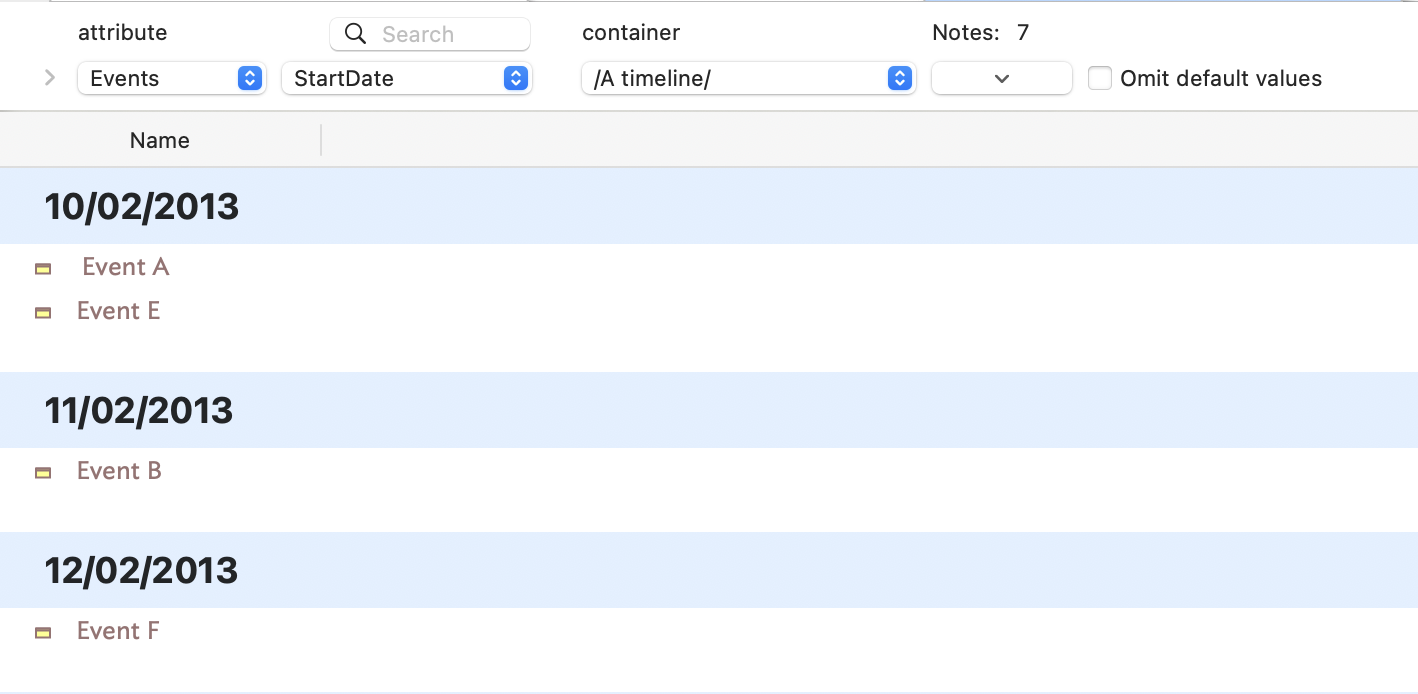
categorised for the date value of $StartDate.
In a mature TBX, looking at $Tags will give way too much info but if you separate out discrete aspects of you understanding of the notes into discrete user attribute values , it is easy to see the notes that share a common link.
In doing this, you aren’t changing the map or outline, it’d just a different view. Like plucking the courage to leave the shallow end of the swimming pool, it is scary at first but suddenly all sorts of different views [sic] of your work are available. Just using Map and/or Outline is driving your sports car in first gear (for those old enough to remember cars without automatic gears).
There isn’t a right way to use AB view, or Treemap view, or Hyperbolic view, etc. If you can’t make use of them it is a tell that you’re placing way to much in $Text alone. This is likely most challenging for those working in the Humanities where process is all. But, stepping away from the shackles of “in our filed e too thins…” and simply extracting your understanding into attributes, a wonderful richness awaits. Plus, no harm is done to the note text ($Text). Conversely, with facets of your understanding of your notes safely placed in attributes these can be viewed/queried with ease.
It’s like getting a free upgrade from scribal parchment to print in moveable type. Once you let go of the safety of $text and only $Text (or $Tags) you will see the richer analytical perspectives on offer. The same holds for all those other views you may not have used. They don’t need a tutorial, until you’ve tried them, and then may have real question as to aspects of function.
MS Word has a text (print) view and a (poor) outline view but perhaps this enfeebles our perspective of what our notes may show us. Tinderbox has been cutting through such confusion since 2002, and its elder sister Storyspace since 1987. This isn’t new. Tinderbox v1 shipped wth four views, yet most simply never try more than Map or Outline. So, no wonder they don’t get the most out of their use of that.
1 Like
Thank you Mark and Dominique. I now see that I have been operating in a $Text plus $Tags (multiple) environment, a digitised version of my note card collection. To up my game I need to consider attribute content more carefully, in particular the relationship between attributes and $Text. It would be helpful, Mark, if you could expand a bit on the meaning of “simply extracting your understanding into attributes.”
As for driving a sports car in first gear, As evidence of age I learned on a farm truck with no synchromesh. Double clutching forever! There must be some software metaphor in there.
1 Like
Imagine you are writing or taking notes on a story, with a note per scene. You can note the main protagonist and the location in $Tags. But more granular might be to put the main protagonist in $Protagonist and the place in $Location. You could do both. Now fetching `values(“Protagonist”) will return a Set†—so automatically a de-duped and A–Z sorted list—of all the characters who are the main protagonist in one or more places. Open an AB view and set $Protagonist as the primary target and you will see a (‘category’) banner per protagonist and under each banner the notes of all the scene(s) where they are the primary character.
It might be that a location is also the name of one of the characters. Using $Tags, does that value indicate the person or the place. You can’t tell, you have to read the note’s $Text to disambiguate, thus negating the point of storing a value in $Tags.
You can substitute your own field of study/task here but the basic points holds. If you are tagging/keywording, in a general sense, it helps to have at least some strands of annotation stored in their own attribute as it makes it easier/faster to access just that strand of info latter.
The first time you do this it will seem like extra work, but soon you’ll do it reflexively as soon as you start planning annotation or start on a strand of annotation you know you’ll want to re-find with ease later.
There is no process or technique. The basic premise is to store (separately) things you are fairly sure you’ll want to refer to discretely at a later date. It really is that simple.
Even if you’ve started out with a tag-bucket ($Tags or such) you can always review existing notes and migrate them. for instance, take the above scary. We’re half way through our task before we realise a $Protagonist is a good idea. Now you could use a query for notes you’ve finished (there are $Tags values) and which have no protagonist. Now work through the aliases setting $Protagonist and oprtionall removing the same value from $Tags.
Things you might do that might be new the first time you try the above:
- Creating a user attribute: User Inspector.
- Perhaps set up suggested values for a user attribute.
- some understanding of the different possible Attribute Data Types.
- Altering a notes ( prototype’s) Displayed Attributes table using its Add Displayed Attributes pop-over.
1 Like
Hi Mark, How do you link Claude.ai with Tinderbox ?
By the way, I find Claude is more useful for me than chatgpt or gemini… that’s a detail.
Rigas
- Tinderbox ▸ Enable AI Integration
- Open the Tinderbox document you wish to work on. Document Settings:General has a checkbox to enable AI Integration in this document.
- Quit Tinderbox and Claude Desktop.
- Open Claude Desktop; it will open Tinderbox for you
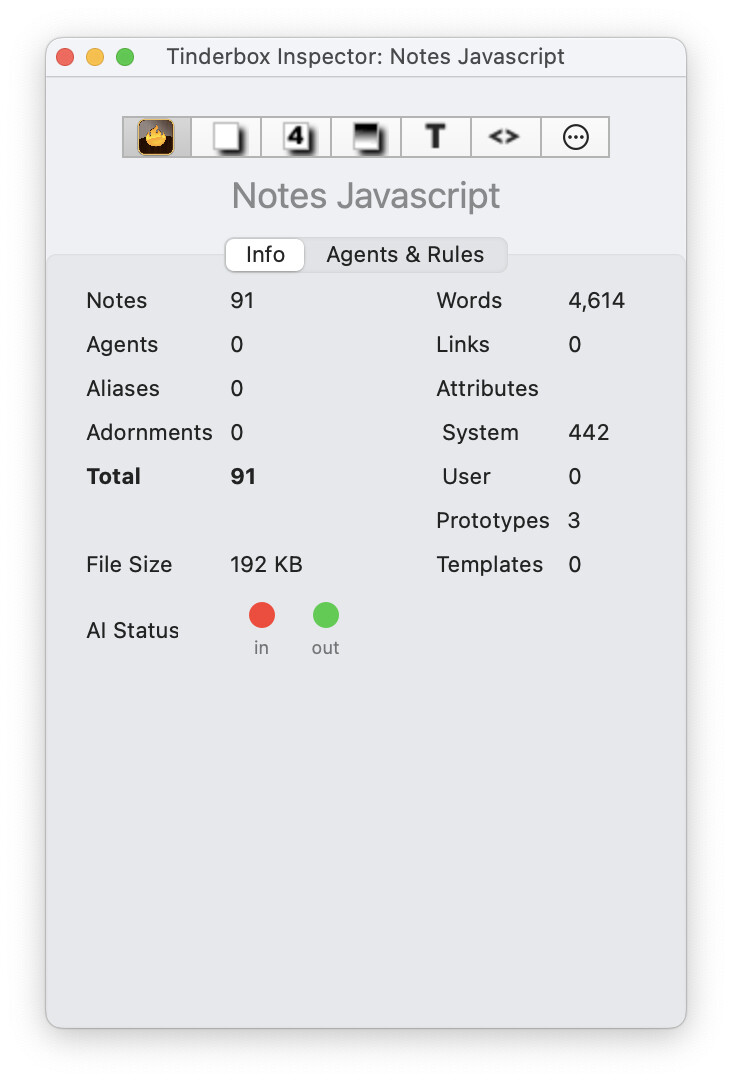
- Check the Tinderbox Inspector for AI Status; it should have two green lights.
Thanks ! Very useful.