I just came from a “practice session” where I tried to write an article with the help of Tinderbox. I worked extensively in the Map View and encountered several hurdles.
Challenges:
Difficulty in locating and centering notes within a container:
After opening a container, I haven’t found an efficient way to quickly locate and center the notes it contains.
Zooming in and out with the mouse scroll is slow, and the notes need to be manually re-centered repeatedly.
Missing familiar navigation features like in Finder:
I miss the arrow-key navigation and the “Quickview” function I know from Finder. I often instinctively use the up and down arrow keys to navigate, which unexpectedly takes me to a higher hierarchy level and causes me to lose context.
Uncertainty about selection:
There’s a persistent feeling of uncertainty about whether I’ve correctly selected a note, leading to constant anxiety about accidentally deleting or moving something.
Unexpected behavior from Tinderbox:
Notes frequently behave unpredictably, such as suddenly shifting position or disappearing when I click on them.
Abstract Problem:
The core issue lies in the distinction between spatial navigation (zooming in, zooming out, focusing on specific areas) and content navigation. Although the Map View is a model of spatial representation, there’s a lack of intuitive spatial navigation. Instead, constant mode-switching between spatial focus and content structuring is required. I would prefer to stay within the spatial metaphor entirely. A good example of what I mean can be seen in Prezi (prezi.com). So I try to find ways to emulate this.
Potential Solutions I Plan to Explore:
Combining Map View with Outline View:
Switching between these views might help; however, in the early stages of a project, there’s often a lack of nested structures, which makes this approach less effective.
Efficient use of built-in navigation and search features:
I plan to dive deeper into the navigation tools and search functionalities in Tinderbox.
Leveraging Spatial Hypertext:
Working deliberately with spatial markers and layouts could help maintain an overview.
Using specific metadata or associated notes for adornments:
This approach could create “navigation notes” to facilitate searching and centering.
Working with multiple windows:
Keeping several windows open simultaneously could help maintain different perspectives and contexts in parallel.
Question to the Community:
How have you addressed similar challenges when starting to work with Tinderbox? Are there tips or proven strategies to effectively overcome these issues?
Some discussions I found in the forum
archurhhArt Currim
You can place a large Adornment in your Inbox and have all/selected Notes/Containers be created on it by setting $Adornment in the OnAdd. This way all your new Notes would be created at a preset and precise location. You could additionally set DisplayedAttributes to include $Adornment, and delete or replace that value when you’re ready to place those Notes elsewhere on the Map while building your ideas.
This post discusses a lot and introduced me to using coordinates. I am going to explore this
This post among other themes discusses the slip away notes
I’m mystified by the opening, as to why you’d try to write an article in map view. Whilst people can do what they like in an of Tinderbox’s 10 views (a default TBX file uses 2 views, partly to indicate the >1 options) a map is most powerful for exploring a topic. The map view is a spatial hypertext, you put things in a position giving them meaning via their relative position. Hard to explain as maps are really very personal - much like a memory palace.
A map view is not, by primary design intent, an organisational tool. Chart view offers org-chart style fixity. Map allows capture of more nuanced relationship between notes. The scope/topic of the note is in the eye of the user so it is hard to generalise as to what goes in one note as opposed to several. It is the case that Tinderbox’s design over the years works best for smaller notes, i.er. those with less text ($Text). You can write a whole chapter into a note if you feel you must but such lack of granularity robs you of much of the richness of linkage, metadata and analysis at which Tinderbox excels.
You might want to read up on the different types of view on offer before simply trying to do everything on the default view. Reading how it works should resolve a number of your assumptions (based on other tools about how it works.
Worth understanding too is the relationship between a note shown in Map view and the same note in Outline view. Here is a discussion of the differences—worth a read. It will show why your assumptions about ‘content’ navigation works are misplaced.
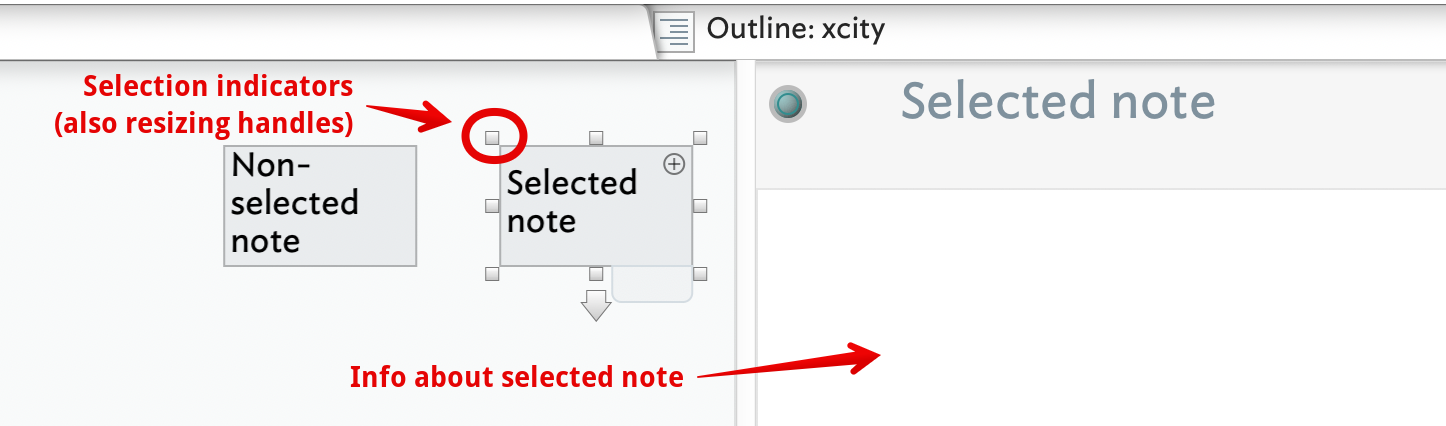
It is actually very easy to spot a selected note in Map view. The are two selection indicators:
The tabs text pane is populated with information about the note selected in the view pane. See more on the document window structure.
The selected item (note, adornment or agent) shows visible selection shows 8 selection markers. Click on and drag any of them the resize the note. To move the note, click on the note itself and drag (clicking into the title or the badge areas will engage edit of those feature, so avoid those areas if trying to drag).
View zoom is not mouse-wheel based, likely as wheeled mice are not common in Macs. Using a trackpad or the surface of a magic mouse the input (finger) movement pans the view in whatever direction the input suggests. Zoom is normally via Cmd key with + or - keys or Cmd+0 (zero) for default zoom. An extensive (non-exhaustive!) list of key shortcuts is here: Reverse Look-up Map.
Generally, trying to force the app to behave like a different app with different design ideas will give a less productive experience. Rather than ask “why is [feature] not the same as in [some other app]?” ask “how do I do this [task] in Tinderbox?”. The latter allows users to help you understand the task in the context of Tinderbox’s features avoiding pointless discussion as to why apps differ in the way they do things.
If you are able to join one of the regular weekend meet-ups would help you explore how Tinderbox works and which views fit what purpose. As I write there is one starting in a few hours - the see the main forum listing.
I have not seen anything like this in a decade or more. I have not had any report of any such behavior in years, and this is the sort of thing people definitely report.
This surprises me. When you select a note, its resize handles appear. No resize handles? The note isn’t selected.
There is an extensive research literature on spatial navigation in Tinderbox an related systems. Mark Anderson is writing a review paper on the subject, so I’ll defer to him if you enjoy reading research. I’m quite familiar with Prezi specifically and with pan-zoom interfaces generally.
Your concern with what’s inside containers suggests you do have nested structure. Outlines are great. Map view is pretty good, though it is neither Finder nor Prezi.
(Mark Anderson and I have been debating this for a long time!). I’m not mystified at all: I typically begin to write in map view — especially when the structure of an article is not clearly determined. Of course, some publications have pre-ordained structures, so their outline writes itself. But when I’m not certain about the structure.
Actually, I believe we do support the scroll wheel for scaling in map view. Pinch zoom is available as well for trackpad users. I agree with Mark Anderson that +/- are the most common ways to adjust scale. On the whole, most Tinderbox work is usually done at a magnification close to normal scale.
All interesting questions. Keep in mind: if Tinderbox isn’t the tool of your dreams, you can write your own. You may find that there are ideas here worth reflecting upon…
I’m reminded that ‘write’ is a slippery word here in terms of implicit meaning. It can imply the act of inputting text of any kind. Just as validly, it might mean writing a complete trilogy of novels. That’s why my comment on use of map for writing, and @eastgate’s aren’t in conflict with one another, lest they appear so. The contingent point is how much structure, either visual or narrative, we individually want. In addition, our choices may vary at different stages of ‘writing’ the same piece.
This is why it is very difficult to make one-size-fits-all assertions about the purpose of views. Most software is of a different type, with very fixed rules as to what is/isn’t allowed and in what order.
Map view certainly is very useful—at least, for me—at the earlier stages where I’m not yet committed to a linear structure. I have parts of the article but the order, cross-connections, or relevance to the whole is still fluid. Thus he non-linearity of the map is a boon. There is no explicit order—or not in my example—implying what is next/previous and up/down/left/right are not being mapped literally. These notes here are separated from those there merely because they are different. Order is not yet certain, but will likely become so later at which point I’ll likely be using other views instead of/alongside Map view.
There is a constant battle group between disparate sub-groups of users for the soul of Map view. Each group arguing for a ‘main’ use aligned with their main use of it (or because they wish it was like an app with which they have more expertise). But over-optimising for one such also destroys other uses. At heart, I view the Map as a *non-linear’ exploration space whether we use if for writing/drafting, diagramming, mind-mapping, mood boards, etc., etc.
We can review this in the 5Cs TBX 101 Class your in. Map View and Outline View are different views. You really “don’t combine them.” Thinking this way may lead to unintended results; for example, when you nest and unnest children in outline view, this can change the positioning of notes on the map.
This is, of course, necessary. When a note moves to a new map, it needs a new map position. When it moves back to the old map, it doesn’t necessarily remember its former residence. Some other note might have moved in, or some semantic neighborhood may have been assigned to that region.
Thank you for all the helpful feedback. I would like to emphasize again: I am in the process of exploring the program and learning how to work with it.
I was in the exploration and brainstorming phase. Structuring the content and not in the actual writing phase
My approach is also not to have a lot of text in the notes.
thanks for all the links to support.
Thank you, I mentally ignored the tabs in the text pane.
The contents of the window were not visible, hence the question.
I agree. However, my goal was to explore what it’s like to work with Tinderbox. Mentioning other apps was not intended as an “implementation request” but rather as a description of my usual workflows and “muscle memory.” I wanted to explore which of these processes are feasible in Tinderbox and where other workflows adapted specifically to Tinderbox might make sense.
Thanks, that was a helpful tip. I should probably not let the map get too big.
…yes… I happen to have only a mouse with scroll wheel.
I’m sure I made some kind of “mistake” that caused this reaction. It’s an example of my initial uncertainty about how to navigate within a map and the resulting errors.
I think with Tinderbox there are great possibilities in this aerea … I simply haven’t yet learned how to use Tinderbox efficiently for this purpose. My description of the initial experiences was an account of the intuitive patterns I’ve applied to Tinderbox as a beginner. Tinderbox doesn’t need to behave like Prezi, Finder, or any other tool. In the early stages of getting to know a program, it’s important for me to observe which working patterns or learned “interface metaphors” I can carry over and which I need to adapt to the new program.
I have to smile because I wrote the post below and then came across this thread here.
I seem to think similarly to onko, and I don’t really understand it yet.
Now that I’ve been working with Tinderbox more intensively, I have a fundamental problem. During my first attempts with Tinderbox, I worked mainly in MapView. But I kept getting strange surprises when editing with the mouse. Notes jumped out of the container or changed size or disappeared. This still happens today in version 11. But that’s not my question.
Now I work in OutlineView. It’s clearer. But when I switch to MapView for the first time, my desktop looks worse than the chaos in my children’s room.
Everyone has a different sense of order, but I would like to have a tidy, clear layout that I can improve manually.
Things don’t jump out of containers. If you drag a note that is inside a container, that note is dragged into the map you’re editing.
Notes changes size when you drag a resize handle.
Notes don’t disappear. They might seem to if you cover them with a larger note, delete them, or drop them into a container.
View ▸ Arrange ▸ Cleanup offers a variety of geometries to arrange the selected notes, or all the notes in the map.
Suggestion: make a new Tinderbox document for practice. Add a few notes to map view. Drag them around. Drop notes in containers, and drag them out again.
Many, many hundreds of hours of testing have been devoted to this view. It’s not sloppiness or indifference. We’re happy to make improvements, but we’re not idiots.
It may be due to the Magic Mouse (although I’ve also seen it with a standard mouse), but I’ve really experienced this many times in Map View. A note is in the container with others. I click on it and it’s gone. I move the container a little and it’s right there on the desktop without the container. At least visually.
I admit that I haven’t checked in Outline to see if it was really thrown out of the container. I’ll take a look when I find it again.
It would never even occur to me to think such a thing.
I commend these notes to people trying to understand Map vs Outline. I wrote them some while back, but I believe the basics hold true.
If I add something in Outline view that give Tinderbox no indication where it should go on the Map view render of that container. Tinderbox will give a note an X/Y location and one not overlapping other pre-existing note on the map. But maps are essentially a human-laid-out spatial hypertext. So, until a human first looks at the map pretty much any layout might not seem insightful.
Essentially, if working in Outline but wanting specific things to happen on the map of that container† then either keep a separate tab open with the map of that container or use some automation (sorting, grid layouts, etc.) to add structure to the map as you go. A common mis-assumption is that a map’s design roots are a box-and-line drawing tool with auto-layout. Not the case, a map is if anything a spatial hypertext. Things go where the user places them, thus “where you are is what you are”; relative position/styling indicate relationships not (yet) effected as anything as deliberate as a line/link.
†. It is important to remember that whilst an outline view can show the entire document, a map can only ever show the contents of one (outline) container at a time.
Things are becoming much clearer to me.
From the perspective of a Tinderbox student, I found the approach of creating notes in Map View more intuitive. That’s how I work at my desk or in my office.
I find the Outline method easy but also strange, because then I have to have a structure in my head, which makes Tinderbox hardly any different from Word.
If I understand correctly, Tinderbox’s strengths lie precisely in finding and developing connections.
I simply have to invest significantly more time to use Tinderbox more effectively.
You’ll have to be patient with me. I just hope I haven’t upset Mr. Bernstein. He always seems very relaxed.
I would love to know how to reproduce this. I expect that the note is underneath the container; move the container aside and I think you’ll find the note.
I never see this, and (as you might imagine) I use map view a lot.
I think I remember it being that way. I just wondered why it was thrown out of the container.
It’s rude to turn this into a forum guessing game. So I’ll try to reproduce it and report back.
Thank you for your attention.
To address @Usit ‘s query on keeping the Map View organized - the best method (once recommended to me by @mwra and since then always adhered to) is to keep the ROOT container as simple as possible. Most of your Map Note creation ought to take place 1 or more levels down. At the root level, Notes do tend to move around particularly when you make edits to them. A second thing you can do is as @eastgate mentions, to use the Clean Up command. A third is to specify a distance between Notes and you can even write Stamps to place Notes at various locations on your Map - you can get really creative with this and your Notes can stay super-organized. The last tip is to use Adornments so particular Notes leap atop those adornments. Really, there are many ways to keep your Map View looking as you want it. Start with not creating too many Notes in root.
With regard to Notes “jumping” in and out of containers - I have this issue from time to time, I would say every few months. Last it happened to me was yesterday, where a Note I created persistently kept popping into my current Map, even though I had created that Note in a different Map (in the same project). I also suspect that the issue is directly due to the Magic Mouse - I can’t put my finger on it, but I believe Magic Mouse sends a spurious additional signal. I have seen this issue in Numbers - where simply clicking on a cell with the Magic Mouse actually not only selects the cell but also activates its Edit mode. Similarly, browsing Mail.app with a Magic Mouse can be a nightmare as it keeps auto-swiping emails left or right. They say BetterTouchTool can fix that by disabling MM swipes on a per-app basis - but I own BTT and Magic Mouse doesn’t appear to obey this command. Irrespective, when this “Note-jumping” happens to me I simply take a breath, close the project file and re-open it. Something about the zen moment appears to release the djinn and all is good again. I don’t believe it’s happening due to Tinderbox, but it definitely does happen in Tinderbox - rarely. A related phenomenon is as described above, when (in Map View) a Note appears to leap out of a Container and then hide behind that same Container. All these behaviours have so far been experienced by me only in Map View, and only when I use my Magic Mouse. I love the MM otherwise, but have recently been considering the new Logitech MX4 (or MX4s).
 Map View and Outline View are different views. You really “don’t combine them.” Thinking this way may lead to unintended results; for example, when you nest and unnest children in outline view, this can change the positioning of notes on the map.