This posting introduces a new Tinderbox “Package Management” system that I have developed with constructive input from @mwra and @satikusala along with the latest version of my “Diagram View” (see prior posting of initial “Diagram View”). Please note that this release requires Tinderbox 10.2.0 released on June 9, or later. @eastgate has introduced some significant enhancements in this latest version that have allowed this project to achieve its objectives.
Note that I gave a demo of the Package Management system during the Meetup on May 24 that may be helpful if you prefer a video overview. Also, the first version of the Diagram View application was presented during the March 1 Meetup.
The purpose of the Package Management system is to allow users to create collections of notes that can be bundled into a package and deployed automatically into other Tinderbox documents. For this approach to work, a standardized framework (the “Document Commons”) needs to be established in a destination document. However, the Package Management system can self-install this framework, and even update the framework and any included packages when new versions are made available.
Here is the new “Document Commons Framework” Tinderbox document that includes the latest Diagram View version:
Document Commons Framework v2•1•1e.tbx (12.4 MB) {Saved from Tinderbox 11.5.0 (b759)}
To make this trivial to deploy, a single copy-and-paste operation will deploy the Document Commons Framework along with any add-on packages into a destination document. While this will add essential items to the destination document, the current contents of the destination document will be unaffected.
To try this out, open the Tinderbox document provided above, and select the red Copy of “Document Commons” container as shown here:
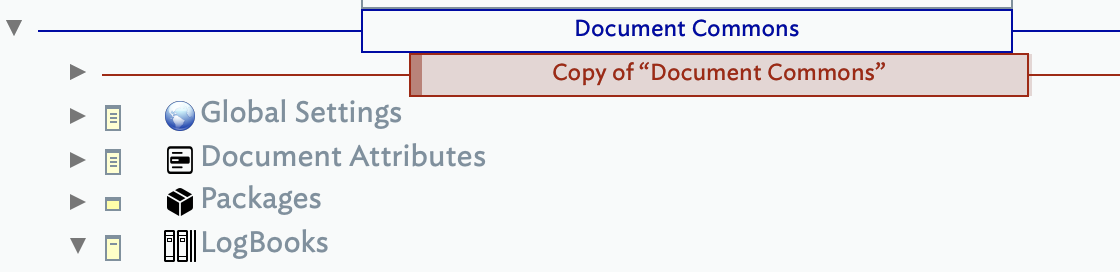
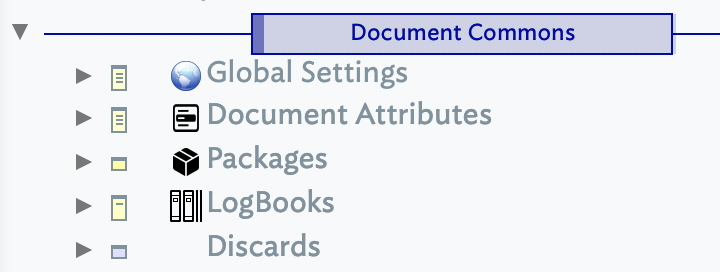
Copy this container, and then paste the entire container anywhere into the destination document. That’s it! (It is recommended that you try this with a new or play document before trying this with any of your important documents, though I’m reasonably confident that nothing bad will happen.) The paste operation will activate a sequence of Installer code modules that will result in a new blue “Document Commons” container that will be the last top-level item in the document. It should look like this in Outline view:
In addition to installing the Document Commons Framework, the Tinderbox document provided with this posting (see above) will also install two add-on packages: (1) Diagram View and (2) Network Tools. This illustrates how multiple packages can be included in a single installation procedure. In practice, users could assemble (without any coding required) the installer for the Document Commons to include their own Packages, as well as Packages provided by others. The Diagram View is an example of an elaborate Package that provides an entire application within a Tinderbox document while the Network Tools is an example of a simple package with just some useful functions, stamps, and user attributes (useful to someone working with networks, that is).
There will also be an “InstallerLog” note placed inside the “LogBooks” container that will provide a detailed listing of everything the Installer procedure does, including the installation of any add-on packages.
A neat feature of this system is that a single package, or the entire Document Commons framework can be re-deployed into a document at any time. If there are any new items provided, then the Installers will properly update the corresponding items in the destination document, and move the outdated items into the “Discards” container. Any other left-overs from the installation will also be moved into Discards. Users can delete the Discards container at any time. In the case that an item in the document is newer than the item provided with the pasted installation, then it will be left as is. To try this, merely copy the red Copy of “Document Commons” container a second time into the same document. This can be done at any time, and provides a useful way to provide updates that can be replicated to one or more Tinderbox documents. The InstallerLog will detail exactly what gets done during updates.
Included with the Tinderbox document provided above are two ReadMe notes inside the Cover container that provide further details about the Package Management system and the latest version of the Diagram View. There is also a note that provides the Vision behind the introduction of Tinderbox Packages. Further documentation can be found throughout the provided Document. For example, select the blue “Document Commons” container, and the associated $Text entry provides a useful overview of this container and its purpose.
Also included is a “Playground” container that provides an example of a Diagram with a collection of notes that can be used to gain experience in creating and manipulating Tinderbox Diagrams. (Aside, check the ReadMe for Diagram View for an overview and a link to a deployment guide that explains how to complete the setup for the two required Link Types.)
While the technical approach taken is possibly interesting, the real intent is that this becomes something that just works, and that allows users to assemble and work with their own Packages without needing to know how it all works under the hood or do any coding.
I need to emphasize that this is a first release of the Package Management system, and there are some things that should be refined and enhanced in future versions. While it is pretty easy to build a package, and then incorporate a package as an add-on for the framework installation procedure, there are further improvements that can make this more reliable and even easier. And, of course, the documentation always seems to be incomplete.
What I would like to ask of this community is that, if you think Packages would be useful to you, then please take a look at the way that the Document Commons has been set up, and let me know if it is missing anything you feel your package could make use of? In particular, take a look at the $Text associated with the “Document Commons” container and the “Get Commons Note $ID” function. While my current approach is to provide a simple, minimalist implementation, this approach needs to be tested.
Feel free to reach out to me with questions or suggestions. I can be reached at:
Chuck@Interisle.net
+1 508 277 6439
